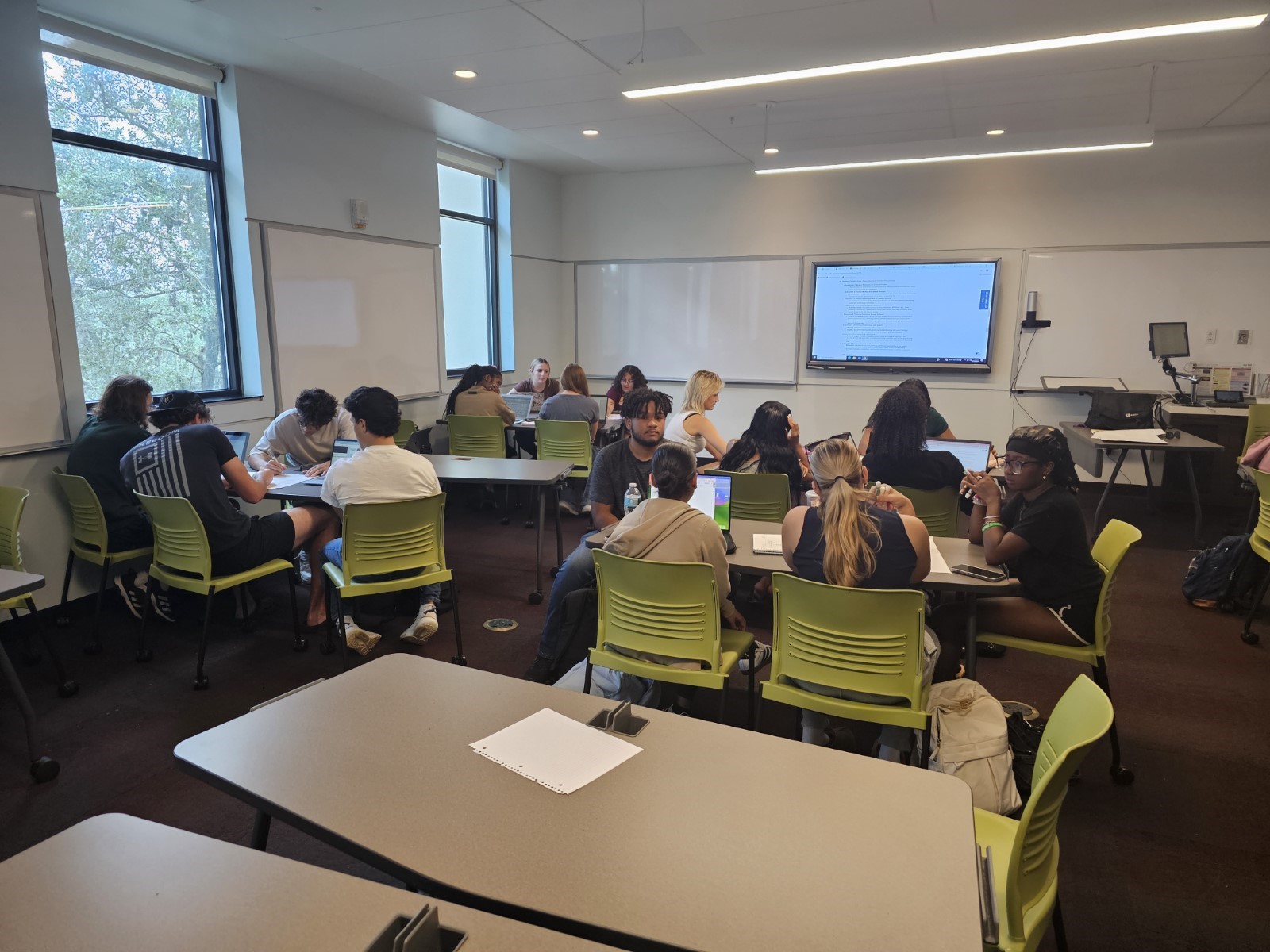
As an educator teaching undergraduates and graduates, both online and face-to-face, it’s always a challenge to find meaningful ways to engage students. Now that artificial intelligence has come into play, that challenge has become even greater. This has resulted in a need to address ways to create “AI-proof” assignments and content.
Simulations in different types of courses
According to Boston College, simulations are designed to engage students “directly with the information or the skills being learned in a simulated authentic challenge.” In my teaching over the past decade plus, I have gone from using simulations in one primary operations management course to using them in almost every course I teach. And I don’t necessarily use them in a stand-alone assignment, although they can be used as such. How I use a simulation is course dependent.
Face-to-face
In some face-to-face courses, I will run the simulation in class with everyone participating. Sometimes I will have teams work in a “department,” or have true, open discussions. Sometimes I will run the room, ensuring every single student is paying attention and contributing. Using simulations in this fashion gives flexibility in the classroom. It shows me who truly gets the concepts and who is going through the motions. The dynamic of the class itself can dictate how I run the simulation.
Online
In online courses, I typically assign simulation work. This can be one simulation assignment or a progressive unit of simulations. It’s a great way to see students improve as they move through various concepts, ideas, and applications of the topics covered. Creating assignments which are both relative to the simulation and comparative to the work environment make assignments AI-proof. Students must think about what they have actually done in class and relate it to their workplace environment and/or position.
Why simulations work for all levels
There are many simulations that can be used and incorporated in both undergraduate and graduate level courses. As much as we don’t think of graduate students relying on AI to complete work, I have seen this happen multiple times. The results aren’t always ideal. Using simulations at the graduate level, and ensuring your assignments reflect both the simulation and real-world comparisons, can help your students use AI to gather thoughts, but not rely on it for the answers.
Student benefits
Using simulations will have many benefits for your students. I have gotten feedback from many students over the years regarding their ability to make decisions and see the results that simulations give. My capstone students often want to continue running the simulation, just to see how well they can do with their “business.” I have had students in lower-level management courses ask me how they can get full access to run these when I have them as “in-class only” options. The majority of feedback includes:
Anything is better than lecture!
Being able to see how students’ decisions impact other areas can be very helpful for them. They actually remember it, enforcing more than reading or watching can do.
Students want more simulations throughout their courses, rather than just one or two. They will have the ability to make those decisions and see those impacts. And they feel it will prepare them even more for the workforce.
As a retention and engagement tool, simulations seem to be one of the best I have found. Are there students that don’t like them? Yes, there always are. Even so, they’re forced to think through solutions and determine a best course of action to get that optimal result. From an instructor’s perspective, there’s nothing better than seeing those wheels turn. Students are guided on how to recover from an issue, and are advised on what may happen if different solutions were attempted. The questions gained are often better than the results.
Instructor benefits
For instructors, there are many benefits. As I stated earlier, you can see improvements in student behavior. They ask questions and have a defined interest in the results of their actions. In classes when you have teams, it can become friendly competition. If they are individual assignments, you get more questions, which is something we always want to see. More questions show interest.
Ease of use
Although I usually include recorded instructions and tips for simulations in my online courses, I prefer my personal recordings, since I also give examples relevant to student majors and interests. For example, in an entrepreneurial class, I would go through a simulation piece and include how this might affect the new business in the market vs. how it might impact an established business.
Auto-grading
When assigning simulations, they are usually auto-graded. This can drastically lighten our workload. I personally have around 150-200 students each term, so being able to streamline the grading function is a huge benefit. However, with this, there are trade-offs. Since I also create simulation-based questions and assignments, there are no textbook answers to refer to. You must know the simulations and be the content expert, so you can effectively guide your students.
Thoughtful responses
AI can be a great tool when used productively. But seeing overuse of the tool is what led me to learn more simulations. This adjustment on my end has resulted in students presenting me with more thoughtful, accurate, and relevant responses. Feedback from students has been positive.
Sims for all industries
An additional benefit of simulations is that there are basically sims for all industries. Pilot and healthcare sims have existed for a very long time. But even if you only have access to one or two, you have the ability to make it relatable to any field. If you’re like me and teach a variety of classes, you can use one simulation for almost any class.
Overall success
I was using simulations before AI became so influential. The extensive and current use of AI has driven me to use more simulations in all of my courses. By adjusting what tools I use, I have been able to encourage more thorough problem solving, active listening and reasoning. Plus, I get strategic and effective questions from my students. The overall results include intense engagement, better critical thinking skills, and content retention.
Written by Therese Gedemer, Adjunct Instructor and Workforce Development Trainer, Marian University, Moraine Park Tech College and Bryant & Stratton College
Phil Laufenberg is the Head of Artificial Intelligence (AI) at Macquarie University. His experience varies from tech-startups to executive responsibilities in public universities across three continents.
His vision is for AI-enabled universities that accelerate accessible education for all, and sees that one way to do that is through universities partnering with tech companies.
Let’s face it: education is changing with technology. But hasn’t it always? Imagine the calligraphy teacher’s grimace at the typewriter. Math teachers and calculators, English teachers and spellcheck, history teachers and Google — instructors quickly adopted all of these tools for their own usage. The same opportunity arises with the explosion of artificial intelligence.
Personalizing asynchronous courses
Having been an online student and now leading online courses, I empathize with both sets of stakeholders. Online courses have grown with the availability of the internet and lowered home computer costs. The flexibility asynchronous courses offer is what makes them desirable. Neither party must be in a specific classroom at a particular time. This allows both to work a more convenient schedule.
The most obvious challenge for instructors is bringing value to the students in a format that lacks the personalization of the classroom setting. Emails and discussion boards don’t communicate with the same personal touch. Recording classroom lectures for a face-to-face class certainly has some merit. The online student gets to hear and watch lectures and discussions. Yet, this might not be a foreseeable solution for instructors without in-person and online sections of the same subject. Also, recorded lectures may give the online sections less time to consume the content than their in-person peers.
Recorded lecture: the challenges
Until recently, my modus operandi was recording lectures for online students. I did this in order to replicate what they would get in the classroom, albeit passively devoid of discussion. Unless these videos are reused for different semesters and classes, it still seems inefficient and strangely impersonal. The inefficiency comes from mistakes that I would have laughed off in a live course. However, they certainly became points of frustration when watching myself stumble through a word or phrase that rolled off the tongue effortlessly during the dry run. Sometimes, I didn’t realize my mic was not toggled on. This resulted in a very uneventful silent film. Or someone would interrupt. I don’t think I’ve scratched the surface of all the things that disrupted my attempts. So, I looked for alternative sources for help.
The power of AI avatars for lecture delivery
I spent some time dabbling with AI avatars and seeing the potential to adopt the technology. The avatars cross the personalization hurdle by offering lifelike renditions with mannerisms and voice. While the technology is not quite as precise as recorded video, it’s good and getting better. The students have given it positive reviews. It is undoubtedly better than some of the textbook videos I had the unfortunate task of watching in a couple of my online courses as a student.
Avatars also clear the hurdle of efficiency and frustration. Using an avatar, I no longer have to fret over interruptions or mistakes. The editing is all done in its script. I load what I want it to say, and the avatar says it. No “ums.” No coughs or sneezes to apologize for. No triple takes on the word, “anthropomorphic.” If I’m interrupted, I can save it and return to it later. This enables me to scale my efforts.
Using Google’s NotebookLM to create AI-generated podcasts
Depending on your social media algorithm, you were probably privy to people’s Spotify top stats or other creative memes of the phenomenon in early December 2024. Spotify created personal “Wrapped AI podcasts” based on AI’s interpretation of users’ listening habits throughout the year. From a marketing perspective, this is great cobranding for both Google and Spotify, but the instructor’s perspective is why I’m writing. I learned about NotebookLM at a recent conference. The real beauty is that, currently, it’s free with a Google account.
Evaluating anecdotal evidence from my courses again, the students enjoyed the podcast version of the content. Instructors can add content that they have created and own the rights to, like lecture notes, and two AI “podcasters” will discuss it.
Because it’s only audio content, students can listen to it anywhere they are with their phones. Some comments that I noted were, “Listening to it felt less like studying” and “It was easy to listen to driving in my car.” This adds another layer of content consumption for students.
Balancing AI and instructor presence
Though I offered two technologies to deliver content to students, I do so as supplements to recorded lectures and web meetings. Indeed, in this era of AI, it is easy to become enamored with or apprehensive of this technology. Our students live very digitalized lives. Versing yourself in emerging technologies while still interacting with online students in more “traditional” formats can help you keep up with the times. You can still lean on tried-and-true education delivery. I think the key is to be willing to try a new technology and ask the students what they think of it. So many educators are worried about replacement, but at this stage in technology, we need to use AI as enhancements. So many digital platforms are using it. Why not use it in online classes responsibly?
Written by Britton Legget, Assistant Professor of Marketing at McNeese State University and Cengage Faculty Partner.
Want to learn about Professor Leggett’s unique journey into his current role?
Co-Authored By Aaliyah Lee-Raji, Amadis Canizales, Amaiya Peterson, Andrew Stillwell, Anessa Mayorga, Aniyah Campbell, A’niyah Leather, Anna Fleeman, Brookelyn Vivas, Cassandra Mathieu, Christian Bennett, Clio Chatelain, Daniel Abernethy, Fatoumata Sow, India Davis, Isabella Maiello, Jazmine Collins, Jennifer Sanchez-Martinez, Joseph Stauffer, Karlee Howard, Kaylee Japak, Keanell Tonny, Kristian Isom, Leonardo Pisa, Mackenzie Lemus, Maddox Wreski, Madelyn Beasley, and Saverio Consolazio
In higher education, one of the greatest challenges is getting students not only engaged in learning but also excited about research. An equally pressing issue is navigating the increasing role of artificial intelligence (AI) in the teaching and learning space. This semester, I aimed to tackle both by teaching a psychology of wellness class that integrated the principles of positive psychology with the use of AI tools. During the two-week module on positive psychology, I wanted students to experience research and writing as positive and engaging activities. I floated the idea of co-authoring an article on student wellness from their perspective, incorporating the responsible use of AI, fostering a passion for research, and ensuring that the process was enjoyable.
Here is how the project unfolded:
Day 1: Setting the Stage for Collaborative Writing
The project began by gauging student interest in co-authoring an article on student wellness. I asked those who wanted front-facing credit and authorship acknowledgment to text me their consent and indicate if they would be comfortable with their photo(s) being included. Importantly, students had the option to opt-out at any time if they felt uncomfortable with the direction of the article. I was fortunate because a large majority of the students showed a genuine interest in this assignment.
To kick off the project, I used ChatGPT to generate an outline based on positive psychology as aligned with the textbook chapters and student-led ideas and topics. The students were then divided into groups, where each group received a dedicated workspace in our learning management system, D2L. Each group selected a predetermined subtopic to focus on, and I tasked them with using ChatGPT to generate 20 ideas on that subtopic. From those 20 ideas, the groups narrowed it down to three, which they discussed in detail, considering both research-based and personal experiences. Each group member took notes to guide the next stage of the project.
Day 2: Mind Mapping and Cross-Pollination of Ideas
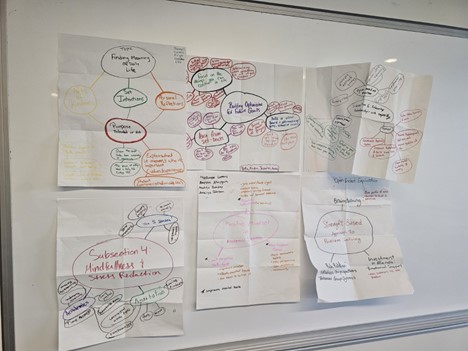
On the second day, students were given poster paper and markers to create mind maps of their ideas and help gain clarity on their discussions from the previous day. Each group placed their chosen topic at the center of the mind map and organized the associated ideas around it. The mind mapping exercise allowed students to visually connect their thoughts and discussions from day one.
One member from each group was nominated to circulate among the other groups, engaging in discussions about each team’s subsection of the article. This not only gave students a broader perspective on how their topics related to the overarching theme of student wellness but also facilitated the flow of information between teams. After gathering input from other teams, the group representative brought the new insights back to their original group, enhancing their understanding of their own topic and how it fit into the larger article. To ensure continuity, students took photos of their mind maps, which would later serve as guides for the writing process.
Day 3: Writing and Research Alignment
On the third day, each group was tasked with creating a document that contained a minimum of five references, with each group member responsible for contributing at least one reference. The document consisted of chunks of article drafts accompanied by their respective references. Students were asked to align these references with the ideas discussed during the earlier sessions and integrate them into their mind maps. Next, students took 15 minutes individually within a shared Google doc to write about their subsection, drawing from their mind maps and class discussions. This individual writing time allowed students to consolidate their thoughts and begin crafting their portion of the collaborative article.
Day 4: Ethical Use of AI in the Writing Process
The fourth day focused on ethical AI usage. We began with a discussion on how students had been using AI tools like ChatGPT and how they envisioned using any type of AI tools in the creation of this article. Together, we created an AI disclosure statement, agreeing on how AI would be used during the editing phase.
We explored specific AI prompts that could enhance their writing, including:
“Rephrase for clarity.”
“Organize this paragraph for the introduction, summary, or conclusion.”
“Give me a starting sentence for this paragraph.”
These prompts were designed to guide students in using AI as a tool to enhance clarity and organization rather than relying on it to write the content.
Day 5: Final Writing and Cohesive Editing
On the final day, students returned to their group documents and spent 15 minutes revising their sections. Afterward, they worked together to co-edit the document without the use of AI, striving to make the article more cohesive and polished. Finally, we revisited the agreed-upon AI prompts, and students were given the option to use AI only when they felt it was necessary for tasks like rephrasing sentences or organizing paragraphs.
The project culminated in a completed article on student wellness, co-authored by students and enhanced by responsible AI usage. The collaborative process not only demystified research and writing but also empowered students to see these activities as positive, engaging, and enjoyable experiences.
Takeaways From This Teaching Experience
The AI writing project was a valuable learning experience for the students, as it incorporated individual and collaborative learning elements alongside technology-based approaches. Reflecting on this experience, I have identified several key takeaways to carry forward into the new semester of teaching and learning.
The Importance of Throwback Learning Experience: Something Familiar Traditional tools like markers and poster boards remain essential in fostering cohesion, socialization, and competence-building. These activities encouraged students to engage in discussions and create visual representations of their ideas, which helped build their confidence and reinforce the collaborative process.
Starting With Original Ideas Matters Students benefited from discussing their ideas within the context of originality before integrating AI-generated content. Generative AI poses a potential threat to originality, emphasizing the need for human thought, discussion, and creativity to provide a benchmark for comparing the quality and intentionality of AI contributions.
Clear Parameters and Prompts Are Essential Defining the role of AI in the writing process was critical for success. Many students initially viewed AI as a tool for producing entire works. By discussing the parameters beforehand, it became clear that AI was to be used to supplement and enhance cohesion rather than replace the creative process.
The Importance of Prompt Development Students gained a growing understanding of the importance of crafting effective prompts for AI. Recognizing how prompts influence AI outputs is a crucial skill that was previously underdeveloped in many students. Moving forward, this skill will be vital as they navigate the intersection of human creativity and AI assistance.
Final Thoughts
Developing effective AI prompts is a pivotal skill that empowers students to use AI intentionally and meaningfully in their learning. A well-crafted prompt acts as the foundation for generating accurate, relevant, and cohesive responses, highlighting the importance of clarity, specificity, and purpose in the initial instructions given to the AI. By understanding how to formulate prompts, students can better harness the potential of AI to support their ideas, enhance their creativity, and improve the quality of their work without relying on AI to replace their original contributions.
This skill also encourages critical thinking, as students must evaluate the type of input needed to achieve a desired outcome, troubleshoot issues in responses, and refine their prompts for better results. Moreover, it aligns with the broader need for digital literacy in education, preparing students to interact responsibly and effectively with technology in academic, professional, and personal contexts.
Lastly, incorporating intentional AI use into teaching strategies ensures that students not only learn how to use these tools but also understand their limitations and ethical considerations. By balancing traditional methods, which foster originality and human connection, with innovative technologies like AI, educators can create a holistic learning environment that values both creativity and technological fluency. This balance will be crucial as AI continues to play an increasingly integral role in education and beyond.
Dr. Courtney Plotts’ students in class.A snapshot of the students’ work.
Special Note of Pride: I would like to note that this group of students worked on this project during class and completed this while two natural disasters accrued, power outages, remote and in person learning and did a great job considering the circumstances. I am so proud of each of them! We originally had bigger visions for the project but due to weather we had to make some changes to the plan!
Freshman College Students’ Advice to Peers for Health & Wellness in 2025
The new year always comes with the possibility of change and growth. As students, much of our growth focus is academics and learning-based. Being academically successful isn’t an easy task. Student wellbeing is an important factor in the learning process (Frazier & Doyle-Fosco, 2024). And for most of us, throwing ourselves into our studies and homework can come with negative side effects like burnout, stress, and decreased mood and motivation. But being successful doesn’t have to come at the risk of your mental health. In our view, academic success means more than good grades and knowledge. Although you may have gone through something last year, or are still going through it now, it doesn’t have to affect you in a negative way. There is so much more that goes into being successful. Success requires dedication, consistency, self-care, and a positive mindset. But for many of us a positive mind set is hard to come by.
The Collective Obstacle
The average age of our class is 19.7 years of age. We have lived with social media all of our lives. A lot of voices have imparted information. Some good, some not so good. The negativity that is readily accessible on social media can lead to negative self-talk. “Negative self-talk refers to your inner voice making critical, negative, or punishing comments. These are the pessimistic, mean-spirited, or unfairly critical thoughts that go through your head when you are making judgements about yourself” (Scott, 2023). Negative self-talk can be detrimental to your psychological well-being. It can really bring you down after you do it for too long. Negative self-talk can also induce stress, depression, and relationship problems. How you can start to believe the negative self-talk: you can start to believe negative self-talk after a while of you doing it. The more you start to tell yourself you can’t do something, the more you’ll start to believe it.
The effects of positive self-talk are the opposite of negative self-talk. It will improve your mental health, can reduce stress, lessen depression, and improve relationships. This not only impacts academics, but other aspects of life. To minimize negative self-talk, you can catch your inner critic when it’s happening and change your thinking to think more positive thoughts, remember that thoughts are not facts, contain your negativity, shift your perspective, think like a friend, or other trusted advisors.
Two Positive Ideas to Embrace in 2025
Two ideas to embrace in the new year that can jumpstart your positivity are evaluating how you think about failure and the control of your future. Failure is an inevitable part of life, but it is through our setbacks that we find opportunities for growth and success. How we respond to failure matters more than the failure itself, and cultivating a mindset of optimism is key to overcoming challenges (Hilppö & Stevens, 2020). Optimism, combined with grit—the perseverance and passion to achieve long-term goals—forms the foundation for a positive and resilient lifestyle. Together, these qualities enable us to turn obstacles into stepping stones and approach life’s difficulties with determination and hope. Think of failures as learning opportunities. Think about the knowledge you gain from hindsight when thinking about failure.
Additionally, understanding the distinction between what we can and cannot control is crucial for maintaining positivity and health (Pourhoseinzadeh, Gheibizadeh,& Moradikalboland, Cheraghian, 2017). Accepting that not everything is within our power allows us to shift our focus to areas where we can make a difference and grow from the experience. Remaining positive during challenging situations and remembering the aspects we can influence help us navigate adversity with a constructive mindset. It’s also important to respect that some factors are beyond our control and may happen for reasons we do not yet understand. By seeking to understand why certain things are outside our control, we can cultivate acceptance and use these moments as opportunities for reflection and personal growth.
The Importance of Health Communication in 2025
Healthy communication is critical to positive personal growth. Asking open-ended questions is important when engaging in meaningful communication because it ensures that there are no assumptions being made. One researcher found that assumptions “lead to consistent and unnecessary community failures” (Macrae, 2018, p.5). Additionally, healthy communication can build true connections among people and better understanding. Also, avoiding assumptions is a way to stay present in the moment allowing you to determine if there is genuine interest in the conversation. Most importantly, health aspects of communication like listening, reflecting, and pausing encourage new thinking and can develop new ideas just about anything.
In addition to healthy communication, think about sharing more of your experiences with peers. Starting from a place of curiosity and health, inquire about someone’s well-being. You can start with a simple phrase like “Are you ok?” Or be ready and willing to share your own personal experience when the time is right. Not only can this help someone else but sharing your story can also help you process what you have been through. Sharing and listening to each other’s experiences can show understanding and help you feel more willing to share now and in the future. Understanding and being present is a power combination for communication.
Lastly, remember that relationships are complex. Whether parental, academic, or personal, everyone has their relationships challenges. One tactic to strengthen relationships is humor. Remember to laugh and enjoy life and the people around you. Most people forget about light heartedness and humor, and how humor can help strengthen and resolve issues within a relationship. Humor can improve the quality of relationships by reducing the stress, tension, and anxiety of the people within the relationship. This effect can only occur if humor is used respectfully in relationships. When used right, humor also can create a more comfortable relationship with less anxiety and sadness for those in it. It’s ok to laugh—even in challenging times.
Summary
A positive mindset is the root of achieving any goal you put your mind to. As a collective voice, we hope the information we shared is valuable information. Our goal was to share meaningful information for your new year and new journey in 2025. As students, we fully understand the importance of mental health, especially because all of us experienced covid at some of the most challenging times of our lives. We hope this information helps you in the new year as much as it helped us learn and grow. Remember to stay happy, healthy, and safe in the new year and think positive!
Dr. Courtney Plotts is a Dynamic Keynote Speaker, Author, and Professor. Dr. Plotts is the National Chair of the Council For At-Risk Student Education and Professional Standards, the country’s only organization that provides standards for working with marginalized and nontraditional students in Kindergarten to College. Her role as National Chair includes training, consulting, and research. Her subject matter expertise has been used in a variety of book publications. Most recently “Small Teaching Online” By Flower Darby with James M. Lang published in June 2019. Dr. Plotts was recognized in 2017 by the California State Legislature for a bold commitment to change in education. She is currently in talks with higher education institutions to launch an institute that focuses on diversity and best practices in online teaching spaces to launch in 2021.
References
Frazier, T., & Doyle Fosco, S. L. (2024). Nurturing positive mental health and wellbeing in educational settings – the PRICES model. Frontiers in public health, 11, 1287532. https://doi.org/10.3389/fpubh.2023.12875
Hilppö, J., & Stevens, R. (2020). “Failure is just another try”: Re-framing failure in school through the FUSE studio approach. International Journal of Educational Research, 99, 101494. https://doi.org/10.1016/j.ijer.2019.101494
Macrae, C. (2018). When no news is bad news: Communication failures and the hidden assumptions that threaten safety. Journal of the Royal Society of Medicine, 111(1), 5–7. https://doi.org/10.1177/0141076817738503
Pourhoseinzadeh, M., Gheibizadeh, M., & Moradikalboland, M., Cheraghian, B. (2017). The Relationship between Health Locus of Control and Health Behaviors in Emergency Medicine Personnel. International journal of community based nursing and midwifery, 5(4), 397–407.
South by Southwest Edu returns to Austin, Texas, running March 3-6. As always, it’ll offer a huge number of panels, discussions, film screenings, musical performances and workshops exploring education, innovation and the future of schooling.
Keynote speakers this year include neuroscientist Anne-Laure Le Cunff, founder of Ness Labs, an online educational platform for knowledge workers; astronaut, author and TV host Emily Calandrelli, and Shamil Idriss, CEO of Search for Common Ground, an international non-profit. Idriss will speak about what it means to be strong in the face of opposition — and how to turn conflict into cooperation. Also featured: indy musical artist Jill Sobule, singing selections from her musical F*ck 7th Grade.
As in 2024, artificial intelligence remains a major focus, with dozens of sessions exploring AI’s potential and pitfalls. But other topics are on tap as well, including sessions on playful learning, book bans and the benefits of prison journalism.
To help guide the way, we’ve scoured the schedule to highlight 25 of the most significant presenters, topics and panels:
Monday, March 3:
11 a.m. — Ultimate Citizens Film Screening:A new independent film features a Seattle school counselor who builds a world-class Ultimate Frisbee team with a group of immigrant children at Hazel Wolf K-8 School.
11:30 a.m. — AI & the Skills-First Economy: Navigating Hype & Reality: Generative AI is accelerating the adoption of a skills-based economy, but many are skeptical about its value, impact and the pace of growth. Will AI spark meaningful change and a new economic order, or is it just another overhyped trend? Meena Naik of Jobs for the Future leads a discussion with Colorado Community College System Associate Vice Chancellor Michael Macklin, Nick Moore, an education advisor to Alabama Gov. Kay Ivey, and Best Buy’s Ryan Hanson.
11:30 a.m. — Navigation & Guidance in the Age of AI: The Clayton Christensen Institute’s Julia Freeland Fisher headlines a panel that looks at how generative AI can help students access 24/7 help in navigating pathways to college. As new models take root, the panel will explore what entrepreneurs are learning about what students want from these systems. Will AI level the playing field or perpetuate inequality?
12:30 p.m. — Boosting Student Engagement Means Getting Serious About Play: New research shows students who are engaged in schoolwork not only do better in school but are happier and more confident in life. And educators say they’d be happier at work and less likely to leave the profession if students engaged more deeply. In this session, LEGO Education’s Bo Stjerne Thomsen will explore the science behind playful learning and how it can get students and teachers excited again.
1:30 p.m. — The AI Sandbox: Building Your Own Future of Learning:Mike Yates of The Reinvention Lab at Teach for America leads an interactive session offering participants the chance to build their own AI tools to solve real problems they face at work, school or home. The session is for AI novices as well as those simply curious about how the technology works. Participants will get free access to Playlab.AI.
2:30 p.m. — Journalism Training in Prison Teaches More Than Headlines: Join Charlotte West of Open Campus, Lawrence Bartley of The Marshall Project and Yukari Kane of the Prison Journalism Project to explore real-life stories from behind bars. Journalism training is transforming the lives of a few of the more than 1.9 million people incarcerated in the U.S., teaching skills from time management to communication and allowing inmates to feel connected to society while building job skills.
Tuesday, March 4:
11:30 a.m. — Enough Talk! Let’s Play with AI: Amid the hand-wringing about what AI means for the future of education, there’s been little conversation about how a few smart educators are already employing it to shift possibilities for student engagement and classroom instruction. In this workshop, attendees will learn how to leverage promising practices emerging from research with real educators using AI in writing, creating their own chatbots and differentiating support plans.
12:30 p.m. — How Much is Too Much? Navigating AI Usage in the Classroom:AI-enabled tools can be helpful for students conducting research, outlining written work, or proofing and editing submissions. But there’s a fine line between using AI appropriately and taking advantage of it, leaving many students wondering, “How much AI is too much?” This session, led by Turnitin’s Annie Chechitelli, will discuss the rise of GenAI, its intersection with academia and academic integrity, and how to determine appropriate usage.
1 p.m. — AI & Edu: Sharing Real Classroom Successes & Challenges: Explore the real-world impact of AI in education during this interactive session hosted by Zhuo Chen, a text analysis instructor at the nonprofit education startup Constellate, and Dylan Ruediger of the research and consulting group Ithaka S+R. Chen and Ruediger will share successes and challenges in using AI to advance student learning, engagement and skills.
1 p.m. — Defending the Right to Read: Working Together: In 2025, authors face unprecedented challenges. This session, which features Scholastic editor and young adult novelist David Levithan, as well as Emily Kirkpatrick, executive director of the National Council of Teachers of English, will explore the battle for freedom of expression and the importance of defending reading in the face of censorship attempts and book bans.
1 p.m. — Million Dollar Advice: Navigating the Workplace with Amy Poehler’s Top Execs: Kate Arend and Kim Lessing, the co-presidents of Amy Poehler’s production company Paper Kite Productions, will be live to record their workplace and career advice podcast “Million Dollar Advice.” The pair will tackle topics such as setting and maintaining boundaries, learning from Gen Z, dealing with complicated work dynamics, and more. They will also take live audience questions.
4 p.m. — Community-Driven Approaches to Inclusive AI Education:With rising recognition of neurodivergent students, advocates say AI can revolutionize how schools support them by streamlining tasks, optimizing resources and enhancing personalized learning. In the process, schools can overcome challenges in mainstreaming students with learning differences. This panel features educators and advocates as well as Alex Kotran, co-founder and CEO of The AI Education Project.
4 p.m. — How AI Makes Assessment More Actionable in Instruction:Assessments are often disruptive, cumbersome or disconnected from classroom learning. But a few advocates and developers say AI-powered assessment tools offer an easier, more streamlined way for students to demonstrate learning — and for educators to adapt instruction to meet their needs. This session, moderated by The 74’s Greg Toppo, features Khan Academy’s Kristen DiCerbo, Curriculum Associates’ Kristen Huff and Akisha Osei Sarfo, director of research at the Council of the Great City Schools.
Wednesday, March 5:
11 a.m. — Run, Hide, Fight: Growing Up Under the Gun Screening & Q&A: Gun violence is now the leading cause of death for American children and teens, according to the federal Centers for Disease Control and Prevention, yet coverage of gun violence’s impact on youth is usually reported by adults. Run, Hide, Fight: Growing Up Under the Gun is a 30-minute documentary by student journalists about how gun violence affects young Americans. Produced by PBS News Student Reporting Labs in collaboration with 14 student journalists in five cities, it centers the perspectives of young people who live their lives in the shadow of this threat.
11:30 a.m. — AI, Education & Real Classrooms:Educators are at the forefront of testing, using artificial intelligence and teaching their communities about it. In this interactive session, participants will hear from educators and ed tech specialists on the ground working to support the use of AI to improve learning. The session includes Stacie Johnson, director of professional learning at Khan Academy, and Dina Neyman, Khan Academy’s director of district success.
11:30 a.m. — The Future of Teaching in an Age of AI:As AI becomes increasingly present in the classroom, educators are understandably concerned about how it might disrupt their teaching. An expert panel featuring Jake Baskin, executive director of the Computer Science Teachers Association andKarim Meghji of Code.org, will look at how teaching will change in an age of AI, exploring frameworks for teaching AI skills and sharing best practices for integrating AI literacy across disciplines.
2:30 p.m. — AI in Education: Preparing Gen A as the Creators of Tomorrow:Generation Alpha is the first to experience generative artificial intelligence from the start of their educational journeys. To thrive in a world featuring AI requires educators helping them tap into their natural creativity, navigating unique opportunities and challenges. In this session, a cross-industry panel of experts discuss strategies to integrate AI into learning, allowing critical thinking and curiosity to flourish while enabling early learners to become architects of AI, not just users.
2:30 p.m. — The Ethical Use of AI in the Education of Black Children:Join a panel of educators, tech leaders and nonprofit officials as they discuss AI’s ethical complexities and its impact on the education of Black children. This panel will address historical disparities, biases in technology, and the critical need for ethical AI in education. It will also offer unique perspectives into the benefits and challenges of AI in Black children’s education, sharing best practices to promote the safe, ethical and legal use of AI in classrooms.
2:30 p.m. — Exploring Teacher Morale State by State:Is teacher morale shaped by where teachers work? Find out as Education Week releases its annual State of Teaching survey. States and school districts drive how teachers are prepared, paid and promoted, and the findings will raise new questions about what leaders and policymakers should consider as they work to support an essential profession. The session features Holly Kurtz, director of EdWeek Research Center, Stephen Sawchuk, EdWeek assistant managing editor, and assistant editor Sarah D. Sparks.
2:30 p.m. — From White Folks Who Teach in the Hood: Is This Conversation Against the Law Now?While most students in U.S. public schools are now young people of color, more than 80% of their teachers are white. How do white educators understand and address these dynamics? Join a live recording of a podcast that brings together white educators with Christopher Emdin and sam seidel, co-editors of From White Folks Who Teach in the Hood: Reflections on Race, Culture, and Identity (Beacon, 2024).
3:30 p.m. — How Youth Use GenAI: Time to Rethink Plagiarism:Schools are locked in a battle with students over fears they’re using generative artificial intelligence to plagiarize existing work. In this session, join Elliott Hedman, a “customer obsession engineer” with mPath, who with colleagues and students co-designed a GenAI writing tool to reframe AI use. Hedman will share three strategies that not only prevent plagiarism but also teach students how to use GenAI more productively.
Thursday, March 6:
10 a.m. — AI & the Future of Education: Join futurists Sinead Bovell and Natalie Monbiot for a fireside discussion about how we prepare kids for a future we cannot yet see but know will be radically transformed by technology. Bovell and Monbiot will discuss the impact of artificial intelligence on our world and the workforce, as well as its implications for education.
10 a.m. — Reimagining Everyday Places as Early Learning Hubs: Young children spend 80% of their time outside of school, but too many lack access to experiences that encourage learning through hands-on activities and play. While these opportunities exist in middle-class and upper-income neighborhoods, they’re often inaccessible to families in low-income communities. In this session, a panel of designers and educators featuring Sarah Lytle, who leads the Playful Learning Landscapes Action Network, will look at how communities are transforming overlooked spaces such as sidewalks, shelters and even jails into nurturing learning environments accessible to all kids.
11 a.m. — Build-a-Bot Workshop: Make Your Own AI to Make Sense of AI:In this session, participants will build an AI chatbot alongside designers and engineers from Stanford University and Stanford’s d.school, getting to the core of how AI works. Participants will conceptualize, outline and create conversation flows for their own AI assistant and explore methods that technical teams use to infuse warmth and adaptability into interactions and develop reliable chatbots.
11:30 a.m. — Responsible AI: Balancing Innovation, Impact, & Ethics:In this session, participants will learn how educators, technologists and policymakers work to develop AI responsibly. Panelists include Isabelle Hau of the Stanford Accelerator for Learning, Amelia Kelly, chief technology officer of the Irish AI startup SoapBox Labs, and Latha Ramanan of the AI developer Merlyn Mind. They’ll talk about how policymakers and educators can work with developers to ensure transparency and accuracy of AI tools.
When my son started the fourth grade, his teacher provided a thick bound packet of cursive writing worksheets. She said that completing the packet was optional, but only if completed would her students earn their “pen license” and move from years of pencil use to the holy grail, ink. Using AI should also be earned; earned after becoming AI literate. Banning AI use in college classrooms is a pointless and exhausting endeavor. Instead, we should learn alongside our students to become AI literate. Our society is fully emerged in the AI era with nearly half of US states releasing AI guidance, the state of California signing legislature to include AI literacy in K12 curriculum, and recent guidance from the US Dept of Education on AI implementation in postsecondary education. It is imperative that all of us, students and faculty alike in higher ed institutions, learn AI basics and earn the right to use generative AI responsibly.
So, what does it mean to be AI literate? The answer to this question is changing daily and yet, there are many resources to help our students and us build awareness, knowledge, and skill in AI use. There are online short courses that share many of the same AI literacy basics, including:
Building awareness of how AI is already being used in various fields from healthcare to retail to education and more
Understanding AI vocabulary and acronyms, such as machine learning, deep learning, large language models (LLMs), neural networks, and natural language processing (NLP)
Critique skills to uncover hallucinations, falsehoods, and biases in the output,
Acknowledging privacy, safety, and environmental concerns
Skill in prompt engineering, and 6. knowledge and practice in AI uses in specific contexts
Together, with our students, we can turn to many free online options. Below is a short list I’ve discovered for myself and have provided to my students:
Elements of AI: An online course by MinnaLearn and the University of Helsinki to learn the capabilities of AI through theory and practical exercises.
AI 101 for Teachers: A series of videos, with companion guides, on AI foundations for educators from collaborative partners – Code.org, Educational Testing Service (ETS), International Society for Technology in Education (ISTE), and Khan Academy.
2024 AI Literacy Canvas Module ( Request Form): This AI literacy Canvas module with a Creative Commons CC BY-NC-SA license designed by the Center for Teaching Excellence and Innovation (CTEI at Rush University, covers four areas of AI literacy: recognition, comprehension, critical thinking, and proficiency.
Ultimately, learning AI basics does go beyond short online courses and requires iterative practice using a variety of AI tools. Once we all know the basics, we can use established frameworks to help guide more informed discussions establishing dos and don’ts for responsible AI use in our courses. And yes, some, maybe even many, will abuse the privilege of AI use in your class, and you’ll find a big splatter of blue cross-outs or black ink smudges, but it’s still better than banning pens completely. Let’s provide avenues to improve our awareness, knowledge, and skills in AI use as we all collectively figure out how to manage in a future world where AI will be embedded in our work.
Madeline Craig is an associate professor and technology integration coordinator at Molloy University in Rockville Centre, NY. In improving her own AI knowledge and skill, she relies on her professional learning networks on LinkedIn, Bluesky, and ISTE CONNECT while at the same time playing with a wide variety of AI tools.
U.S. Department of Education, Office of Educational Technology. (2024). Navigating Artificial Intelligence in Postsecondary Education: Building Capacity for the Road Ahead, Washington, DC.
AI is becoming a bigger part of our daily lives, and students are already using it to support their learning. In fact, from our studies, 90% of faculty feel GenAI is going to play an increasingly important role in higher ed.
Embracing AI responsibly, with thoughtful innovation, can help students take charge of their educational journey. So, we turn to the insights and expertise of you and your students — to develop AI tools that support and empower learners, while maintaining ethical practices, accuracy and a focus on the human side of education.
Training the Student Assistant together
Since we introduced the Student Assistant in August 2024, we continue to ensure that faculty, alongside students, play a central role in helping to train it.
Students work directly with the tool, having conversations. Instructors review these exchanges to ensure the Student Assistant is guiding students through a collaborative, critical thinking process —helping them find answers on their own, rather than directly providing them.
“I was extremely impressed with the training and evaluation process. The onboarding process was great, and the efforts taken by Cengage to ensure parity in the evaluation process was a good-faith sign of the quality and accuracy of the Student Assistant.” — Dr. Loretta S. Smith, Professor of Management, Arkansas Tech University
Supporting students through our trusted sources
The Student Assistant uses only Cengage-authored course materials — it does not search the web.
By leveraging content aligned directly with instructor’s chosen textbook , the Student Assistant provides reliable, real-time guidance that helps students bridge knowledge gaps — without ever relying on external sources that may lack credibility.
Unlike tools that rely on potentially unreliable web sources, the Student Assistant ensures that every piece of guidance aligns with course objectives and instructor expectations.
Here’s how:
It uses assigned Cengage textbooks, eBooks and resources, ensuring accuracy and relevance for every interaction
The Student Assistant avoids pulling content from the web, eliminating the risks of misinformation or content misalignment
It does not store or share student responses, keeping information private and secure
By staying within our ecosystem, the Student Assistant fosters academic integrity and ensures students are empowered to learn with autonomy and confidence.
“The Student Assistant is user friendly and adaptive. The bot responded appropriately and in ways that prompt students to deepen their understanding without giving away the answer.” – Lois Mcwhorter, Department Chair for the Hutton School of Business at the University of Cumberlands
Personalizing the learning journey
56% of faculty cited personalization as a top use case for GenAI to help enhance the learning experience.
The Student Assistant enhances student outcomes by offering a personalized educational experience. It provides students with tailored resources that meet their unique learning needs right when they need them. With personalized, encouraging feedback and opportunities to connect with key concepts in new ways, students gain a deeper understanding of their coursework. This helps them close learning gaps independently and find the answers on their own, empowering them to take ownership of their education.
“What surprised me most about using the Student Assistant was how quickly it adapted and adjusted to feedback. While the Student Assistant helped support students with their specific questions or tasks, it did so in a way that allowed for a connection. It was not simply a bot that pointed you to the correct answer in the textbook; it assisted students similar to how a professor or instructor would help a student.” — Dr. Stephanie Thacker, Associate Professor of Business for the Hutton School of Business at the University of the Cumberlands
Helping students work through the challenges
The Student Assistant is available 24/7 to help students practice concepts without the need to wait for feedback, enabling independent learning before seeking instructor support.
With just-in-time feedback, students can receive guidance tailored to their course, helping them work through challenges on their own schedule. By guiding students to discover answers on their own, rather than providing them outright, the Student Assistant encourages critical thinking and deeper engagement.
“Often students will come to me because they are confused, but they don’t necessarily know what they are confused about. I have been incredibly impressed with the Student Assistants’ ability to help guide students to better understand where they are struggling. This will not only benefit the student but has the potential to help me be a better teacher, enable more critical thinking and foster more engaging classroom discussion.” — Professor Noreen Templin, Department Chair and Professor of Economics at Butler Community College
Want to start using the Student Assistant for your courses?
The Student Assistant, embedded in MindTap, is available in beta with select titles , such as “Management,” “Human Psychology” and “Principles of Economics” — with even more coming this fall. Find the full list of titles that currently feature the Student Assistant, plus learn more about the tool and AI at Cengage right here.
Australian universities and TAFEs are embracing and combining emerging technologies like artificial intelligence (AI), virtual reality (VR) and augmented reality (AR).
These innovations are reshaping the further and higher education sectors, offering more engaging, accessible, data-based learning experiences for students, educators and institutions alike.
As students and institutions seek value amidst economic and work-life challenges, these technologies are crucial in delivering sustainable and scalable skilling and workforce-development goals. Integrating AI, VR, and AR can provide more personalised and cost-effective learning pathways for students facing daily pressures, making education more accessible and financially viable.
The transformative role of AI in personalised learning
AI is becoming a game-changer in Australian education by enabling personalised learning and providing data-driven insights. AI-powered platforms can analyse the complex interplay of factors impacting student performance and customise immersive content delivery to improve persistence, resilience and success.
This integrated approach can serve personalised springboard content that matches students’ strengths, promotes growth in areas of weakness, and builds both capability and confidence.
In this way, AI is not just about student learning; it also directly benefits teachers and professional staff. It streamlines the development of educational materials, from video and interactive content to branched lessons and adaptive learning paths.
A few Australian higher and vocational education institutions have already demonstrated this by exploring the affordances of AI-driven platforms to offer personalised learning programs tailored to students’ career goals and development needs.
Researchers from the University of South Australia are proving how AI can enhance students’ learning outcomes, equip teachers with advanced education tools and overhaul the education sector for good.
At the University of Sydney, AI-driven learning platforms offer personalised learning experiences via the university’s generative AI platform, Cogniti, which shows that generative AI is a powerful way to support teachers and their teaching, not supplant them.
Immersive learning through VR
Virtual reality also continues to revolutionise Australian further and higher education, providing immersive learning environments that make complex subjects more accessible and engaging.
From medical schools to engineering programs and advanced manufacturing, VR allows students to engage with practical scenarios that realistically present workplace problems, assess skills application and assess complex tasks.
VR is a technology with tremendous promise in scaling high-quality and safe immersive learning by doing training at TAFE NSW.
Its Ultimo campus utilises a high-tech, remarkably lifelike canine mannequin to provide aspiring veterinary nurses with invaluable hands-on training.
Recently imported from the USA, this highly advanced model enables animal studies and veterinary nursing students to develop essential clinical skills, including intubation, CPR, bandaging and ear cleaning.
By implementing VR as a training tool, TAFE NSW Ultimo plumbing students can learn to recognise potential risk from return electrical current via copper pipes into a residence, which can cause serious, even fatal, electric shock, in a safe and protected environment.
Additionally, its welding students were able to identify and solve potentially hazardous scenarios when preparing for welding work.
AR brings practical training to life
AR is another immersive technology revolutionising Australian education by deepening the interaction between students and their learning materials. AR overlays digital content in the real world, making abstract concepts more tangible and understandable.
AR is broadly applicable across diverse fields such as healthcare, technical trades, and construction, allowing students to practice and refine their skills in a controlled, simulated environment.
At TAFE Queensland, welding students use AR to identify and solve potentially hazardous scenarios when preparing for welding work.
With a screen inside the helmet, students position their virtual welding torch, with sparks flying like in real life, against a plastic board and press the torch trigger to see the welds they have made.
The screen flashes red when they are incorrect and gives them a score at the end. Using AR in welding has reduced raw material wastage by 68 per cent at a time of scarcity.
TAFE Box Hill Institute’s Advanced Welder Training Centre is equipped with the latest augmented reality simulators, allowing students to use best-practice technology and quality systems in a hands-on environment.
It was developed in collaboration with Weld Australia, which represents Australian welding professionals, and will help address the current shortage of qualified and skilled welders in Australia.
Monash University’s Engineering Student Pilot Plant is designed to reflect real-world industrial environments and requirements.
AR experiences are being developed in Vuforia Studio using 3D CAD models of the pilot plant, enabling visualisation of proposed equipment before installation.
These AR interfaces will integrate with Internet of Things (IoT) devices, Digital Twin models and process simulations, creating an AR-based Human Machine Interface (HMI) that enhances on-site accessibility by providing remote, simultaneous interaction with the physical equipment and its Digital Twin.
The future of Australian further and higher education
The future of further and higher education in Australia will likely see these advanced digital technologies integrated further into the curriculum, offering new opportunities and skills for students to thrive in a competitive, tech-driven environment.
Australia’s educational institutions have a rich history of effectively using educational technology to further learning and teaching.
Assessing and leveraging rapidly evolving tools like AR and Gen AI will ensure they remain at the forefront of global education by providing students with the relevant and engaging learning experiences they need to succeed.
Tony Maguire is regional director of ANZ at global learning technology company D2L.
Rainie, L. and Watson, E. AAC&U and Elon University.
Report from a survey of 337 college and university leaders that provides a status report on the fast-moving changes taking place on US campuses. Key data takeaways include the fact faculty use of AI tools trails significantly behind student use, more than a third of leaders surveyed perceive their institution to be below average or behind others in using GenAI tools, 59% say that cheating has increased on their campus since GenAI tools have become widely available, and 45% think the impact of GenAI on their institutions in the next five years will be more positive than negative.
Aldridge, S. Times Higher Education. January 27th, 2025
The four objectives are: 1) ensure that curricula prepare students to use AI in their careers and to add human skills value to help them success in parallel of expanded use of AI; 2) employ AI-based capacities to enhance the effectiveness and value of the education delivered; 3) leverage AI to address specific pedagogical and administrative challenges; and 4) address pitfalls and shortcomings of using AI in higher ed, and develop mechanisms to anticipate and respond to emerging challenges.
Packer, H. Times Higher Education. January 31st, 2025
The success of artificial intelligence platform DeepSeek, which was developed by a relatively young team including graduates and current students from leading Chinese universities, could encourage more students to pursue opportunities at home amid a global race for talent, experts have predicted.
MacGregor, K. University World News. January 25th, 2025
Insights from (and recording of) the University World News webinar “Trends in AI for student assessment”, held on January 21st. 6% of audience members said that they did not face significant challenges in using GenAI for assessment, 53% identified “verifying the accuracy and validity of AI-generated results” as a challenge, 49% said they lacked training or expertise in using GenAI tools, 45% identified “difficulty integrating AI tools within current assessment systems”, 41% were challenged in addressing ethical concerns, 30% found “ensuring fairness and reducing bias in AI-based assessments” challenging, 25% identified “protecting student data privacy and security” as a challenge, and 19% said “resistance to adopting AI-driven assessment” was challenging.
Wang, T. and Mishra, S. University World News. January 24th, 2025
The digital transformation of higher education has positioned open educational resources (OER) as essential digital public goods for the global knowledge commons. As emerging technologies, particularly artificial intelligence (AI), reshape how educational content is created, adapted and distributed, the OER movement faces both unprecedented opportunities and significant challenges in fulfilling its mission of democratising knowledge access.
The Dubai Declaration on OER, released after the 3rd UNESCO World OER Congress held in November 2024, addresses pressing questions about AI’s role in open education.