Category: Digital Learning Tools

  • 3 reasons to switch to virtual set design

    3 reasons to switch to virtual set design

    Key points:

    If you’ve attended a professional show or musical recently, chances are you’ve seen virtual set design in action. This approach to stage production has gained so much traction it’s now a staple in the industry. After gaining momentum in professional theater, it has made its way into collegiate performing arts programs and is now emerging in K-12 productions as well.

    Virtual set design offers a modern alternative to traditional physical stage sets, using technology and software to create immersive backdrops and environments. This approach unlocks endless creative possibilities for schools while also providing practical advantages.

    Here, I’ll delve into three key benefits: increasing student engagement and participation, improving efficiency and flexibility in productions, and expanding educational opportunities.

    Increasing student engagement and participation

    Incorporating virtual set design into productions gets students excited about learning new skills while enhancing the storytelling of a show. When I first joined Churchill High School in Livonia, Michigan as the performing arts manager, the first show we did was Shrek the Musical, and I knew it would require an elaborate set. While students usually work together to paint the various backdrops that bring the show to life, I wanted to introduce them to collaborating on virtual set design.

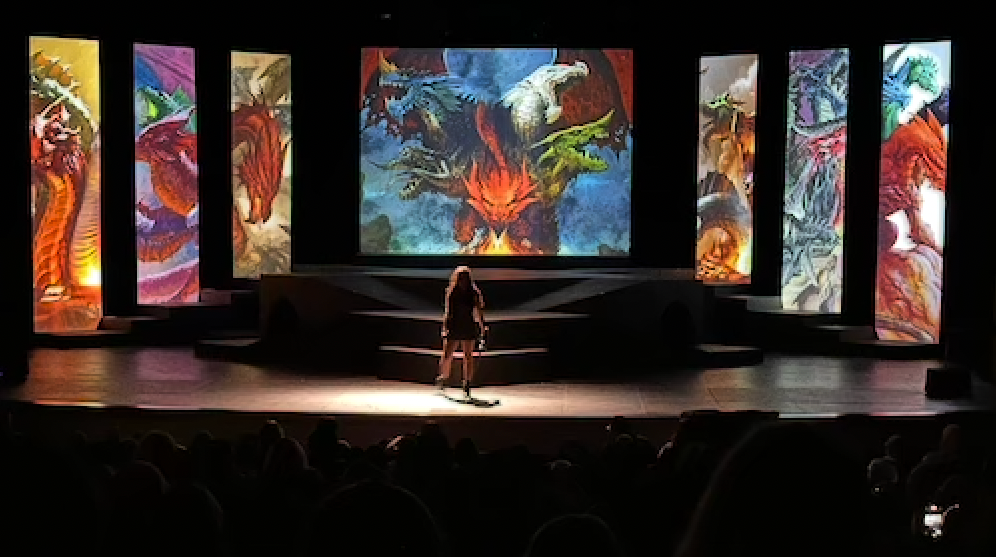
    We set up Epson projectors on the fly rail and used them to project images as the show’s backdrops. Positioned at a short angle, the projectors avoided any shadowing on stage. To create a seamless image with both projectors, we utilized edge-blending and projection mapping techniques using just a Mac® laptop and QLab software. Throughout the performance, the projectors transformed the stage with a dozen dynamic backdrops, shifting from a swamp to a castle to a dungeon.

    Students were amazed by the technology and very excited to learn how to integrate it into the set design process. Their enthusiasm created a real buzz around the production, and the community’s feedback on the final results were overwhelmingly positive.

    Improving efficiency and flexibility

    During Shrek the Musical, there were immediate benefits that made it so much easier to put together a show. To start, we saved money by eliminating the need to build multiple physical sets. While we were cutting costs on lumber and materials, we were also solving design challenges and expanding what was possible on stage.

    This approach also saved us valuable time. Preparing the sets in the weeks leading up to the show was faster, and transitions during performances became seamless. Instead of moving bulky scenery between scenes or acts, the stage crew simply switched out projected images making it much more efficient.

    We saw even more advantages in our spring production of She Kills Monsters. Some battle scenes called for 20 or 30 actors to be on stage at once, which would have been difficult to manage with a traditional set. By using virtual production, we broke the stage up with different panels spaced apart and projected designs, creating more space for performers. We were able to save physical space, as well as create a design that helped with stage blocking and made it easier for students to find their spots.

    Since using virtual sets, our productions have become smoother, more efficient, and more creative.

    Expanding educational opportunities

    Beyond the practical benefits, virtual set design also creates valuable learning opportunities for students. Students involved in productions gain exposure to industry-level technology and learn about careers in the arts, audio, and video technology fields. Introducing students to these opportunities before graduating high school can really help prepare them for future success.

    Additionally, in our school’s technical theater courses, students are learning lessons on virtual design and gaining hands-on experiences. As they are learning about potential career paths, they are developing collaboration skills and building transferable skills that directly connect to college and career readiness.

    Looking ahead with virtual set design

    Whether students are interested in graphic design, sound engineering, or visual technology, virtual production brings countless opportunities to them to explore. It allows them to experiment with tools and concepts that connect directly to potential college majors or future careers.

    For schools, incorporating virtual production into high school theater offers more than just impressive shows. It provides a cost-effective, flexible, and innovative approach to storytelling. It is a powerful tool that benefits productions, enriches student learning, and prepares the next generation of artists and innovators.


    Latest posts by eSchool Media Contributors (see all)

    Source link

  • More parents are homeschooling–and turning to podcasts for syllabus support

    More parents are homeschooling–and turning to podcasts for syllabus support

    Key points:

    A revolution quietly underway in American education: the rise of homeschooling. In the past decade, there’s been a 61 percent increase in homeschool students across the United States, making it the fastest growing form of education in the country. You might not have noticed (I didn’t, at first), because only about 6 percent of students are homeschooled nationally. But that number is nearly double what it was just two years ago.

    Then I noticed something that made me take a closer look closer to home. At Starglow Media, the podcast company I founded in 2023, nearly 20 percent of our listenership comes from homeschool families. That substantially overindexes against the national population. In other words, podcasts were particularly popular in the homeschool community.

    I was curious, for my business and in general. We make podcasts for kids (and their parents)  without any specific content for homeschool families. Why was audio resonating so well with this audience? I did some digging, and the answers surprised me.

    First, I wanted to find out why homeschooling was booming. According to the Washington Post, the explosive growth is consistent across “every measurable line of politics, geography, and demographics.” Experts have offered multiple explanations. Some families started homeschooling during COVID and never went back, others want greater say in what their children learn. Some families feel their kids are safer from violence and discrimination at home, others think it’s a better environment for children with disabilities. All these reasons collectively suggest a broader motivation: people are dissatisfied with the traditional education system and are taking it into their own hands.

    None of these factors, however, explained why podcasts were popular among homeschool families. So I decided to ask the question myself. I reached out to some Starglow listeners in the Starglow community to hear what about the format was appealing to them. Three main themes emerged.

    Many people told me that podcasts are uniquely well-suited to address educational hurdles facing homeschool families. When you’re a homeschool parent, it can be difficult to navigate all the resources that inform lesson planning while ensuring that the content is age- and subject-appropriate. Parents have found podcasts to be an intuitive way to elevate their curricula. They can search for subjects, filter by age group, and trust that the content is suitable for their kids. Ads on the network add another layer of value–because parents can trust the content, they tend to trust further educational materials promoted via the same channels. Simply put, the podcast ecosystem offers a reliable means to supplement lesson plans.

    They also offer a clear financial benefit. Homeschooling can be expensive, especially in STEM, but the majority of states don’t offer government subsidies for homeschool education. Podcasts have proven to be a cost-effective way to supplement at-home learning modules. Parents appreciate that it’s free to listen.

    Lastly–and this came up in nearly every conversation–they fit in well to homeschool life. Routine is a critical part of any educational context, and podcasts are useful anchors in the school day. Parents can easily pair podcasts with lessons at any point in their day, whether it’s a current events primer paired with a news podcast over breakfast or a specific episode of “Who Smarted” (our most popular educational podcast) about how snow forms worked into a science lesson. In this way, podcasts are becoming an integral part of family life in the homeschool community. Educational content like “Who Smarted” or an age-appropriate audiobook of “Moby Dick” may be the gateway, but families tend to co-listen throughout the day, whether it’s to KidsNuz over coffee or a Koala Moon story at night.

    What does all this mean? Homeschooling is growing, and with it is the need for flexible, affordable, and trustworthy educational content. To meet that demand, families are turning to audio, which offers age-appropriate solutions that can be worked into family life through regular co-listening.

    I expect that the homeschool movement will continue to grow, because new formats and strategies are offering families new opportunities. That’s good news, because we need innovation in education right now. Test scores are falling, literacy is in decline, and school absenteeism hasn’t fully bounced back from the pandemic. The homeschool surge is just one indicator of our increased dissatisfaction with the status quo. If we want to course correct, we all need to embrace new resources, podcasts or otherwise, to enhance education at home and in the classroom. New media has the potential to transform how people teach–we should embrace the opportunity.

    Latest posts by eSchool Media Contributors (see all)

    Source link

  • How interactive tech simplifies IT and supercharges learning

    How interactive tech simplifies IT and supercharges learning

    Key points:

    Today’s school IT teams juggle endless demands–secure systems, manageable devices, and tight budgets–all while supporting teachers who need tech that just works.

    That’s where interactive displays come in. Modern, OS-agnostic solutions like Promethean’s ActivPanel 10 Premium simplify IT management, integrate seamlessly with existing systems, and cut down on maintenance headaches. For schools, that means fewer compatibility issues, stronger security, and happier teachers.

    But these tools do more than make IT’s job easier–they transform teaching and learning. Touch-enabled collaboration, instant feedback, and multimedia integration turn passive lessons into dynamic, inclusive experiences that keep students engaged and help teachers do their best work.

    Built to last, interactive displays also support long-term sustainability goals and digital fluency–skills that carry from classroom to career.

    Discover how interactive technology delivers 10 powerful benefits for schools.

    Download the full report and see how interactive solutions can help your district simplify IT, elevate instruction, and create future-ready classrooms.

    Laura Ascione
    Latest posts by Laura Ascione (see all)

    Source link

  • What educators need to know

    What educators need to know

    Key points:

    Literacy has always been the foundation of learning, but for middle school students, the stakes are especially high. These years mark the critical shift from learning to read to reading to learn.

    When students enter sixth, seventh, or eighth grade still struggling with foundational skills, every subject becomes harder–science labs, social studies texts, even math word problems require reading proficiency. For educators, the challenge is not just addressing gaps but also building the confidence that helps adolescents believe they can succeed.

    The confidence gap

    By middle school, many students are keenly aware when they’re behind their peers in reading. Interventions that feel too elementary can undermine motivation. As Dr. Michelle D. Barrett, Senior Vice President of Research, Policy, and Impact at Edmentum, explained:

    “If you have a student who’s in the middle grades and still has gaps in foundational reading skills, they need to be provided with age-appropriate curriculum and instruction. You can’t give them something that feels babyish–that only discourages them.”

    Designing for engagement

    Research shows that engagement is just as important as instruction, particularly for adolescents. “If students aren’t engaged, if they’re not showing up to school, then you have a real problem,” Barrett said. “It’s about making sure that even if students have gaps, they’re still being supported with curriculum that feels relevant and engaging.”

    To meet that need, digital programs like Edmentum’s Exact Path tailor both design and content to the learner’s age. “A middle schooler doesn’t want the cartoony things our first graders get,” Barrett noted. “That kind of thing really does matter–not just for engagement, but also for their confidence and willingness to keep going.”

    Measuring what works

    Educators also need strong data to target interventions. “It’s all about how you’re differentiating for those students,” Barrett said. “You’ve got to have great assessments, engaging content that’s evidence-based, and a way for students to feel and understand success.”

    Exact Path begins with universal screening, then builds personalized learning paths grounded in research-based reading progressions. More than 60 studies in the past two years have shown consistent results. “When students complete eight skills per semester, we see significant growth across grade levels–whether measured by NWEA MAP, STAR, or state assessments,” Barrett added.

    That growth extends across diverse groups. “In one large urban district, we found the effect sizes for students receiving special education services were twice that of their peers,” Barrett said. “That tells us the program can be a really effective literacy intervention for students most at risk.”

    Layering supports for greater impact

    Barrett emphasized that literacy progress is strongest when multiple supports are combined. “With digital curriculum, students do better. But with a teacher on top of that digital curriculum, they do even better. Add intensive tutoring, and outcomes improve again,” she said.

    Progress monitoring and recognition also help build confidence. “Students are going to persist when they can experience success,” Barrett added. “Celebrating growth, even in small increments, matters for motivation.”

    A shared mission

    While tools like Exact Path provide research-backed support, Barrett stressed that literacy improvement is ultimately a shared responsibility. “District leaders should be asking: How is this program serving students across different backgrounds? Is it working for multilingual learners, students with IEPs, students who are at risk?” she said.

    The broader goal, she emphasized, is preparing students for lifelong learning. “Middle school is such an important time. If we can help students build literacy and confidence there, we’re not just improving test scores–we’re giving them the skills to succeed in every subject, and in life.”

    Laura Ascione
    Latest posts by Laura Ascione (see all)

    Source link

  • Digital learning is different

    Digital learning is different

    Key points:

    In the animated film Up, the character Dug is a talking dog with an interesting mannerism. Each time he sees a movement off to the side, he stops whatever he is doing, stares off in that direction and shouts, “Squirrel!” I feel that this is a perfect representation of how schools often deal with new and emerging technologies. They can be working hard to provide the best instruction for their students but become immediately distracted anytime a new technology is introduced.

    From the internet and computers to cell phones and artificial intelligence, schools continue to invest a lot of time and money into figuring out how best to use these new technologies. Overall, schools have done a good job adapting to the numerous digital tools introduced in classrooms and offices–and often, these tools are introduced as standalone initiatives. Why do school districts feel the need to ‘reinvent the wheel’ every time a new technology is released? Instead of looking at each new technology as a tool that must be integrated in the curriculum, why not determine what is missing from current instruction and identify what prevents integration from occurring naturally?

    Schools need to recognize that it is not just learning how to use these new digital tools that is important. They must learn how to interpret and use the incredible variety of resources that accompany these tools–resources that provide perspectives that students would never have access to when using physical resources.

    Digital is different

    For centuries, learning material has come from a variety of physical resources. These include human-made items (i.e. textbooks, documents, paintings, audio recordings, and movies) as well as one of the most commonly used physical resources: teachers. In traditional instruction, teachers spend a great deal of class time teaching students information from these physical resources. But the physical nature of these resources limits their availability to students. To ensure that students have long-term access to the information provided by these physical resources, most traditional instruction emphasizes memorization, summarizing, and note taking. 

    With digital resources, students can access information at any time from anywhere, which means learning how to retain information is less important than learning how to effectively find credible information. The authenticity of the information is important because the same tools that are used to access digital resources can just as easily be used to create new digital resources. This means there is a lot of misinformation available online, often consisting of nothing more than personal opinions. Students need to not only be able to search for information online, but they also need to be able to verify the authenticity of online information. The ability to identify misleading or false information is a skill that will benefit them in their personal and academic lives.

    Learning

    While it is fairly easy to find information online, especially with the inclusion of AI in search engines, there are some search techniques that will reduce the amount of misinformation found in simple search requests. By teaching students how to refine their searches and discussing the impact of these search skills, students will be more discerning when it comes to reviewing search results. They need to be aware that the most helpful sites do not always appear at the top of the search list. Some sites are sponsored and thus automatically placed at the beginning of the search list. Other sites will tweak their web search parameters to ensure a higher priority in the search list.  A better understanding of how online searching works will result in more effective searches. 

    Once information is found, the authenticity of the resource and the information itself needs to be established. Fortunately, there are standard practices that can be utilized to teach verification. In the early 2000’s, a popular checklist method called CRAAP (Currency [timeliness], Relevance, Authority, Accuracy, Purpose) emerged. While this method was effective in evaluating the authenticity of the website, it did not ensure the accuracy of the information on the website. In 2019, the SIFT (Stop, Investigate, Find confirming resources, and Trace claims) methodology was introduced.  This methodology focuses on determining if online content is credible. These are not the only tools available to teachers. Librarians and media specialists are a good place to start when determining age-appropriate lessons and material to teach verification.

    Students need to have access to some high-quality digital resources starting in elementary school. Teaching website verification at an early age will help students understand, from the beginning, that there is a lot of misinformation available online. At the same time, schools need to ensure that they provide access to digital resources that are age appropriate. Today’s network technology provides many ways for schools to monitor and control what information or sites are available to students at different grade levels. While these network tools are effective, they should be used in conjunction with well-trained teachers who understand how to safely navigate digital resources and students who are expected to practice responsible internet behavior. Introducing a select number of digital resources in elementary classes is the first step toward creating discerning researchers who will gain the ability to effectively judge a website’s appropriateness and usefulness.

    Teaching

    In order to create opportunities for students to experience learning with digital resources, instructional practices need to be less reliant on teacher-directed instruction. The use of physical resources requires the teacher to be the primary distributor of the information. Typically, this is done through lecture or whole-class presentations. With digital resources, students have direct access to the information, so whole-class distribution is not necessary. Instead, instructional practices need to provide lessons that emphasize finding and verifying information, which can be done by shifting to a learner-centered instructional model. In a learner-centered lesson, the onus falls on the student to determine what information is needed, and if the found information is credible for a given task. The class time that previously would have been spent on lecture becomes time for students to practice finding and authenticating online information. Initially, these learning experiences would be designed as guided practice for finding specific information. As students become more proficient with their search skills, the lesson can shift toward project-based lessons.

    Project-based lessons will help students learn how to apply the information they find, as well as determine what unknown information they need to complete the work. Unlike lesson design for practicing information searching and verification, project-based lessons provide opportunities for students to decide what information is needed and how best to use it. Instead of directing the student’s information-gathering, the teacher provides guidance to ensure they are accessing information that will allow the students to complete the project.

    This shift in instruction does not necessarily mean there will be a significant curricular change. The curricular content will remain the same, but the resources could be different. Because students control what resources they use, it is possible that they could find resources different from the ones specified in the curriculum. Teachers will need to be aware of the resources students are using and may have to spend time checking the credibility of the resource. Given the varying formats (text, audio, video, graphic) available with digital resources, students will be able to determine which format(s) best supports their learning style. Because most digital tools utilize the same digital resources and formats, teaching students how to learn with digital resources will prepare them for adapting to the next new digital tool. It is simply a matter of learning how to use the tool–after all, they already know how to use the resource.

    When creating units of study, teachers should consider the type of resources students will be using. To simplify matters, some units should be designed to utilize digital resources only and include lessons that teach students how to find and verify information. Students still need to develop skills to work with physical resources as well. It may be helpful to start off with units that utilize only physical or digital resources. That way teachers can focus on the specific skills needed for each type of resource. As students gain proficiency with these skills, they will learn to use the appropriate skills for the given resources.

    The amount of information available to the public today is staggering. Unfortunately, too much of it is unverified and even purposely misleading. Trying to stop misinformation from being created and distributed is not realistic. But teaching students how to validate online information can make the distribution of and exposure to misinformation much less impactful. The open nature of the internet allows for many divergent opinions and perspectives. We need to ensure that when students graduate, they have the skills necessary to determine the authenticity of online information and to be able to determine its merit.

    Teaching and learning with digital resources is different, and traditional instruction does not meet the learning needs of today’s students. Giving students the opportunity to master learning with digital resources will prepare them for the next technology “squirrel” and will enable them to determine how best to use it on their own.

    Latest posts by eSchool Media Contributors (see all)

    Source link

  • 8 under-the-radar digital learning resources

    8 under-the-radar digital learning resources

    Key points:

    Digital learning resources are transforming classrooms, and educators are always on the lookout for tools that go beyond the standard platforms. There are numerous lesser-known digital platforms that offer unique, high-quality learning experiences tailored to students’ and teachers’ needs.

    Here are ten standout resources that can enhance instruction, boost engagement, and support deeper learning.

    1. CurrikiStudio

    Subject areas: All subjects
    Best for: Interactive learning content creation

    CurrikiStudio is a free, open-source platform that allows teachers to design interactive learning experiences without needing coding skills. Educators can create multimedia lessons, games, and assessments tailored to their curriculum. It’s ideal for flipped classrooms, project-based learning, or blended learning environments.

    2. InqITS (Inquiry Intelligent Tutoring System)

    Subject areas: Science
    Best for: Developing scientific inquiry skills

    InqITS offers virtual science labs where students can conduct experiments, analyze results, and receive real-time feedback. The platform uses AI to assess student performance and provide just-in-time support, making it a great tool for teaching scientific practices and critical thinking aligned with NGSS.

    3. Parlay

    Subject areas: ELA, Social Studies, Science
    Best for: Structured online and in-class discussions

    Parlay enables educators to facilitate student discussions in a more inclusive and data-informed way. With written and live discussion formats, students can express their ideas while teachers track participation, collaboration, and the quality of responses. It’s an excellent tool for fostering critical thinking, debate, and reflective dialogue.

    4. Geoguessr EDU

    Subject areas: Geography, History, Global Studies
    Best for: Geospatial learning and global awareness

    Geoguessr EDU is an educational version of the popular game that drops players into a random location via Google Street View. Students use context clues to determine where they are, building skills in geography, culture, and critical observation. The EDU version allows teachers to control content and track student progress.

    5. Mosa Mack Science

    Subject areas: Science
    Best for: Middle school science with an inquiry-based approach

    Mosa Mack offers animated science mysteries that prompt students to explore real-world problems through investigation and collaboration. With built-in differentiation, hands-on labs, and assessments, it’s a rich resource for schools seeking engaging science content that supports NGSS-aligned inquiry and critical thinking.

    6. Listenwise

    Subject areas: ELA, Social Studies, Science
    Best for: Listening comprehension and current events

    Listenwise curates high-quality audio stories from public radio and other reputable sources, paired with interactive transcripts and comprehension questions. It helps students build listening skills while learning about current events, science topics, and historical moments. It’s especially helpful for English learners and auditory learners.

    7. Mind Over Media

    Subject areas: Media Literacy, Social Studies
    Best for: Analyzing propaganda and media messages

    Created by media literacy expert Renee Hobbs, Mind Over Media teaches students to critically analyze modern propaganda in advertising, news, social media, and political content. Through guided analysis and opportunities to submit their own examples, students build essential digital citizenship and media literacy skills.

    8. Brilliant

    Subject areas: Math, Science, Computer Science
    Best for: Problem-solving and conceptual learning

    Brilliant.org offers interactive lessons and puzzles that teach students how to think logically and apply concepts rather than simply memorize formulas. With content tailored for advanced middle schoolers and high school students, it’s ideal for enrichment, gifted learners, or students seeking challenge and depth in STEM topics.

    Each of these digital learning tools brings something unique to the table–whether it’s fostering deeper discussion, building scientific inquiry skills, or promoting digital literacy.

    As schools look to personalize learning and prepare students for a complex, fast-evolving world, these lesser-known platforms provide meaningful ways to deepen engagement and understanding across subjects.

    By incorporating these tools into your classroom, you not only diversify your digital toolkit but also give students access to a wider range of learning modalities and real-world applications. Whether you’re looking for curriculum support, project-based tools, or enrichment resources, there’s a good chance one of these platforms can help meet your goals.

    Laura Ascione
    Latest posts by Laura Ascione (see all)

    Source link

  • How Gimkit engages my students

    How Gimkit engages my students

    Key points:

    During the height of the COVID-19 outbreak, teachers needed to become resourceful in how they delivered content to students. During this time, students experienced significant change and evolved into a more technologically-dependent group.

    This sparked a period when online learning and digital resources gained substantial popularity, and one tool that helps students learn–while also feeling like a game instead of a lesson–is Gimkit.

    I am an 8th-grade science teacher in a fairly large district, and I recognize the importance of these engaging and interactive resources to help students build knowledge and continue learning.

    What is Gimkit?

    To begin with, what is Gimkit? According to a tutorial, “Gimkit is an excellent game-based learning platform that combines fun and education, making it a highly engaging tool for both teachers and students. It works like a mashup of Kahoot and flash card platforms, but with several unique features that set it apart.

    “Unlike other platforms, Gimkit allows students to earn virtual currency for every correct answer, which they can use to purchase power-ups, adding a competitive edge that keeps students motivated.”

    Gimkit offers so much more than just a game-based learning experience for students–it can be used as an introduction to a lesson, as assigned homework, or as a tool for reviewing.

    Building a Gimkit

    From the teacher’s side of Gimkit, the platform makes it extremely easy to build lessons for the students to use. When you go to create a lesson, you are given many different options to help with the construction.

    Jamie Keet explains: “After establishing your basic Kit information, you will then move onto the fun part–adding your questions! You will be given the option of adding a question, creating your Kit with Flashcards, continuing with KitCollab, adding from Gimkit’s Question Bank, or importing from Spreadsheet.”

    Adding your questions is a great way to make sure your students are getting the exact information they have been provided in class, but some of the other options can help with a teacher’s time, which always seems to be scarce.

    The option to add questions from the question bank allows teachers to view other created kits similar to their topic. With a few simple clicks, a teacher can add questions that meet the needs of their lesson.

    Gimkit as data collection

    Gimkit isn’t just a tool for students to gain knowledge and play games; it is also an excellent way for teachers to collect data on their students. As Amelia Bree observes:

    “Gimkit reports explained show you both big pictures and small details. The look might change sometimes. But you will usually see:

    • Overall Class Performance: This shows the average right answers. It tells you the total questions answered. It also shows how long the game took. It’s a good first look at how everyone understood.
    • Individual Student Results: Click on each student’s name here. You see their personal game path. Their accuracy. Which questions did they get right or wrong? Sometimes, even how fast they answered.
    • Question Breakdown: This part is very powerful. It shows how everyone did on each question you asked. You see how many got it right. How many missed it? Sometimes, it shows common wrong answers for multiple-choice questions.”

    Being able to see this data can help ensure that your students are not just completing the required steps to finish the task, but are also working towards mastering the materials within your class.

    When examining the data, if you identify trends related to specific questions or concepts that students are struggling with, you have the opportunity to revisit and reteach these areas.

    Conclusion

    As you can see, Gimkit isn’t just a tool for students to play games and have fun in class; it is also an opportunity for students to gain knowledge in your lessons while potentially having some fun in the process. Teachers can make creating content for their classes much easier by utilizing some of the built-in features Gimkit provides.

    They can collect the meaningful data needed to ensure students are making progress in the areas where they want them to.

    Works Cited

    Breisacher, J. (2024, October 7). How Teachers Can Use Gimkit in the Classroom (a tutorial). Student-Centered World. https://www.studentcenteredworld.com/gimkit/

    Keet, J. (2021, July 9). How to Use Gimkit- Step By Step Guide. Teachers.Tech.
    https://teachers.tech/how-to-use-gimkit/

    Bree, E. (2025, June 6). Unlock Data-Driven Teaching: Using Gimkit for Meaningful
    Assessment Insights. GIMKIT JOIN.
    https://gimkitjoin.net/gimkit-for-meaningful-assessment-insights/

    Latest posts by eSchool Media Contributors (see all)

    Source link

  • 10 (and counting…) Google goodies for your classroom

    10 (and counting…) Google goodies for your classroom

    Key points:

    Google enthusiasts, unite.

    During an ISTELive 25 session, Dr. Wanda Terral, chief of technology for Tennessee’s Lakeland School System, took attendees through a growing list of Google tools, along with some non-Google resources, to boost classroom creativity, productivity, and collaboration.

    Here are just 10 of the resources Terral covered–explore the full list for more ideas and resources to increase your Google knowledge.

  • Student-created book reviews inspire a global reading culture

    Student-created book reviews inspire a global reading culture

    Key points:

    When students become literacy influencers, reading transforms from a classroom task into a global conversation.

    When teens take the mic

    Recent studies show that reading for pleasure among teens is at an all-time low. According to the National Assessment of Educational Progress (NAEP), only 14 percent of U.S. students read for fun almost every day–down from 31 percent in 1984. In the UK, the National Literacy Trust reports that just 28 percent of children aged 8 to 18 said they enjoyed reading in their free time in 2023.

    With reading engagement in crisis, one group of teens decided to flip the narrative–by turning on their cameras. What began as a simple classroom project to encourage reading evolved into a movement that amplified student voices, built confidence, and connected learners across cultures.

    Rather than writing traditional essays or book reports, my students were invited to create short video book reviews of their favorite titles–books they genuinely loved, connected with, and wanted others to discover. The goal? To promote reading in the classroom and beyond. The result? A library of student-led recommendations that brought books–and readers–to life.

    Project overview: Reading, recording, and reaching the world

    As an ESL teacher, I’ve always looked for ways to make literacy feel meaningful and empowering, especially for students navigating a new language and culture. This video review project began with a simple idea: Let students choose a book they love, and instead of writing about it, speak about it. The assignment? Create a short, personal, and authentic video to recommend the book to classmates–and potentially, to viewers around the world.

    Students were given creative freedom to shape their presentations. Some used editing apps like Filmora9 or Canva, while others recorded in one take on a smartphone. I offered a basic outline–include the book’s title and author, explain why you loved it, and share who you’d recommend it to–but left room for personal flair.

    What surprised me most was how seriously students took the project. They weren’t just completing an assignment–they were crafting their voices, practicing communication skills, and taking pride in their ability to share something they loved in a second language.

    Student spotlights: Book reviews with heart, voice, and vision

    Each student’s video became more than a book recommendation–it was an expression of identity, creativity, and confidence. With a camera as their platform, they explored their favorite books and communicated their insights in authentic, impactful ways.

    Mariam ElZeftawy: The Fault in Our Stars by John Green
    Watch Miriam’s Video Review

    Mariam led the way with a polished and emotionally resonant video review of John Green’s The Fault in Our Stars. Using Filmora9, she edited her video to flow smoothly while keeping the focus on her heartfelt reflections. Mariam spoke with sincerity about the novel’s themes: love, illness, and the fragility of life. She communicated them in a way that was both thoughtful and relatable. Her work demonstrated not only strong literacy skills but also digital fluency and a growing sense of self-expression.

    Dana: Dear Tia by Maria Zaki
    Watch Dana’s Video Review

    In one of the most touching video reviews, Dana, a student who openly admits she’s not an avid reader, chose to spotlight “Dear Tia,” written by Maria Zaki, her best friend’s sister. The personal connection to the author didn’t just make her feel seen; it made the book feel more real, more urgent, and worth talking about. Dana’s honest reflection and warm delivery highlight how personal ties to literature can spark unexpected enthusiasm.

    Farah Badawi: Utopia by Ahmed Khaled Towfik
    Watch Farah’s Video Review

    Farah’s confident presentation introduced her classmates to Utopia, a dystopian novel by Egyptian author Ahmed Khaled Towfik. Through her review, she brought attention to Arabic literature, offering a perspective that is often underrepresented in classrooms. Farah’s choice reflected pride in her cultural identity, and her delivery was clear, persuasive, and engaging. Her video became more than a review–it was a form of cultural storytelling that invited her peers to expand their literary horizons.

    Rita Tamer: Frostblood
    Watch Rita’s Video Review

    Rita’s review of Frostblood, a fantasy novel by Elly Blake, stood out for its passionate tone and concise storytelling. She broke down the plot with clarity, highlighting the emotional journey of the protagonist while reflecting on themes like power, resilience, and identity. Rita’s straightforward approach and evident enthusiasm created a strong peer-to-peer connection, showing how even a simple, sincere review can spark curiosity and excitement about reading.

    Literacy skills in action

    Behind each of these videos lies a powerful range of literacy development. Students weren’t just reviewing books–they were analyzing themes, synthesizing ideas, making connections, and articulating their thoughts for an audience. By preparing for their recordings, students learned how to organize their ideas, revise their messages for clarity, and reflect on what made a story impactful to them personally.

    Speaking to a camera also encouraged students to practice intonation, pacing, and expression–key skills in both oral language development and public speaking. In multilingual classrooms, these skills are often overlooked in favor of silent writing tasks. But in this project, English Learners were front and center, using their voices–literally and figuratively–to take ownership of language in a way that felt authentic and empowering.

    Moreover, the integration of video tools meant students had to think critically about how they presented information visually. From editing with apps like Filmora9 to choosing appropriate backgrounds, they were not just absorbing content, they were producing and publishing it, embracing their role as creators in a digital world.

    Tips for teachers: Bringing book reviews to life

    This project was simple to implement and required little more than student creativity and access to a recording device. Here are a few tips for educators who want to try something similar:

    • Let students choose their own books: Engagement skyrockets when they care about what they’re reading.
    • Keep the structure flexible: A short outline helps, but students thrive when given room to speak naturally.
    • Offer tech tools as optional, not mandatory: Some students enjoyed using Filmora9 or Canva, while others used the camera app on their phone.
    • Focus on voice and message, not perfection: Encourage students to focus on authenticity over polish.
    • Create a classroom premiere day: Let students watch each other’s videos and celebrate their peers’ voices.

    Literacy is personal, public, and powerful

    This project proved what every educator already knows: When students are given the opportunity to express themselves in meaningful ways, they rise to the occasion. Through book reviews, my students weren’t just practicing reading comprehension, they were becoming speakers, storytellers, editors, and advocates for literacy.

    They reminded me and will continue to remind others that when young people talk about books in their own voices, with their personal stories woven into the narrative, something beautiful happens: Reading becomes contagious.

    Latest posts by eSchool Media Contributors (see all)

    Source link