Category: engaging

  • Creating a classroom built for success

    Creating a classroom built for success

    Key points:

    For decades, curriculum, pedagogy, and technology have evolved to meet the changing needs of students. But in many schools, the classroom environment itself hasn’t kept pace. Classic layouts that typically feature rows of desks, limited flexibility, and a single focal point can often make it harder for educators to support the dynamic ways students learn today.

    Classrooms are more than places to sit–when curated intentionally, they can become powerful tools for learning. These spaces can either constrain or amplify great teaching. By reimagining how classrooms are designed and used, schools can create environments that foster engagement, reduce stress, and help both teachers and students thrive.

    Designing a classroom for student learning outcomes and well-being

    Many educators naturally draw on their own school experiences when shaping classroom environments, often carrying forward familiar setups that reflect how they once learned. Over time, these classic arrangements have become the norm, even as today’s students benefit from more flexible, adaptable spaces that align with modern teaching and learning needs.

    The challenge is that classic classroom setups don’t always align with the ways students learn and interact today. With technology woven into nearly every aspect of their lives, students are used to engaging in environments that are more dynamic, collaborative, and responsive. Classrooms designed with flexibility in mind can better mirror these experiences, supporting teaching and learning in meaningful ways, even without using technology.

    To truly engage students, the classroom must become an active participant in the learning process. Educational psychologist Loris Malaguzzi famously described the classroom as the “third teacher,” claiming it has just as much influence in a child’s development as parents or educators. With that in mind, teachers should be able to lean on this “teacher” to help keep students engaged and attentive, rather than doing all the heavy lifting themselves.

    For example, rows of desks often limit interaction and activity, forcing a singular, passive learning style. Flexible seating, on the other hand, encourages active participation and peer-to-peer learning, allowing students to easily move and reconfigure their learning spaces for group work or individual work time.

    I saw this firsthand when I was a teacher. When I moved into one of my third-grade classrooms, I was met with tables that quickly proved insufficient for the needs of my students. I requested a change, integrating alternative seating options and giving students the freedom to choose where they felt most comfortable learning. The results exceeded my expectations. My students were noticeably more engaged, collaborative, and invested in class discussions and activities. That experience showed me that even the simplest changes to the physical learning environment can have a profound impact on student motivation and learning outcomes.

    Allowing students to select their preferred spot for a given activity or day gives them agency over their learning experience. Students with this choice are more likely to engage in discussions, share ideas, and develop a sense of community. A comfortable and deliberately designed environment can also reduce anxiety and improve focus. This means teachers experience fewer disruptions and less need for intervention, directly alleviating a major source of stress by decreasing the disciplinary actions educators must make to resolve classroom misbehavior. With less disruption, teachers can focus on instruction.

    Supporting teachers’ well-being

    Just as classroom design can directly benefit student outcomes, it can also contribute to teacher well-being. Creating spaces that support collaboration among staff, provide opportunities to reset, and reduce the demands of the job is a tangible first step towards developing a more sustainable environment for educators and can be one factor in reducing turnover.

    Intentional classroom design should balance consistency with teacher voice. Schools don’t need a one-size-fits-all model for every room, but they can establish adaptable design standards for each type of space, such as science labs, elementary classrooms, or collaboration areas. Within those frameworks, teachers should be active partners in shaping how the space works best for their instruction. This approach honors teacher expertise while ensuring that learning environments across the school are both flexible and cohesive.

    Supporting teacher voice and expertise also encourages “early adopters” to try new things. While some teachers may jump at the opportunity to redesign their space, others might be more hesitant. For those teachers, school leaders can help ease these concerns by reinforcing that meaningful change doesn’t require a full-scale overhaul. Even small steps, like rearranging existing furniture or introducing one or two new pieces, can make a space feel refreshed and more responsive to both teaching and learning needs. To support this process, schools can also collaborate with learning environment specialists to help educators identify practical starting points and design solutions tailored to their goals.

    Designing a brighter future for education

    Investing in thoughtfully designed school environments that prioritize teacher well-being isn’t just about creating a more pleasant workplace; it’s a strategic move to build a stronger, more sustainable educational system. By providing teachers with flexible, adaptable, and future-ready classrooms, schools can address issues like stress, burnout, and student disengagement. When educators feel valued and empowered in their spaces, they create a better work environment for themselves and a better learning experience for their students. Ultimately, a supportive, well-designed classroom is an environment that sets both educators and students up for success.

    Latest posts by eSchool Media Contributors (see all)

    Source link

  • Effective tools to foster student engagement

    Effective tools to foster student engagement

    Key points:

    In my classroom, students increasingly ask for relevant content. Students want to know how what they are learning in school relates to the world beyond the classroom. They want to be engaged in their learning.

    In fact, the 2025-2026 Education Insights Report vividly proves that students need and want engaging learning experiences. And it’s not just students who see engagement as important. Engagement is broadly recognized as a key driver of learning and success, with 93 percent of educators agreeing that student engagement is a critical metric for understanding overall achievement. What is more, 99 percent of superintendents believe student engagement is one of the top predictors of success at school.

    Creating highly engaging lesson plans that will immerse today’s tech-savvy students in learning can be a challenge, but here are two easy-to-find resources that I can turn to turbo-charge the engagement quotient of my lessons:

    Virtual field trips
    Virtual field trips empower educators to introduce students to amazing places, new people and ideas, and remarkable experiences–without ever leaving the classroom. There are so many virtual field trips out there, but I always love the ones that Discovery Education creates with partners.

    This fall, I plan to take my K-5 students to see the world’s largest solar telescope, located in Hawaii, for a behind-the-scenes tour with the National Science Foundation and Sesame. For those with older grades, I recommend diving into engineering and architecture with the new Forging Innovation: A Mission Possible Virtual Field Trip.

    I also love the virtual tours of the Smithsonian National Museum of Natural History. Together as a class or individually, students can dive into self-guided, room-by-room tours of several exhibits and areas within the museum from a desktop or smart device. This virtual field trip does include special collections and research areas, like ancient Egypt or the deep ocean. This makes it fun and easy for teachers like me to pick and choose which tour is most relevant to a lesson.

    Immersive learning resources
    Immersive learning content offers another way to take students to new places and connect the wider world, and universe, to the classroom. Immersive learning can be easily woven into the curriculum to enhance and provide context.

    One immersive learning solution I really like is TimePod Adventures from Verizon. It features free time-traveling episodes designed to engage students in places like Mars and prehistoric Earth. Now accessible directly through a web browser on a laptop, Chromebook, or mobile device, students need only internet access and audio output to begin the journey. Guided by an AI-powered assistant and featuring grade-band specific lesson plans, these missions across time and space encourage students to take control, explore incredible environments, and solve complex challenges.

    Immersive learning content can be overwhelming at first, but professional development resources are available to help educators build confidence while earning microcredentials. These resources let educators quickly dive into new and innovative techniques and teaching strategies that help increase student engagement.

    Taken together, engaging learning opportunities are ones that show students how classrooms learnings directly connect to their real lives. With resources like virtual field trips and immersive learning content, students can dive into school topics in ways that are fun, fresh, and sometimes otherworldly.

    Latest posts by eSchool Media Contributors (see all)

    Source link

  • 4 tips to create an engaging digital syllabus

    4 tips to create an engaging digital syllabus

    Key points:

    Back-to-school season arrives every year with a mixed bag of emotions for most educators, including anticipation and excitement, but also anxiety. The opportunity to catch up with friendly colleagues and the reward of helping students connect with material also comes with concern about how best to present and communicate that material in a way that resonates with a new classroom.

    An annual challenge for K-12 educators is creating a syllabus that engages students and will be used throughout the year to mutual benefit rather than tucked in a folder and forgotten about. Today’s digital transformation can be a means for educators to create a more dynamic and engaging syllabus that meets students’ and parents’ needs.

    While it can be overwhelming to think about learning any new education technology, the good news about a digital syllabi is that anyone who’s sent a digital calendar invite has already done most of the technical-learning legwork. The more prescient task will be learning the best practices that engage students and enable deeper learning throughout the year. 

    Step one: Ditch the PDFs and print-outs

    Creating a syllabus that works begins with educators stepping into the shoes of their students. K-12 classrooms are full of students who are oriented around the digital world. Where textbooks and binders were once the tools of the trade for students, laptops and iPads have largely taken over. This creates an opportunity for teachers to create more dynamic syllabi via digital calendars, rather than printed off or static PDFs with lists of dates, deadlines, and relevant details that will surely change as the year progresses. In fact, many learning management systems (LMS) already have useful calendar features for this reason. Again, teachers need only know the best way to use them. The digital format offers flexibility and connectivity that old-school syllabi simply can’t hold a candle to.

    Tips for creating an effective digital syllabus

    Classroom settings and imperatives can vary wildly, and so can the preferences of individual educators. Optimization in this case is in the eye of the beholder, but consider a few ideas that may wind up on your personal best practices list for building out your digital syllabus every year around this time:

    Make accessing the most up-to-date version of the syllabus as frictionless as possible for students and parents. Don’t attach your syllabus as a static PDF buried in an LMS. Instead, opt-in to the calendar most LMS platforms offer for the mutual benefit of educators, students, and parents. To maximize engagement and efficiency, teachers can create a subscription calendar in addition or as an alternative to the LMS calendar. Subscription calendars create a live link between the course syllabus and students’ and/or parents’ own digital calendar ecosystem, such as Google Calendar or Outlook. Instead of logging into the LMS to check upcoming dates, assignments, or project deadlines, the information becomes more accessible as it integrates into their monthly, weekly, and daily schedules, mitigating the chance of a missed assignment or even parent-teacher conference. Students and parents only have to opt-in to these calendars once at the beginning of the academic year, but any of the inevitable changes and updates to the syllabus throughout the year are reflected immediately in their personal calendar, making it simpler and easier for educators to ensure no important date is ever missed. While few LMS offer this option within the platform, subscription calendar links are like any hyperlink–easy to share in emails, LMS message notifications, and more.

    Leverage the calendar description feature. Virtually every digital calendar provides an option to include a description. This is where educators should include assignment details, such as which textbook pages to read, links to videos or course material, grading rubrics, or more. 

    Color-code calendar invitations for visual information processors. Support different types of information processors in the classroom by taking the time to color-code the syllabus. For example, purple for project deadlines, red for big exams, yellow for homework assignment due dates. Consistency and routine are key, especially for younger students and busy parents. Color-coding, or even the consistent naming and formatting of events and deadlines, can make a large impact on students meeting deadlines.

    Encourage further classroom engagement by integrating digital syllabus “Easter eggs.” Analog syllabi often contain Easter eggs that reward students who read it all the way through. Digital syllabi can include similar engaging surprises, but they’re easy to add throughout the year. Hide extra-credit opportunities in the description of an assignment deadline or add an invitation for last-minute office hours ahead of a big quiz or exam. It could be as simple as a prompt for students to draw their favorite animal at the bottom of an assignment for an extra credit point. If students are aware that these opportunities could creep up in the calendar, it keeps them engaged and perhaps strengthens the habit of checking their classroom syllabus.

    While the start of the new school year is the perfect time to introduce a digital syllabus into the classroom, it’s important for educators to keep their own bandwidth and comfortability in mind. Commit to one semester with a digital syllabus and spend time learning the basic features and note how the classroom responds. From there, layer in more advanced features or functionality that helps students without being cumbersome to manage. Over time, educators will learn what works best for them, their students and parents, and the digital syllabus will be a classroom tool that simplifies classroom management and drives more engagement year-round. 

    Latest posts by eSchool Media Contributors (see all)

    Source link

  • New teachers’ impact on equitable science learning

    New teachers’ impact on equitable science learning

    Key points:

    New elementary teachers who promote equity in science are proving highly effective at engaging students, no matter their background, a new University of Michigan study shows.

    U-M researchers found that new educators are pioneering paths in science education by offering opportunities for scientific conversations, innovative learning strategies and encouraging children to become active participants in scientific exploration. 

    “When teachers are equipped to foster a more equitable and just learning environment in science, it not only enhances children’s understanding of scientific concepts but also empowers them to see themselves as scientists and to use science to address real-world issues that matter in their communities,” said Elizabeth Davis, a professor at U-M’s Marsal Family School of Education.

    “Beginning teachers use a range of effective strategies to work toward more equitable science teaching. They vary in their emphasis on opportunity and access, representation and identification, expanding what counts as science and engaging children as change-makers using science to support a better world. This variation highlights the multiplicity of entry points into this challenging work and shows these teachers’ many strengths.”

    The study, published in the General Proceedings of the 5th Annual Meeting of the International Society for the Learning Sciences 2025, also identified areas for growth: These teachers were less consistently likely to work to broaden what counts as science and to link science to social justice. 

    Davis and co-authors Jessica Bautista and Victoria Pérez Nifoussi said the study helps understand how different approaches to equity in science education can work together, potentially influencing future teacher training for improved K-12 science learning. 

    They emphasized the clear need for teacher educators and curriculum developers to provide more concrete examples and resources to help future teachers navigate complex, justice-oriented approaches to science.

    “All children deserve to experience the joy and wonder of the natural world, yet science is taught far less often than language arts or math in elementary schools,” Davis said. “Furthermore, many students are marginalized in science, including girls, students of color, children with learning differences and queer or gender nonconforming children.”

    Funding challenges impact long-term research

    The study is part of the U-M ASSETS research, a four-year longitudinal project that began in September 2023. Although it was intended to run for four years, the project, funded by the National Science Foundation, was terminated in its 20th month, just shy of two years from its start.

    “The termination of these NSF projects–focused on STEM education, and in particular equity in STEM education–is going to adversely affect science education and science for generations to come,” Davis said. 

    “We are seeking additional funds for this work. Regardless, we will continue to support the teachers who participate in this project and we’ll continue to collect and analyze data to the extent we’re able to do so.”

    The team is now working on characterizing the participants’ first year of teaching to assess how their approaches to equitable and just elementary science teaching align with and differ from their approaches during teacher education.

    This news release originally appeared on U-M’s news site.

    Latest posts by eSchool Media Contributors (see all)

    Source link

  • How Gimkit engages my students

    How Gimkit engages my students

    Key points:

    During the height of the COVID-19 outbreak, teachers needed to become resourceful in how they delivered content to students. During this time, students experienced significant change and evolved into a more technologically-dependent group.

    This sparked a period when online learning and digital resources gained substantial popularity, and one tool that helps students learn–while also feeling like a game instead of a lesson–is Gimkit.

    I am an 8th-grade science teacher in a fairly large district, and I recognize the importance of these engaging and interactive resources to help students build knowledge and continue learning.

    What is Gimkit?

    To begin with, what is Gimkit? According to a tutorial, “Gimkit is an excellent game-based learning platform that combines fun and education, making it a highly engaging tool for both teachers and students. It works like a mashup of Kahoot and flash card platforms, but with several unique features that set it apart.

    “Unlike other platforms, Gimkit allows students to earn virtual currency for every correct answer, which they can use to purchase power-ups, adding a competitive edge that keeps students motivated.”

    Gimkit offers so much more than just a game-based learning experience for students–it can be used as an introduction to a lesson, as assigned homework, or as a tool for reviewing.

    Building a Gimkit

    From the teacher’s side of Gimkit, the platform makes it extremely easy to build lessons for the students to use. When you go to create a lesson, you are given many different options to help with the construction.

    Jamie Keet explains: “After establishing your basic Kit information, you will then move onto the fun part–adding your questions! You will be given the option of adding a question, creating your Kit with Flashcards, continuing with KitCollab, adding from Gimkit’s Question Bank, or importing from Spreadsheet.”

    Adding your questions is a great way to make sure your students are getting the exact information they have been provided in class, but some of the other options can help with a teacher’s time, which always seems to be scarce.

    The option to add questions from the question bank allows teachers to view other created kits similar to their topic. With a few simple clicks, a teacher can add questions that meet the needs of their lesson.

    Gimkit as data collection

    Gimkit isn’t just a tool for students to gain knowledge and play games; it is also an excellent way for teachers to collect data on their students. As Amelia Bree observes:

    “Gimkit reports explained show you both big pictures and small details. The look might change sometimes. But you will usually see:

    • Overall Class Performance: This shows the average right answers. It tells you the total questions answered. It also shows how long the game took. It’s a good first look at how everyone understood.
    • Individual Student Results: Click on each student’s name here. You see their personal game path. Their accuracy. Which questions did they get right or wrong? Sometimes, even how fast they answered.
    • Question Breakdown: This part is very powerful. It shows how everyone did on each question you asked. You see how many got it right. How many missed it? Sometimes, it shows common wrong answers for multiple-choice questions.”

    Being able to see this data can help ensure that your students are not just completing the required steps to finish the task, but are also working towards mastering the materials within your class.

    When examining the data, if you identify trends related to specific questions or concepts that students are struggling with, you have the opportunity to revisit and reteach these areas.

    Conclusion

    As you can see, Gimkit isn’t just a tool for students to play games and have fun in class; it is also an opportunity for students to gain knowledge in your lessons while potentially having some fun in the process. Teachers can make creating content for their classes much easier by utilizing some of the built-in features Gimkit provides.

    They can collect the meaningful data needed to ensure students are making progress in the areas where they want them to.

    Works Cited

    Breisacher, J. (2024, October 7). How Teachers Can Use Gimkit in the Classroom (a tutorial). Student-Centered World. https://www.studentcenteredworld.com/gimkit/

    Keet, J. (2021, July 9). How to Use Gimkit- Step By Step Guide. Teachers.Tech.
    https://teachers.tech/how-to-use-gimkit/

    Bree, E. (2025, June 6). Unlock Data-Driven Teaching: Using Gimkit for Meaningful
    Assessment Insights. GIMKIT JOIN.
    https://gimkitjoin.net/gimkit-for-meaningful-assessment-insights/

    Latest posts by eSchool Media Contributors (see all)

    Source link

  • How we designed a space where our students connect, collaborate, and flourish

    How we designed a space where our students connect, collaborate, and flourish

    Key points:

    Our charter school, Westbrook Academy, has been serving middle and high school students in the South Los Angeles area for the past six years and stands as a beacon of opportunity for our community. With a student body comprising nearly 99 percent Black and Latinx individuals hailing from historically under-resourced communities, we confront the realities of poverty and the accompanying insecurities head-on.

    Despite the odds, our 400 students consistently demonstrate remarkable resilience and a profound capacity for excellence. Our institution is supported by generous donors and funding sources. Operated and managed by the education nonprofit LA Promise Fund, which provides students with academic and enrichment opportunities that support our mission to spark passion, empower leadership, and prepare them for their chosen college and career paths.

    At one point, our high school students were learning in a church because we didn’t have a traditional classroom set-up. We also lacked the equipment that a traditional high school might have. This changed when we moved into our forever home in South Gate, where an on-campus Empowerment Center serves as a modern, welcoming “student hub.”

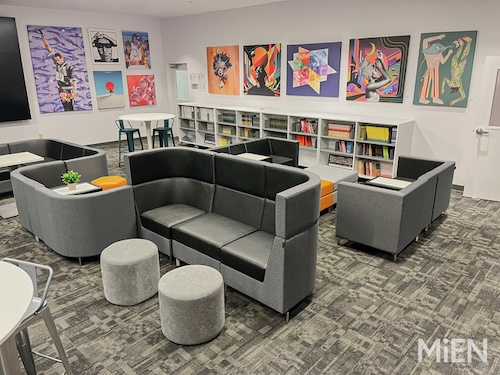
    Designed and outfitted by MiEN and Meteor Education, the Empowerment Center is where kids go to hang out, collaborate, and/or participate in school club activities. The hub is also set up with two wellness rooms where students can go to debrief and disconnect from a long day or just the stresses of being a student. It’s there for the students’ use.

    Here are the steps we took to create a space that consistently makes jaws drop and impresses parents who never thought their children would have access to such a warm, welcoming communal space on campus:

    • Add some flexibility into the process. Our original goal was to open the Empowerment Center’s doors in time for the 2023-24 school year, but getting it done the right way would require a bit more time. Our partners were willing to listen to us in terms of what we wanted to create, but within the realistic timelines. That was really cool.
    • Acknowledge the financial limitations. We largely relied on fundraising for this project and knew that some things just weren’t going to be realistic. To other schools in similar situations, I’d recommend staying flexible enough to hit the timelines and get all of the bases covered while keeping student needs in mind. We can have all the bells and whistles, but at the end of the day, if the car runs, the car runs. We know we can always add a new paint job later.
    • Get the right partners onboard early. As we went through the steps of designing the Empowerment Center, we learned a lot about architecture, planning, and construction. Through it all, having the right partners in its corner helped the school achieve its goals within budget and on time. It was really great to have our design and furniture partners sharing their best practices and other insights with us. We knew what we wanted to do, and a lot of the ideas came from our families and students. We just needed them to show us how we could get those ideas as close to reality as possible.
    • Make it personal. Special features we wanted in our Empowerment Center included a huge, interactive flatscreen TV that students, teachers, and guest speakers use to interact and work together. There’s also a large selection of donated books, the latest technology tools, and artwork that was personally selected by an art curation team. They were able to secure artists from the LA community to create and share visuals that our students are really familiar with. For example, some of the artwork spotlights female empowerment (i.e., with photos of authors like Octavia Butler) and the importance of acknowledging indigenous people. Everything in the hub is meant to spark curiosity. 
    • Brace yourself for some jaw-dropping moments. At our ribbon-cutting ceremony last year, our parents’ jaws were on the floor. They just never thought these resources would be available to their kids. A lot of them grew with us being in the church and a co-located space, and then we asked them to trust us to deliver on our promise, and now we’re able to show that as the reward for supporting us. We feel really proud that our parents were just over the moon about it.

    Hitting it out of the park

    Reflecting on the process we put in place to get our modern student hub designed, built, and open for business, I can say that the end result is an engaging, collaborative space that can be used for hanging out, structured learning, or a little of both. I think we really hit the ball out of the park with this innovative space.

    Student, teacher, and family feedback on the Empowerment Center has been extremely positive. Everyone loves it, and students are always excited to come and spend time in the modern, comfortable space that’s equipped with the technology and tools they need to be able to learn and engage.

    Latest posts by eSchool Media Contributors (see all)

    Source link

  • 7 new and engaging virtual field trips

    7 new and engaging virtual field trips

    Key points:

    Virtual field trips have emerged as an engaging resource, offering students immersive experiences and allowing them to explore global landmarks, museums, and natural wonders without leaving their classrooms.​

    Virtual field trips connect students to places that, due to funding, geography, or other logistical challenges, they may not otherwise have a chance to visit or experience.

    These trips promote active engagement, critical thinking, and cater to diverse learning styles. For instance, students can virtually visit the Great Wall of China or delve into the depths of the ocean, fostering a deeper understanding of subjects ranging from history to science.

    If you’re looking for a new virtual field trip to bring to your classroom, here are a few to investigate:

    Giant Panda Cam at the Smithsonian National Zoo: Watch Bao Li and Qing Bao–the two new Giant Pandas at Smithsonian’s National Zoo–as they explore their indoor and outdoor habitats at the David M. Rubenstein Family Giant Panda Habitat. The Giant Panda Cam is live from 7 a.m. to 7 p.m. ET daily. After 7 p.m., the cam feed will switch to a pre-recorded view of the last 12 hours.  

    The Superpower of Story: A Virtual Field Trip to Warner Bros. Studios: Students will go behind the scenes on an exclusive virtual field trip to DC Comics headquarters at Warner Bros. Studios in Burbank, California!.They’ll step into the world of legendary superheroes and blockbuster films, uncovering the secrets of how stories evolve from bold ideas to iconic comics to jaw-dropping live-action spectacles on the big screen. Along the way, they’ll hear from the creative minds who shape the DC Universe and get an insider’s look at the magic that brings their favorite characters to life.

    Mount Vernon: Students can enter different buildings and click on highlighted items or areas for explanations about their significance or what they were used for.

    Arctic Adventures: Polar Bears at Play Virtual Field Trip: Do polar bears play? The LEGO Group’s sustainability team, Polar Bears International, and Discovery Education travel to Churchill Manitoba and the Polar Frontier habitat at the Columbus Zoo and Aquarium in search of polar bears at play. Students will meet polar bears and play experts and uncover how arctic animals use play to learn just like humans, while inspiring students to use their voice to change their planet for the better.

    The Manhattan Project: Join The National WWII Museum for a cross-country virtual expedition to discover the science, sites, and stories of the creation of the atomic bomb. Student reporters examine the revolutionary science of nuclear energy in the Museum’s exhibits and the race to produce an atomic weapon in complete secrecy. 

    The Anne Frank House in VR: Explore the hiding place of Anne Frank and her family in virtual reality using the Anne Frank House VR app. The app provides a very special view into the Secret Annex where Anne Frank and the seven other people hid during WWII. In the VR app, all of the rooms in the Secret Annex are furnished according to how it was when occupied by the group in hiding, between 1942 and 1944. 

    Night Navigators: Build for Bats Virtual Field Trip: Join Discovery Education, the LEGO Group’s Social Responsibility Team, and Bat Conservation International as we travel across Texas and Florida in search of bat habitats. Students will meet play experts as they explore how these nighttime pollinators use play to learn and discover the critical role of bats in protecting farmers’ crops from pests and what we can do to help bats thrive.

    Laura Ascione
    Latest posts by Laura Ascione (see all)

    Source link

  • SMART Technologies Launches AI Assist in Lumio to Save Teachers Time

    SMART Technologies Launches AI Assist in Lumio to Save Teachers Time

    Lumio by SMART Technologies, a cloud-based learning platform that enhances engagement on student devices, recently announced a new feature for its Spark plan. This new offering integrates AI Assist, an advanced tool designed to save teachers time and elevate student engagement through AI-generated quiz-based activities and assessments.

    Designing effective quizzes takes time—especially when crafting well-balanced multiple-choice questions with plausible wrong answers to encourage critical thinking. AI Assist streamlines this process, generating high-quality quiz questions at defined levels in seconds so teachers can focus on engaging their students rather than spending time on quiz creation.

    More News from eSchool News

    HVAC projects to improve indoor air quality. Tutoring programs for struggling students. Tuition support for young people who want to become teachers in their home communities.

    Almost 3 in 5 K-12 educators (55 percent) have positive perceptions about GenAI, despite concerns and perceived risks in its adoption, according to updated data from Cengage Group’s “AI in Education” research series.

    Our school has built up its course offerings without having to add headcount. Along the way, we’ve also gained a reputation for having a wide selection of general and advanced courses for our growing student body.

    When it comes to visual creativity, AI tools let students design posters, presentations, and digital artwork effortlessly. Students can turn their ideas into professional-quality visuals, sparking creativity and innovation.

    Ensuring that girls feel supported and empowered in STEM from an early age can lead to more balanced workplaces, economic growth, and groundbreaking discoveries.

    In my work with middle school students, I’ve seen how critical that period of development is to students’ future success. One area of focus in a middle schooler’s development is vocabulary acquisition.

    For students, the mid-year stretch is a chance to assess their learning, refine their decision-making skills, and build momentum for the opportunities ahead.

    Middle school marks the transition from late childhood to early adolescence. Developmental psychologist Erik Erikson describes the transition as a shift from the Industry vs. Inferiority stage into the Identity vs. Role Confusion stage.

    Art has a unique power in the ESL classroom–a magic that bridges cultures, ignites imagination, and breathes life into language. For English Language Learners (ELLs), it’s more than an expressive outlet.

    In the year 2025, no one should have to be convinced that protecting data privacy matters. For education institutions, it’s really that simple of a priority–and that complicated.

    Want to share a great resource? Let us know at [email protected].

    Source link

  • Product Enhancements from Discovery Education Foster Improved Engagement and Personalization

    Product Enhancements from Discovery Education Foster Improved Engagement and Personalization

    Charlotte, NC — Discovery Education, the creators of essential K-12 learning solutions used in classrooms around the world, today announced a host of exciting product updates during a special virtual event led by the company’s Chief Product Officer Pete Weir. Based on feedback from the company’s school-based partners, these updates make teaching and learning even more relevant, engaging, and personalized for users of Discovery Education products.

    Among the enhancements made to Discovery Education Experience, the essential companion for engaged K-12 classrooms that inspires teachers and motivates students, are:  teachers and motivates students, are:

    • Improved Personalized Recommendations for Teachers: With thousands of resources in Experience, there is something for every classroom. The new Core Curriculum Complements feature in Experience automatically surfaces engaging resources handpicked to enhance school systems’ core curriculum, simplifying lesson planning and ensuring tight alignment with district priorities. Additionally, Experience now offers educators Personalized Content Recommendations. These content suggestions made to individual teachers are based on their unique profiles and preferences, or what is frequently used by other educators like them.
    • An Enhanced AI-Powered Assessment Tool: Originally launched in 2024, this tool is the first in a new suite of AI-powered teaching tools currently under development, and it empowers educators to create high-quality assessments using vetted resources right from within Experience. Educators can now more easily customize assessments according to reading level, question type, Bloom’s Taxonomy, and more – ensuring optimal learning experiences for students. Educators can also review and tailor the questions and, once ready, export those questions into a variety of formats.
    • A New Career Exploration Tool for All Discovery Education Experience Users: Career Connect – the award-winning tool that connects K-12 classrooms with real industry professionals – is now accessible to all Discovery Education Experience users. With this new feature, classrooms using Experience can directly connect to the professionals, innovations, and skills of today’s workforce. Furthermore, Experience is now delivering a variety of new career pathway resources, virtual field trips, and career profiles – building career awareness, inviting exploration, and helping students prepare for their future.
    • A newly enhanced Instructional Strategy Library: To elevate instruction and better support teachers, Discovery Education has enhanced its one-stop-spot for strategies supporting more engaging, efficient, and effective teaching. The improved Instructional Strategy Library streamlines the way educators find and use popular, research-backed instructional strategies and professional learning supports and provides connected model lessons and activities.

    Also announced today were a host of improvements to DreamBox Math by Discovery Education. DreamBox Math offers adaptive, engaging, and scaffolded lessons that adjust in real time to personalize learning so that students can build confidence and skills at their own pace. Among the new improvements to DreamBox Math are:

    • Major Lesson Updates: Based on teacher feedback, Discovery Education’s expert curriculum team has updated DreamBox Math’s most popular lessons to make them easier for students to start, play, and complete successfully. Students will now encounter lessons with updated scaffolding, enhanced visuals, greater interactivity, and added context to ground mathematical concepts in the curriculum and the world they live in.
    • A New Look for Middle School: Middle school students will encounter a more vibrantly colored and upgraded user interface featuring a reorganized Lesson Chooser whose intuitive design makes it easy to identify teacher-assigned lessons from their personalized lesson options. Additional updates will follow throughout the year.
    • New Interactive Curriculum Guide: Discovery Education has strengthened the link between DreamBox Math and school systems’ core instruction with an Interactive Curriculum Guide. Educators can now explore the breadth and scope of DreamBox content by grade and standard to locate, preview, and play lessons, increasing familiarity with lessons, and enhancing targeted instruction. The DreamBox Math team will continue to make updates to standards and curriculum alignments throughout the year.

    To watch a replay of today’s special event in its entirety, and to learn about additional updates to Discovery Education’s suite of K-12 solutions, visit this link.

    “Discovery Education understands teachers’ sense of urgency about closing the achievement gaps highlighted by recent NAEP scores,” said Pete Weir, Discovery Education’s Chief Product Officer. “In response, we accelerated the development and deployment of what has traditionally been our ‘Back-to-School’ product enhancements. The stakes for our students have never been higher, and Discovery Education is dedicated to putting the highest-quality, most effective resources into teachers and students’ hands as soon as possible.”

    For more information about Discovery Education’s award-winning digital resources and professional learning solutions, visit www.discoveryeducation.com, and stay connected with Discovery Education on social media through X, LinkedIn, Instagram, TikTok, and Facebook.    

    eSchool News Staff
    Latest posts by eSchool News Staff (see all)


    Source link

  • CASEL Becomes New Home for Engaging Schools Resources

    CASEL Becomes New Home for Engaging Schools Resources

    The Collaborative for Academic, Social, and Emotional Learning (CASEL) recently announced that it has become the new steward of Engaging Schools’ extensive body of educational resources. With Engaging Schools set to close in early 2025 after more than four decades of impact, CASEL will ensure the organization’s valuable tools, books, and frameworks remain available to educators worldwide.

    As part of this transition, CASEL is making these resources freely accessible to the public. Over time, CASEL will integrate elements of Engaging Schools’ work into several areas including the free Guide for Schoolwide SEL to further advance high-quality, evidence-based SEL implementation in schools and districts.

    “For more than 40 years, Engaging Schools has helped educators create safe and supportive learning environments where students thrive,” said Aaliyah A. Samuel, president and CEO of CASEL. “We are honored to carry forward their legacy by making these resources widely available and embedding them into our work to create school communities that prioritize academic, social, and emotional development.”

    Engaging Schools has long been recognized for its contributions to fostering inclusive school climates, strengthening restorative and equitable  discipline, and advancing engaging  teaching practices. 

    “We take immense pride in the lasting impact of Engaging Schools’ work,” said Larry Dieringer, Executive Director of Engaging Schools. “Though our organization’s chapter is closing, we are deeply grateful to CASEL for ensuring our resources continue to benefit educators and students for years to come.”

    For more than 30 years, CASEL has been a trusted leader in advancing SEL through research, practice, and policy. By integrating Engaging Schools’ resources into its offerings, CASEL reaffirms its commitment to supporting educators with the tools they need to create engaging, inclusive, and academically rich learning environments.

    To access Engaging Schools’ resources now available through CASEL, visit casel.org/engagingschools.

    Kevin Hogan
    Latest posts by Kevin Hogan (see all)

    Source link