
Tag: device

  • Phones, devices, and the limits of control: Rethinking school device policies

    Phones, devices, and the limits of control: Rethinking school device policies

    Key points:

    By now, it’s no secret that phones are a problem in classrooms. A growing body of research and an even louder chorus of educators point to the same conclusion: students are distracted, they’re disengaged, and their learning is suffering. What’s less clear is how to solve this issue. 

    Of late, school districts across the country are drawing firmer lines. From Portland, Maine to Conroe, Texas and Springdale, Arkansas, administrators are implementing “bell-to-bell” phone bans, prohibiting access from the first bell to the last. Many are turning to physical tools like pouches and smart lockers, which lock away devices for the duration of the day, to enforce these rules. The logic is straightforward: take the phones away, and you eliminate the distraction.

    In many ways, it works. Schools report fewer behavioral issues, more focused classrooms, and an overall sense of calm returning to hallways once buzzing with digital noise. But as these policies scale, the limitations are becoming more apparent.

    But students, as always, find ways around the rules. They’ll bring second phones to school or slip their device in undetected–and more. Teachers, already stretched thin, are now tasked with enforcement, turning minor infractions into disciplinary incidents. 

    Some parents and students are also pushing back, arguing that all-day bans are too rigid, especially when phones serve as lifelines for communication, medical needs, or even digital learning. In Middletown, Connecticut, students reportedly became emotional just days after a new ban took effect, citing the abrupt change in routine and lack of trust.

    The bigger question is this: Are we trying to eliminate phones, or are we trying to teach responsible use?

    That distinction matters. While it’s clear that phone misuse is widespread and the intent behind bans is to restore focus and reduce anxiety, blanket prohibitions risk sending the wrong message. Instead of fostering digital maturity, they can suggest that young people are incapable of self-regulation. And in doing so, they may sidestep an important opportunity: using school as a place to practice responsible tech habits, not just prohibit them.

    This is especially critical given the scope of the problem. A recent study by Fluid Focus found that students spend five to six hours a day on their phones during school hours. Two-thirds said it had a negative impact on their academic performance. According to the National Center for Education Statistics, 77 percent of school leaders believe phones hurt learning. The data is hard to ignore.

    But managing distraction isn’t just about removal. It’s also about design. Schools that treat device policy as an infrastructure issue, rather than a disciplinary one, are beginning to implement more structured approaches. 

    Some are turning to smart locker systems that provide centralized, secure phone storage while offering greater flexibility: configurable access windows, charging capabilities, and even low admin options to help keep teachers teaching. These systems don’t “solve” the phone problem, but they do help schools move beyond the extremes of all-or-nothing.

    And let’s not forget equity. Not all students come to school with the same tech, support systems, or charging access. A punitive model that assumes all students have smartphones (or can afford to lose access to them) risks deepening existing divides. Structured storage systems can help level the playing field, offering secure and consistent access to tech tools without relying on personal privilege or penalizing students for systemic gaps.

    That said, infrastructure alone isn’t the answer. Any solution needs to be accompanied by clear communication, transparent expectations, and intentional alignment with school culture. Schools must engage students, parents, and teachers in conversations about what responsible phone use actually looks like and must be willing to revise policies based on feedback. Too often, well-meaning bans are rolled out with minimal explanation, creating confusion and resistance that undermine their effectiveness.

    Nor should we idealize “focus” as the only metric of success. Mental health, autonomy, connection, and trust all play a role in creating school environments where students thrive. If students feel overly surveilled or infantilized, they’re unlikely to engage meaningfully with the values behind the policy. The goal should not be control for its own sake, it should be cultivating habits that carry into life beyond the classroom.

    The ubiquity of smartphones is undeniable. While phones are here to stay, the classroom represents one of the few environments where young people can learn how to use them wisely, or not at all. That makes schools not just sites of instruction, but laboratories for digital maturity.

    The danger isn’t that we’ll do too little. It’s that we’ll settle for solutions that are too simplistic or too focused on optics, instead of focusing  not on outcomes.

    We need more than bans. We need balance. That means moving past reactionary policies and toward systems that respect both the realities of modern life and the capacity of young people to grow. It means crafting strategies that support teachers without overburdening them, that protect focus without sacrificing fairness, and that reflect not just what we’re trying to prevent, but what we hope to build.

    The real goal shouldn’t be to simply get phones out of kids’ hands. It should be to help them learn when to put them down on their own.

    Latest posts by eSchool Media Contributors (see all)

    Source link

  • Centralized IT governance helps improve learning outcomes

    Centralized IT governance helps improve learning outcomes

    Key points:

    As school districts continue to seek new ways to enhance learning outcomes, Madison County School District represents an outstanding case study of the next-level success that may be attained by centralizing IT governance and formalizing procedures.

    When Isaac Goyette joined MCSD approximately seven years ago, he saw an opportunity to use his role as Coordinator of Information Technology to make a positive impact on the most important mission of any district: student learning. The district, located in northern Florida and serving approximately 2,700 students, had made strides towards achieving a 1:1 device ratio, but there was a need for centralized IT governance to fully realize its vision.

    Goyette’s arrival is noted for marking the beginning of a new era, bringing innovation, uniformity, and central control to the district’s technology infrastructure.  His team aimed to ensure that every school was using the same systems and processes, thereby advancing the students’ access to technology.

    Every step of the way, Goyette counted on the support of district leadership, who recognized the need for optimizing IT governance. Major projects were funded through E-rate, grants, and COVID relief funds, enabling the district to replace outdated systems without burdening the general fund.  MCSD’s principals and staff have embraced the IT team’s efforts to standardize technology across the district, leading to a successful implementation. Auto rostering and single sign-on have made processes easier for everyone, and the benefits of a cohesive, cross-department approach are now widely recognized.

    To successfully support and enable centralization efforts, Goyette recognized the need to build a strong underlying infrastructure. One of the key milestones in MCSD’s technology journey was the complete overhaul of its network infrastructure. The existing network was unreliable and fragmented in design. Goyette and his team rebuilt the network from the ground up, addressing connectivity issues, upgrading equipment, and logically redoing district systems and processes, such as the district’s IP network addressing scheme. This transformation has had a positive impact on student learning and engagement. With reliable connectivity, students no longer face disruptions.

    The implementation of an enterprise-grade managed WAN solution has further transformed the educational experience for MCSD’s students and educators, serving as the backbone for all other technologies. Goyette’s innovative co-management approach, coupled with his deep understanding of network topology, has enabled him to optimize the resources of an experienced K-12 service provider while retaining control and visibility over the district’s network.

    New School Safety Resources

    Another significant milestone MCSD has achieved is the successful deployment of the district’s voice system. This reliable phone system is crucial for ensuring that MCSD’s schools, staff, and parents remain seamlessly connected, enhancing communication and safety across the district.

    Goyette’s innovative leadership extends to his strategies for integrating technology in the district. He and his team work closely with the district’s curriculum team to ensure that technology initiatives align with educational goals. By acting as facilitators for educational technology, his team prevents app sprawl and ensures that new tools are truly needed and effective.

    “Having ongoing conversations with our principals and curriculum team regarding digital learning tools has been critical for us, ensuring we all remain aligned and on the same page,” said Goyette. “There are so many new apps available, and many of them are great. However, we must ask ourselves: If we already have two apps that accomplish the same goal or objective, why do we need a third? Asking those questions and fostering that interdepartmental dialogue ensures everyone has a voice, while preventing the headaches and consequences of everyone doing their own thing.”   

    MCSD’s IT transformation has had a profound impact on student learning and engagement. With reliable connectivity and ample bandwidth, students no longer face disruptions, and processes like single sign-on and auto account provisioning have streamlined their access to educational resources. The district’s centralization efforts have not only improved the educational experience for students and educators but have also positioned Madison County School District as a model of success and innovation.

                                                                                                                ###

    Latest posts by eSchool Media Contributors (see all)

    Source link

  • Optoma Announces Launch of the New 3-Series Interactive Displays with Google Certification and AI-Enabled Tools

    Optoma Announces Launch of the New 3-Series Interactive Displays with Google Certification and AI-Enabled Tools

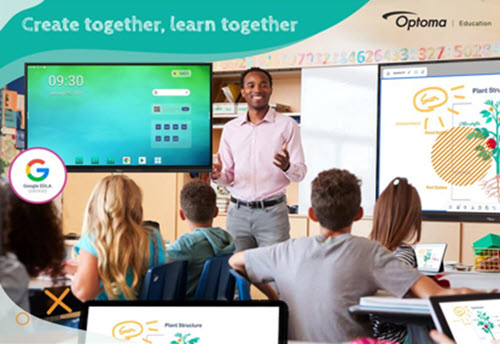
    FREMONT, CA – Optoma, a world-leading provider of visual solutions, today announced its latest Creative Touch 3-Series Interactive Displays designed to empower educators and business professionals with new tools and features to enhance learning, make presentations more effective, and increase collaboration in classrooms, lecture halls, boardrooms, remote working and other business environments.

    With Google’s Enterprise Device Licensing Agreement (EDLA) Certification and added functionality, the new 3-Series empowers professionals and educators to deliver dynamic and impactful content by providing cutting-edge tools that streamline management and elevate engagement. The advanced capabilities of the new 3-Series simplify planning and workflow through wireless collaboration, screen sharing, and innovative meeting solutions in both corporate and educational environments alike, all packed into a robust yet user-friendly platform.

    The 3-Series: Purpose-Built for Corporate and Education Environments

    New features and key highlights include:

    Google EDLA Certification: Ensures compatibility and optimized performance with thousands of educational applications and services available directly from the pre-installed Google Play Store allowing users to experience the full Google Suite for real-time collaboration from practically anywhere in the world.  Without compatibility issues or the hassle of connecting an external PC, users can easily access the entire suite of Google-based applications they are accustomed to – including Google Drive, Google Docs, YouTube, and more!

    The Optoma Solution Suite (OSS®): User-friendly software featuring Artificial Intelligence (AI) enabled tools, such as Sticky Notes* and AI Handwriting Recognition, the OSS package also includes:

    • Whiteboard: Unleash creativity through a digital whiteboard packed with tools that make learning and sharing ideas engaging – facilitating collaboration in real-time from anywhere.
      • Smart Sketch tool is ideal for drawing diagrams as it recognizes shapes and drawings and converts them into clipart images.
      • Floating Toolbar and Infinity Canvas allow you to seamlessly switch between tools to suit your tasks with a virtually limitless writing space.
      • Innovative Annotation and Highlighter Tools make underlining key points or annotating complex diagrams a breeze.
    • File Manager: Easily save, organize, or move files from local storage to networkable storage or to popular cloud services in seconds.
    • Display Share: Connect any device to wirelessly broadcast, share, or stream your content to the big screen. Bringing your own device has never been easier.

    Exceptional Performance: Seamless performance with an 8-core processor, Android 14 OS, and Zero Bonding screen for that natural writing experience.

    “We are excited to announce our new 3-Series and partnership with Raptor Technologies which truly embodies our commitment to supporting education through cutting-edge visual solutions, enhanced software packages and safety and security,” said Maria Repole, Head of Marketing at Optoma.

    A value-added solution, Optoma Management Suite (OMS®) is available out of the box on the 3-Series Interactive Displays, with a free trial available.** OMS offers IT administrators and technicians a real time remote platform to monitor, manage, diagnose, and update multiple or entire fleets of displays simultaneously that are either on the same network or connected through the cloud. OMS makes it easy to broadcast emergency messages, alerts, or announcements across displays worldwide.

    Optoma is thrilled to partner with Raptor® Technologies, the leading innovator in school safety solutions, redefining the landscape of school security with its Raptor School Safety Software Suite. By integrating Raptor’s software with Optoma’s interactive displays, school administrators and students can receive real-time alerts and emergency notifications using CAP protocols to improve the overall safety of the school.

    To experience a demonstration and learn more about Optoma’s new Creative Touch 3-Series Interactive Displays, please schedule a demo or visit: https://www.optomausa.com/products/interactive-flat-panel-displays-3-series/education https://www.optomausa.com/products/interactive-flat-panel-displays-3-series/corporate

    *Some AI features may require the use of an Optoma (OSS) account.

    **Free trial licenses are available for a limited time. Please register your OMS® Cloud account at https://oms.optoma.com or speak with your local representative.

    OMS and OSS are registered trademarks of Optoma Corporation

    DLP is a registered trademark of Texas Instruments

    About Optoma Technology, Inc.  

    Optoma combines cutting-edge technology and innovation to deliver remarkable visual display products designed to connect audiences with engaging video experiences. From the company’s ProScene projectors to its Creative Touch interactive, Professional LCD and LED displays, Optoma’s suite of products can meet the demands of nearly any professional environment, including conference rooms and classrooms, digital signage, corporate, houses of worship, retail, simulation environments and control rooms. Optoma Technology is the U.S. headquarters for The Optoma Group, with continental headquarters also in Europe and Asia. For more information, visit optomausa.com.   

    eSchool News Staff
    Latest posts by eSchool News Staff (see all)

    Source link