Tag: IPEDS

  • Education Department zeroes in on 4-year colleges for expanded IPEDS collection

    Education Department zeroes in on 4-year colleges for expanded IPEDS collection

    This audio is auto-generated. Please let us know if you have feedback.

    Dive Brief:

    •  Only four-year institutions would be subject to significantly stepped-up reporting requirements for admissions data disaggregated by race and sex, under a notice issued by the Trump administration on Wednesday.
    • The plan, first introduced in August, would require affected colleges to submit six years worth of application and admissions data — disaggregated by student race and sex — as part of the next reporting cycle. 
    • The updated terms would exempt two-year colleges and open-enrollment institutions that only award aid based on financial need from having to report this data to the National Center for Education Statistics, which oversees the Integrated Postsecondary Education Data System. 

    Dive Insight:

    The U.S. Department of Education currently only requires institutions to submit data disaggregated by race for enrolled students.

    But under the Trump administration’s proposal, colleges would have to disaggregate data for applicants, those admitted and enrolled students by race and sex. They would also have to cross-reference the data with each individual’s admissions test scores, GPA, family income, Pell Grant eligibility and parents’ educational level.

    Colleges would be required to submit this information for every academic year dating back to 2020-21 for the first IPEDS reporting cycle of the new plan, currently proposed as 2025-26.

    The administration intends to use the data points to “indicate whether institutions of higher education are using race-based preferencing in their admissions processes,” according to the Federal Register notice filed by Ross Santy, data officer at the agency’s Office of Planning, Evaluation and Policy Development. The U.S. Supreme Court struck down the use of race-conscious admissions practices in 2023.

    The plan would also mandate that colleges submit their graduation rates from 2019-20 to 2024-25.

    In its August notice, the Education Department said it expected to focus these additional reporting requirements on four-year institutions with selective admissions processes. It said these colleges “have an elevated risk of noncompliance with the civil rights laws,” both in admissions and scholarships, while it considered community colleges and trade schools at low risk for civil rights noncompliance in admissions since they admit all or virtually all of their applicants.

    The department at the time sought public comment on which institutional types should be subject to the new reporting proposal. This week, it made revisions based on that input, according to Santy.

    Since the Trump administration first announced the proposal, higher ed groups and colleges have raised concerns about the administrative burden it would put on institutions and the rapid turnaround time necessitated by a 2025-26 start date.

    Wednesday’s update would bring relief for two-year institutions and many of those with open enrollment policies. But many of the sector’s concerns went unaddressed, including comments about unclear language in the proposal, issues around student privacy and unease that the Trump administration would construe the data with the intent of attacking colleges further.

    Since President Donald Trump began his second term in January, the federal government has alleged that colleges supporting diversity efforts or permitting student protests are in violation of civil rights law and has opened numerous investigations on these grounds.

    Source link

  • IPEDS Data Collection Schedule (US Department of Education)

    IPEDS Data Collection Schedule (US Department of Education)

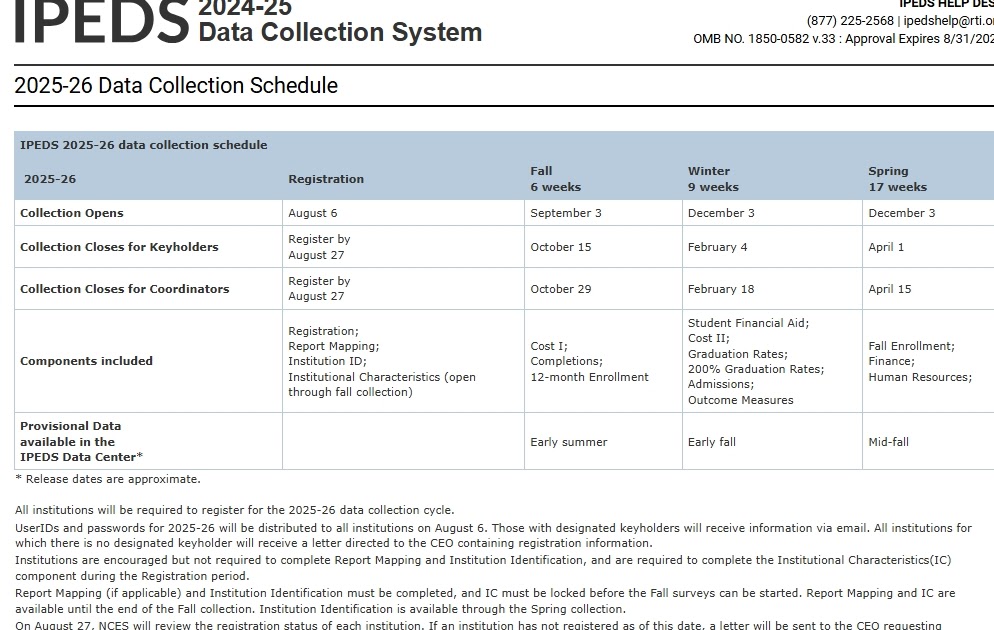
    The IPEDS data collection calendar for 2025-26 has now been posted and is available within the Data Collection System’s (DCS) Help menu, and on the DCS login page at: https://surveys.nces.ed.gov/ipeds/public/data-collection-schedule

    What is IPEDS?

    IPEDS is the Integrated Postsecondary Education Data System. It is a system of interrelated surveys conducted annually by the U.S. Department of Education’s National Center for Education Statistics (NCES). IPEDS gathers information from every college, university, and technical and vocational institution that participates in the federal student financial aid programs. The Higher Education Act of 1965, as amended, requires that institutions that participate in federal student aid programs report data on enrollments, program completions, graduation rates, faculty and staff, finances, institutional prices, and student financial aid. These data are made available to students and parents through the College Navigator college search Web site and to researchers and others through the IPEDS Data Center. To learn more about IPEDS Survey components, visit https://nces.ed.gov/Ipeds/use-the-data/survey-components.

    How is IPEDS Used?

    IPEDS provides basic data needed to describe — and analyze trends in — postsecondary education in the United States, in terms of the numbers of students enrolled, staff employed, dollars expended, and degrees earned. Congress, federal agencies, state governments, education providers, professional associations, private businesses, media, students and parents, and others rely on IPEDS data for this basic information on postsecondary institutions.

    IPEDS forms the institutional sampling frame for other NCES postsecondary surveys, such as the National Postsecondary Student Aid Study.

    Which Institutions Report to IPEDS?

    The completion of all IPEDS surveys is mandatory for institutions that participate in or are applicants for participation in any federal student financial aid program (such as Pell grants and federal student loans) authorized by Title IV of the Higher Education Act of 1965, as amended (20 USC 1094, Section 487(a)(17) and 34 CFR 668.14(b)(19)).

    Institutions that complete IPEDS surveys each year include research universities, state colleges and universities, private religious and liberal arts colleges, for-profit institutions, community and technical colleges, non-degree-granting institutions such as beauty colleges, and others.

    To find out if a particular institution reports to IPEDS, go to College Navigator and search by the institution name.

    What Data are Collected in IPEDS?

    IPEDS collects data on postsecondary education in the United States in eight areas: institutional characteristics; institutional prices; admissions; enrollment; student financial aid; degrees and certificates conferred; student persistence and success; and institutional resources including human, resources, finance, and academic libraries.

    Source link

  • Department of Education Discontinues IPEDS Training

    Department of Education Discontinues IPEDS Training

    Caroline Brehman/CQ-Roll Call Inc./Getty Images

    The Trump administration terminated a key contract to train college officials on how to report data to the Integrated Postsecondary Education Data System, a move that could further hamper the Education Department’s data infrastructure.

    Used to track trends in higher education enrollment, completion, financial aid usage and other institutional characteristics, IPEDS survey data has long been critical to higher education research. But in order to access and utilize the data, institutions need to know how to properly complete the survey and researchers need to know how to navigate the database.

    That’s where the Association of Institutional Research and its IPEDS training programs came in—or at least they used to.

    In a social media post Thursday, AIR’s executive director, Christine Keller, announced that the organization’s subcontract with IPEDS and the National Center for Education Statistics would not be renewed for the upcoming academic year. This means that updated self-paced courses and video tutorials on how to report and use data, as well as in-person workshops on topics like how to set data-informed benchmarks and improvement plans for an institution, will no longer be available.

    “When you’ve done meaningful work with committed partners for more than two decades, it’s difficult to acknowledge that it’s coming to an end,” Keller wrote. “While this chapter is closing, AIR’s commitment to supporting data-informed decision-making remains strong. We are actively exploring ways to continue offering select IPEDS training under the AIR brand to meet the needs of our community.”

    But while AIR intends to continue similar training models, Keller was sure to clarify that any future coaching will come at a cost. Past resources were subsidized by the contract and therefore available for free.

    The end of this subcontract will not, however, terminate other components  of the IPEDS contract managed through RTI International—such as aiding in data collection, maintaining the IPEDS website and managing the help desk. (This paragraph has been corrected to reflect that RTI International contract for IPEDS.)

    An Education Department spokesperson wrote in an email that the decision reflected its commitment to supporting “useful and relevant research” while “respecting the American taxpayer’s wallet.”

    “Multiple federal contractors were collecting 50 percent or more in overhead costs, which is neither sustainable nor reasonable,” the spokesperson said. “We believe in the value of training users to make best use of federally funded databases. Thus, we are in [the] process of reexamining how that training might be more efficiently and effectively delivered in the future.”

    College staff members and policy experts who focus on using institutional data to improve student outcomes, however, say the discontinuation of free AIR training programs will be devastating.

    Henry Zheng, vice provost for institutional effectiveness and planning at Carnegie Mellon University, wrote on LinkedIn that this abrupt ending was “sobering” and that he is “pray[ing] that this program will continue on another day.”

    Wesley Whistle, a project director on student success and affordability at New America, a left-leaning think tank, also took to LinkedIn to comment on the news, saying, “These trainings are vital for institutional researchers as they fulfill their reporting obligations.”

    And this is not the first blow for IPEDS and NCES under the Trump administration. In February, Elon Musk’s Department of Government Efficiency announced that it had canceled nearly $900 million in contracts across the statistics center and its larger parent agency, the Institute of Education Sciences.

    At the time, a DOGE official said 89 IES contracts were canceled, while other organizations put the total at closer to 170. (Previous Inside Higher Ed reporting has shown that the data being published by DOGE regarding the scope and effect of its cuts is likely inaccurate.)

    Additionally, the department fired more than 80 percent of IES’s 120 employees. The Education Department said in recent budget documents that it is planning to reimagine “a more efficient, effective, and useful IES to improve support for evidence-based accountability, data-driven decision making, and education research for use in the classroom.”

    Collectively, IPEDS, NCES and IES serve as the Education Department’s research and development arm, funding research on how to improve equity in education access and outcomes in the future as well as providing data on how students in K–12 and college fare in programs. So to discontinue the services that bolstered college staff members’ professional development could hurt their ability to report congressionally mandated statistics accurately, higher ed experts say.

    In the end, some fear that losing the training could lead to less data-informed decision-making.

    “We need to collect data both at the national level and at the institutional level. Without measuring the problem, we risk pretending it doesn’t exist,” wrote James Orlick, director of grant writing and innovation for inclusive excellence at the University of Louisville. “The belief that ‘if you don’t measure it, it isn’t a problem’ reinforces inaction and won’t solve the systemic issues we face.”

    Source link

  • How to IPEDS, Part II

    How to IPEDS, Part II

    This will be the second part of a series of blogposts about how to use IPEDS, The Integrated Postsecondary Education Data System of the federal government. If you’re just starting, I highly recommend you go to the first post to bring yourself up to speed on the basics.  If you don’t, some of this might not make sense.

    In that post, I covered several of the ways you can extract simple tables of data for a single year or a single institution; or summary data, including fairly basic and interactive charts when you’re looking for something simple.  In this one, I’ll go over how to extract custom data over multiple years, and then walk you through the frustrating process of making sense of the output.  Warning: I get a bit cranky about this, because the data formats are largely unchanged since I started doing this perhaps 20 years ago, and they create far more work for the end user than they should.

    The last post covered the options in italics.  This one will cover the options in bold.

    Data Explorer
    Publications and Products
    Data Trends
    Look Up an Institution
    Statistical Tables
    Data Feedback Report
    Summary Tables


    Custom Data Files
    Compare Institutions
    Complete Data Files
    Access Database

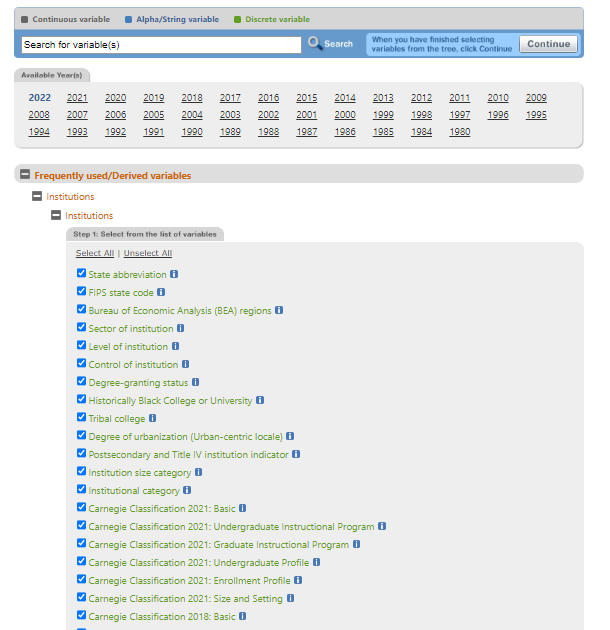
    Custom Data files is a fairly easy way to get the data you want for a single year.  In this example, I’ve used EZ Group to select all institutions (again, larger selections are better because it’s easy to remove but harder to add), and clicked “Institutions” and then the “Select All” button.  It looks like this. 

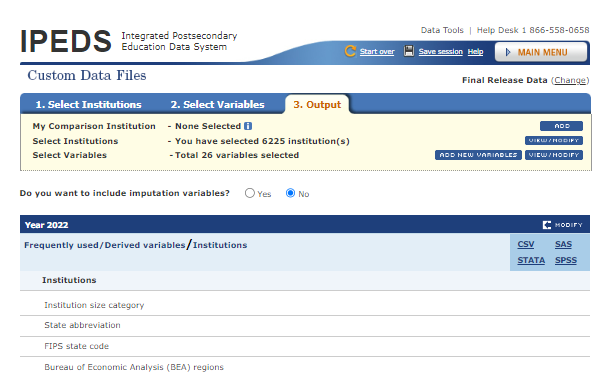
    Click the “Continue” tab, and choose “csv” as your download option.

    Click on the file that you just downloaded to open it (it should open with Excel), and you’ll see something like this (not all columns are displayed due to space constraints.)

    If you want to do this for multiple years, you can go back, change the year, and repeat the download and then stack the files.  The real advantage of this approach is that the data in the columns come in as labels: That is, the size categories are listed as “Under 1,000” or “5,000-9,999” for instance.  That means, especially with large files, you don’t have to translate codes, where “Under 1,000” is listed as 1, and “1,000 to 5,000” is listed as 2, etc.  This keeps you from doing multiple LOOKUP functions in Excel that are a part of other formats.

    If you are going to do a lot of work in IPEDS, I highly recommend you use this method to create one giant file of institutional characteristics to import into an Access Database, and use it to merge that with data from statistical downloads (like endowments, admissions, financial aid, etc.)  There are a couple of reasons for this: It’s too easy to overlook or skip a variable you want to include in your subsequent downloads, but more important, IPEDS only allows 250 variables in a single file, so this can save you 70 or 100 or 150 spots in the future.

    You’ll notice that there are also options to download this data in STATA, SPSS, or SAS, which are statistical programs.  Those require downloading a csv file, a script for the software, and then editing the script to point to your file, running it and saving the output.  With the Custom Data Files option, that’s a bit superfluous.

    Despite the confusion and difficult work arounds that are native to the Compare Institutions option, it’s the one I use most often.  Warning: This is not for people who do not have Sitzfleisch. Even the best data cleaning tools are stymied by some of the quirks in IPEDS.
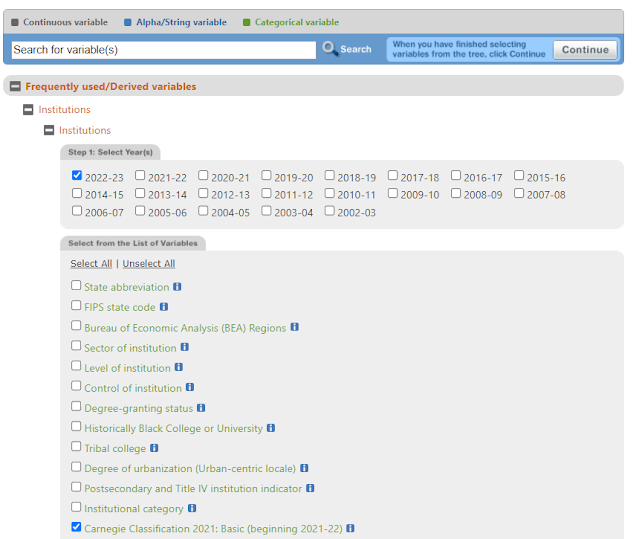
    So let’s go back to our institutional selections, and select all in the IPEDS universe.  If you want to start with things like Carnegie Classifications because you ignored my earlier advice, we can do that, and then we’ll look at Fall Enrollment over time.  Let’s start with the former.  I’d recommend selecting it for one year, unless you want to look at how those classifications have changed over time.  We do that like this.

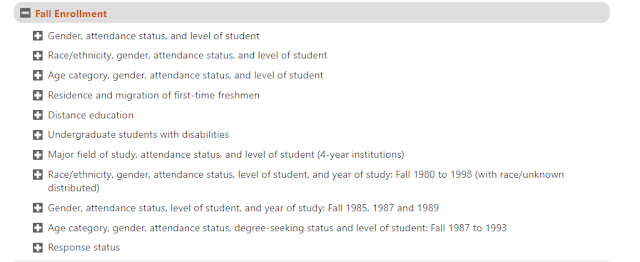
    Then (and this is where it gets tricky), we’ll start specifying enrollment variables.  Let’s say we want to look at how enrollment has changed over a span of time, so we’ll use Fall, 2022 and Fall, 2012.  You have a lot of options, but only these options (IPEDS really should allow you to query the database in the ways you want, but that’s another story.)

    Let’s do the first option: By Gender, Status, and level.  We’ll have the chance to look at men and women (IPEDS has reported gender as binary as its policy, not mine), full- or part-time, status, and graduate or undergraduate level.

    Here’s how that selection is done.

     
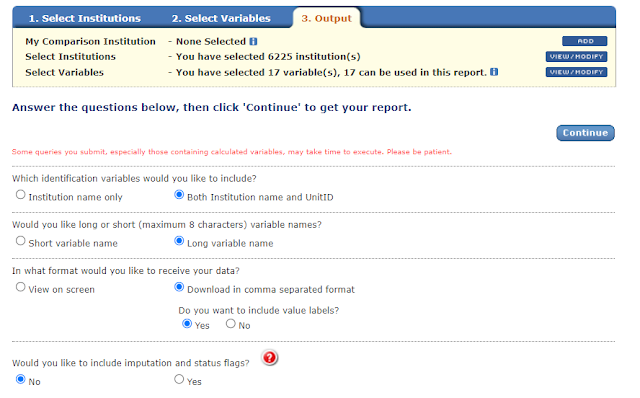
    When you approve that, this is what you see.  Note that this selection creates 17 variables in your data output: One for the Carnegie Classification, and 16 for the enrollment data.  If you added another year, you’d add eight more, and so on.  If you got more granular on the enrollment data, it would increase those counts as well.

    Approve the selections (these are the ones I use, but you can change them.  I highly recommend including UnitID unless you’re doing a short, quick analysis).  

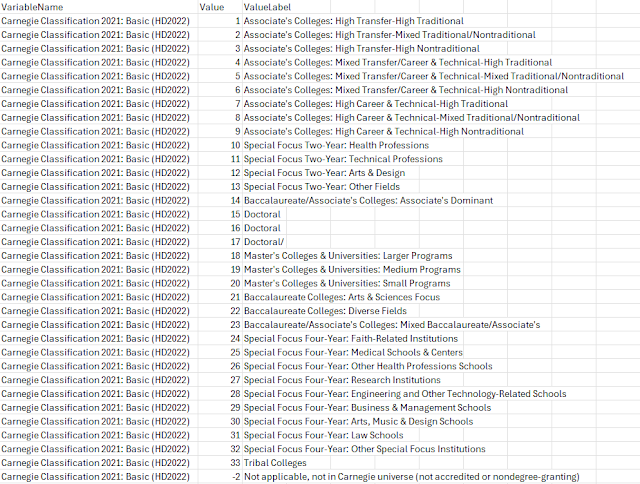
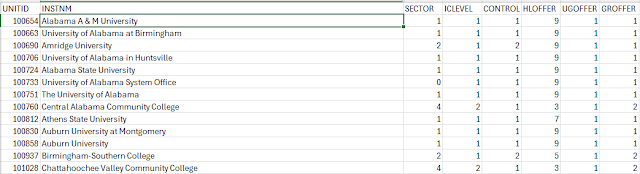
    You will get a ZIP file, with the raw data and the value labels.  In this case, the only values that need to be translated into labels are the Carnegie Classifications.  That translator table looks like this.  If you are proficient in Excel, it’s not hard to use a VLOOKUP or XLOOKUP function to translate those values into labels, but it’s still, IMHO, a quirk leftover from days when it made sense to keep file size as small as possible.

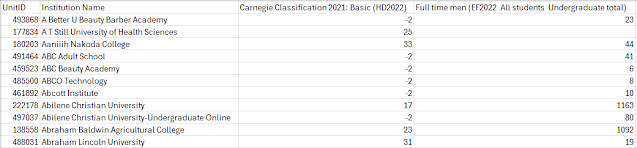
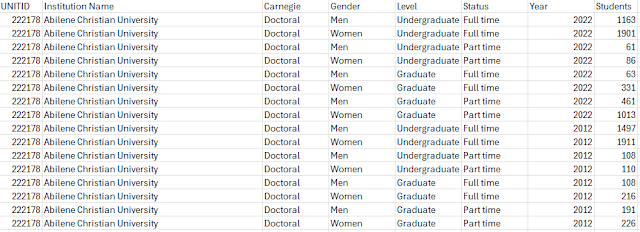
    The actual data file looks like this, and it’s probably the thing that makes a lot of people decide to never do IPEDS again.  The first column contains the ID number, the second contains the name, the third contains the numeric value of the Carnegie classification, and the fourth?  Well, the fourth variable is a tricky one, as it’s actually four variables rolled into one: Year, level (in this case undergraduate), gender, and status (in this case, full-time.) 

    For this to be most useful, the data should look like this, with one row for every discrete combination of characteristics:

    And that’s the hard part:  I use a Tableau Data Restructuring Tool, Excel tools like Flash Fill (if you don’t know it, you have to check it out), Excel Add-insKutools for Excel, EasyMorph and Able Bits.  I’ve used Tableau Prep, but frankly find it confusing and often frustrating. 

    Getting your data into this format not only makes it easier to visualize in Tableau, but it also helps you create better pivot tables for the spreadsheet lovers in your office.

    There are two other options in IPEDS, the Access Database and Complete Files.

    Complete Files is easy, because you can download with one click the complete survey (admissions, financial aid, degrees awarded, etc.)  But again, you get those pesky codes you need to translate, and no translator files or even the ability to translate variable names.  It’s a major pain.  If you’re going to go this route, I’d recommend the SPSS, STATA, or SAS options, where the script will translate and output the file for you.  Another (IMHO) unnecessary step.  IPEDS could make this much easier.

    And, to top it off, if you download the enrollment file, for instance, the values are not discreet.  You’ll have one column for total, which is the sum of men and women separately.  That same total will roll up full- and part-time.  It will roll up grads and undergrads.  You have to be very careful to break them apart and not double count everything.

    Finally, I’ve tried and failed several times to make sense of the full Access Data Base option. It’s huge, it’s clunky, it’s in code, and it duplicates values: In short, it’s the worst of all available options, in a  harder-to-use format.  Enter at your own risk.

    I hope these two posts have been helpful to you as you think about navigating IPEDS.  And I hope someone at IPEDS reads this and realizes how much modernization could be brought to these important data.


    Source link

  • How to IPEDS Part I

    How to IPEDS Part I

    Most, but not all, of the data visualizations on this site use data from IPEDS, the Integrated Postsecondary Education Data System.  And all of the visualizations (as I recall) use Tableau, a very powerful data visualization tool, especially for people like me who don’t know how to write the code necessary in some software packages.

    In this post, I’ll start with a few of the easiest and quickest ways to get data out of IPEDS.  I’ll follow it up with one that dives a little deeper for people who like the raw data for analysis.

    The question I get asked most often is how I get the information out of IPEDS.  And that’s not an easy thing to answer, as I use several of the methods available depending on what I’m doing.  Since you federal tax dollars have not yet been used to create an easy guide to IPEDS, I’m going to give you a primer on how to do the most simple things, and hope you’ll do like I did, which is to learn it the hard way through trial and error once you get started.

    Some tips before we start: You can use Excel to get the information you want, but it ends up being a lot easier if you start with a single download of institutional characteristics in a table and load it to an Access database, if you’re even marginally proficient in that software.  But for now I’ll presume you’re not.

    In the IPEDS Data Center you’ll find several different ways to get IPEDS data  The ones in bold will be covered here:

    • Data Explorer
    • Publications and Products
    • Data Trends
    • Look Up an Institution
    • Statistical Tables
    • Data Feedback Report
    • Summary Tables
    • Custom Data Files
    • Compare Institutions
    • Complete Data Files
    • Access Database
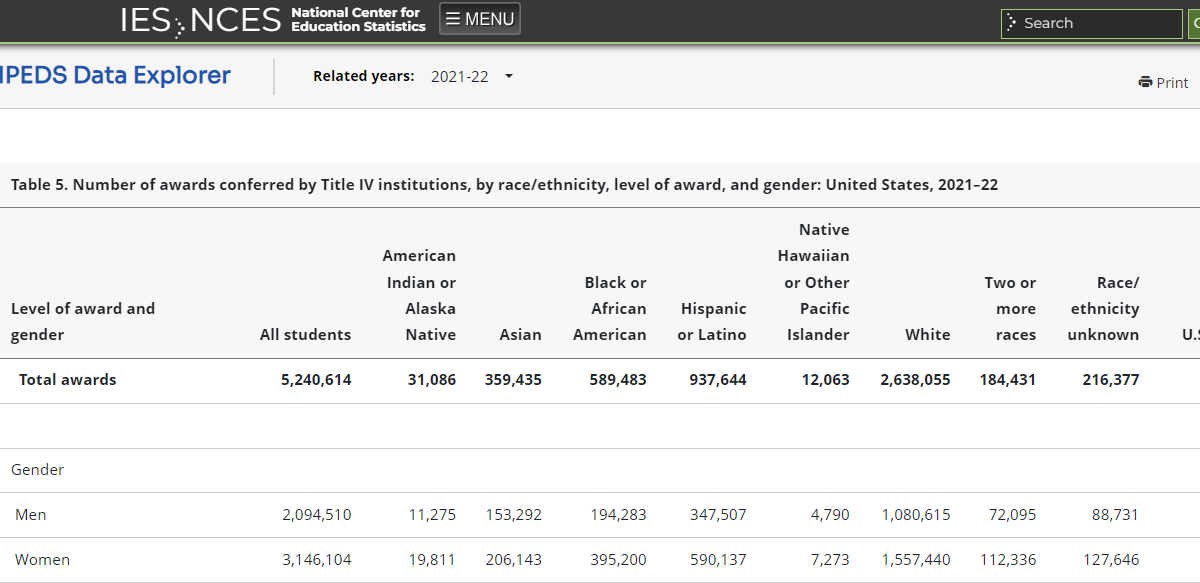
    Data Explorer has aggregated data in a report, and it’s useful if you want to look up something quickly and if there is already a report that summarizes that information.  It’s aggregate, so best for high level trends.  For instance, if you look at Degrees Awarded by Ethnicity, you’ll see this.  Note that you can change the year displayed, and download the Excel file.

    Publications and Products can be helpful, but you may end up going down a rabbit hole chasing what you want, only to find it’s in a restricted file only available to researchers.  You can find links to things like The Condition of Education or the Digest of Education Statistics which is a data rich treasure trove of information, mostly designed to print ala 1998; if you want to analyze it, you have a LOT of data clean up to do.

    Data Trends shows data over time, and it can be very helpful if you want to look at a single statistic in a time sequence. Click on one of the questions and you’ll get your answer quickly.  You can filter and download the data if you wish.

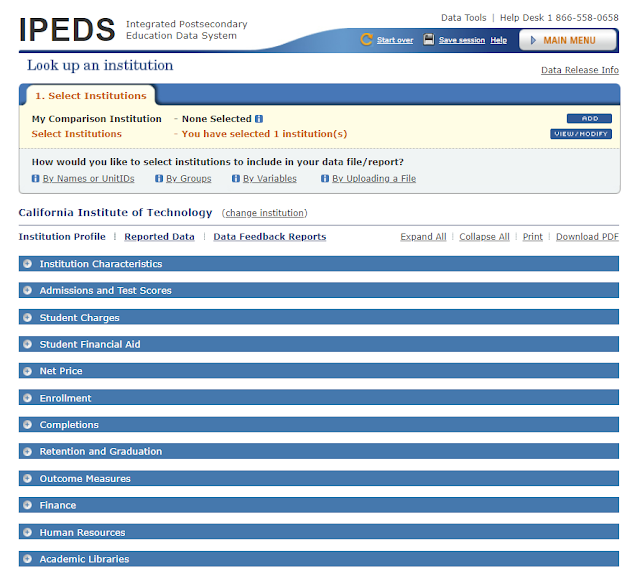
    Look Up an Institution allows you to select any single college or university and look at almost all of the information it reports to IPEDS in one place. It can be helpful when you want to look up a few facts about an institution quickly, but otherwise I find little value in it. 

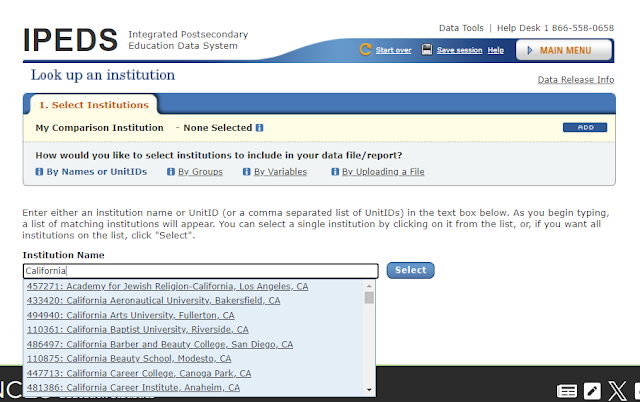
    Typing more of the name of the institution gets you easier results.  For instance, you’ll get a long list if you just type “California.”

    But as you type, the list gets shorter.

    After you make your selection, you’ll get this, and you can click on the plus sign on the blue bars to expand.

    Statistical Tables are less helpful for my work, but maybe they’ll be good for you.  This is where you’ll get your first chance to select a group of colleges, so I’ll go over that first.  You can choose almost any combination of institutions, by location, type, sector, or almost any variable.

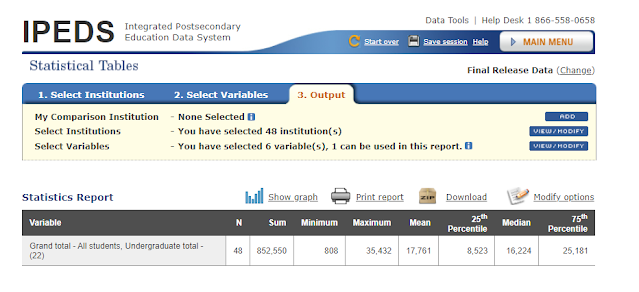
    I like to us EZ Group and make a large selection: It’s a lot easier to start with a large file and eliminate institutions than to try to augment it last.  But if you are certain you want a set of four-year public institutions in California that admit freshmen, for instance, you can get that like this.  The dialog box tells you you’ve selected 48 institutions.

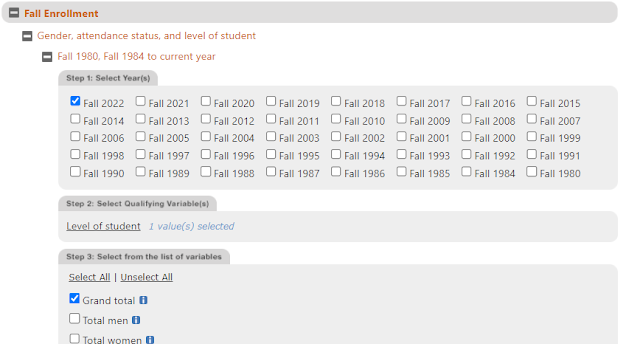
    In this case, you might want to look at total fall 2022 enrollment of undergraduates, in which case you’d select like this:

    Keep clicking “Continue” until you get here, and specify the statistics you want.

    And you’ll get something like this.

    Data Feedback Report is mostly helpful for college and university staff looking at their own numbers in comparison to self-identified competitor or aspiration institutions. CHE did a story on this, and you can read a few articles a month there if you give them your email name (however, if you work in higher ed, you really should subscribe anyway.) 

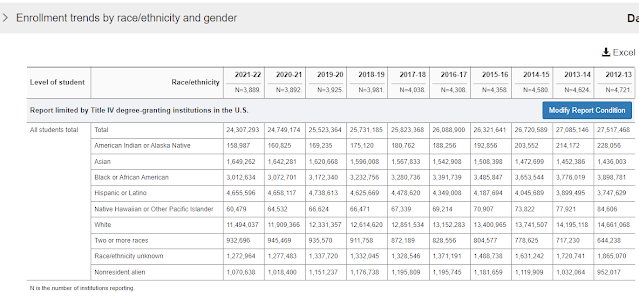
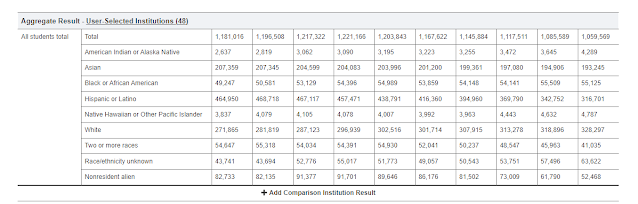
    Summary Tables are very helpful for the casual user.  Specify the variable you want to look at (in this case it’s enrollment by race and gender) and you’ll get a nice summary table over time.

    However, you can also get a summary of the institutions you selected (if they’re still in memory) like this:

    OR (this is the cool part) you can show individual data for a pre-selected set, or one you specify. 

    Go ahead and practice getting information out of IPEDS like this.  You cannot break anything.  There is a Start Over button in case you get stuck. 

    Good luck and check back soon to get the guide about the more powerful ways to extract information, coming soon.

    Source link