Tag: Online Learning

  • Tutoring provides a much-needed on-ramp into the teaching profession. School districts should pay attention.

    Tutoring provides a much-needed on-ramp into the teaching profession. School districts should pay attention.

    After graduating from Knox College in Illinois with a bachelor’s degree, Stephanie Martinez-Calderon’s plans were upended by the pandemic. She hadn’t planned on becoming a teacher but found an opportunity to tutor remotely for the year after college. 

    Tutoring helped her build confidence and develop instructional skills, and today she’s a middle school teacher in the Washoe County School District in Nevada. 

    Tutoring can be a powerful training ground for future educators, providing hands-on experience, confidence and a bridge into the classroom. And what might begin as a temporary opportunity can become a career path at a time when teachers are needed more than ever: A recent report noted that nearly one in five K-12 teachers plan to leave teaching or are unsure if they’ll stay. 

    Turnover remains a crisis in many districts, one that can be solved by a ready-made pipeline of young future educators with instructional experience and relationship-building skills they’ve gained from tutoring.  

    Related: A lot goes on in classrooms from kindergarten to high school. Keep up with our free weekly newsletter on K-12 education. 

    How school districts think about tutoring should evolve. Rather than seeing it as a short-term response to pandemic-interrupted learning, they should view it as part of the fabric of school design and future educator development. This requires including tutoring in strategic plans, forming community partnerships and creating a structure to sustain programs that cultivate tutors for careers in education. To fund these programs and pay tutors, districts can redirect Title I funds, use federal work-study and create apprenticeship programs.  

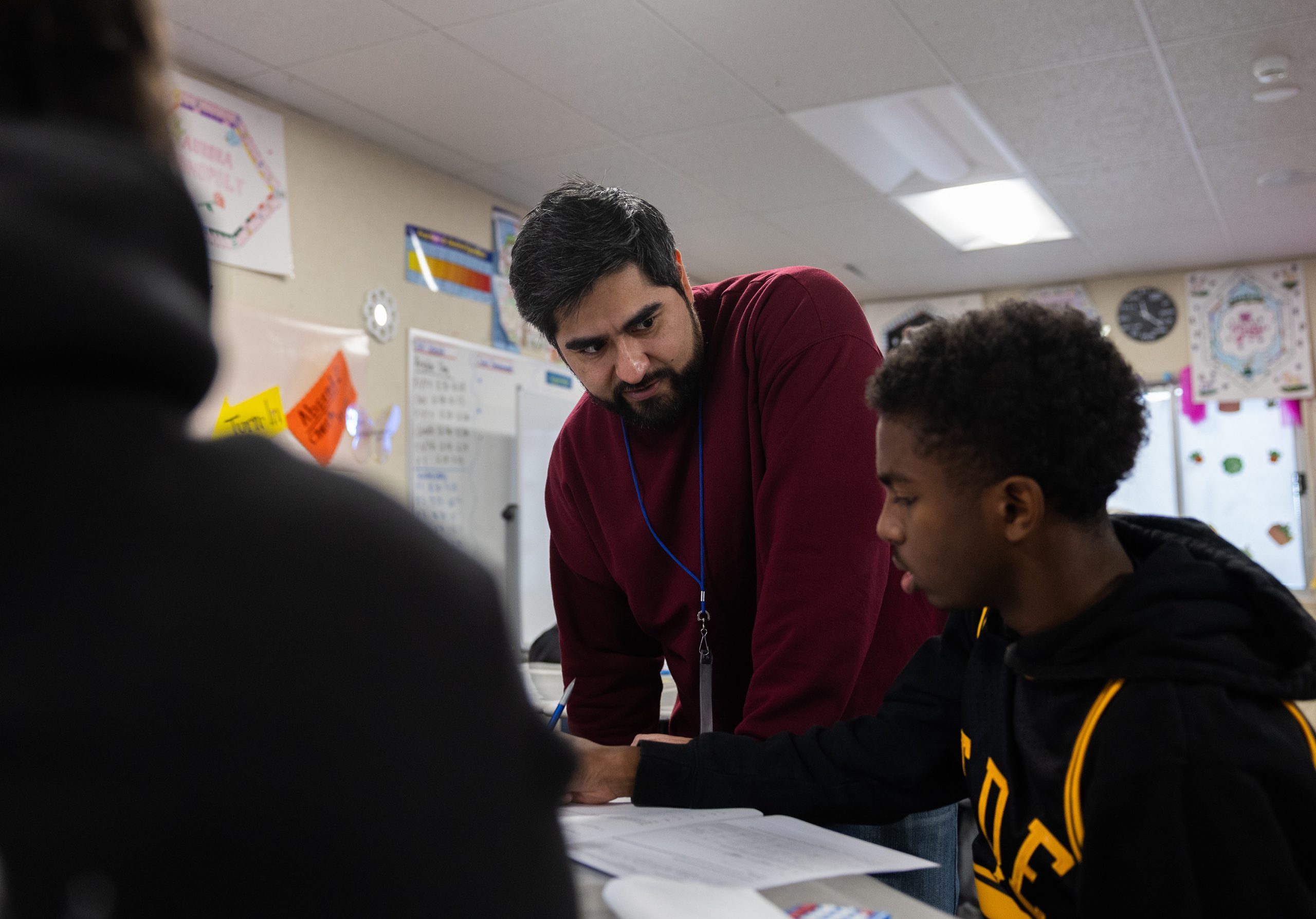
    Starting as a tutor allows aspiring educators to build core teaching skills in a supportive, lower-stakes environment. Tutors learn to navigate student relationships and adapt lessons to individual needs. Without having to manage an entire classroom, they can practice asking questions that get students thinking and selecting problems to help students learn. This early practice eases the transition into teaching. 

    Tutors from Generation Z, born between 1996 and 2012, often bring fresh energy to the profession. As digital natives, they are reimagining how to engage and inspire students, leverage technology and foster creativity and new approaches to learning. 

    They are also the most ethnically and racially diverse generation yet: Many come from backgrounds historically underrepresented in the teaching force; over half of undergraduates identify as first-generation college students. Their engagement broadens the prospects for a more diverse teacher pipeline. 

    Tutor recruiters have noticed that Gen Z workers don’t just want a job — they want roles committed to social impact, professional growth and sustainable work-life balance

    Gen Z’s emphasis on flexibility and remote opportunities is one of the most significant workforce changes since the pandemic. They value mental health, stability and mission-driven work. Part-time, hybrid and wellness benefits help recruit young talent. 

    At our nonprofit, recruiters hear from education candidates that Gen Z appreciates the chance to try out industries, and that tutoring provides them with a window into the world of teaching. 

    Public schools could better meet the evolving needs of young professionals entering education by reimagining tutor roles to include hybrid options, mental health supports and collaborative teaching pathways for professional growth. For instance, a tutor might start off working in a part-time online tutoring role, but after interacting with students virtually and gaining more experience, they may be more excited to take on a full-time teaching role on-site.  

    For school districts, tutoring programs can serve as effective recruitment pipelines. By offering recent graduates a low-barrier entry point into education — one that doesn’t require immediate certification — districts can spark interest in teaching among candidates who may not have previously considered it. 

    Amid ongoing hiring challenges, particularly mid-year vacancies, tutors can offer timely solutions.  

    When tutors step into teaching roles, they bring valuable continuity — familiarity with the students and insight into progress and school culture. This seamless transition supports both student learning and district staffing needs. 

    Related: PROOF POINTS: Taking stock of tutoring 

    The idea that tutoring should be built into future educator pipelines is spreading. For example, since the launch of its Ignite Fellowship in 2020, Teach for America says that 550 of its former tutors have become full-time teachers. The program has proven to be especially effective at drawing in nontraditional candidates — those who may not have initially envisioned themselves in the classroom. In Washington, D.C., the school district launched a tutor-to-teacher apprenticeship program after success with high-impact tutoring. In Texas, teacher residents are required to work as tutors and in other support roles while co-teaching with a mentor. 

    By offering flexible, purpose-driven opportunities, districts can attract Gen Z professionals and give them a meaningful entry point into teaching. And tutoring programs can become more than academic support — they can serve as strategic talent pipelines that strengthen the future of the teaching workforce. 

    Alan Safran is co-founder, CEO and chair of the board of Saga Education; Halley Bowman is senior director of academics. 

    Contact the opinion editor at [email protected]. 

    This story about tutoring was produced by The Hechinger Report, a nonprofit, independent news organization focused on inequality and innovation in education. Sign up for Hechinger’s weekly newsletter.  

    The Hechinger Report provides in-depth, fact-based, unbiased reporting on education that is free to all readers. But that doesn’t mean it’s free to produce. Our work keeps educators and the public informed about pressing issues at schools and on campuses throughout the country. We tell the whole story, even when the details are inconvenient. Help us keep doing that.

    Join us today.

    Source link

  • How Gimkit engages my students

    How Gimkit engages my students

    Key points:

    During the height of the COVID-19 outbreak, teachers needed to become resourceful in how they delivered content to students. During this time, students experienced significant change and evolved into a more technologically-dependent group.

    This sparked a period when online learning and digital resources gained substantial popularity, and one tool that helps students learn–while also feeling like a game instead of a lesson–is Gimkit.

    I am an 8th-grade science teacher in a fairly large district, and I recognize the importance of these engaging and interactive resources to help students build knowledge and continue learning.

    What is Gimkit?

    To begin with, what is Gimkit? According to a tutorial, “Gimkit is an excellent game-based learning platform that combines fun and education, making it a highly engaging tool for both teachers and students. It works like a mashup of Kahoot and flash card platforms, but with several unique features that set it apart.

    “Unlike other platforms, Gimkit allows students to earn virtual currency for every correct answer, which they can use to purchase power-ups, adding a competitive edge that keeps students motivated.”

    Gimkit offers so much more than just a game-based learning experience for students–it can be used as an introduction to a lesson, as assigned homework, or as a tool for reviewing.

    Building a Gimkit

    From the teacher’s side of Gimkit, the platform makes it extremely easy to build lessons for the students to use. When you go to create a lesson, you are given many different options to help with the construction.

    Jamie Keet explains: “After establishing your basic Kit information, you will then move onto the fun part–adding your questions! You will be given the option of adding a question, creating your Kit with Flashcards, continuing with KitCollab, adding from Gimkit’s Question Bank, or importing from Spreadsheet.”

    Adding your questions is a great way to make sure your students are getting the exact information they have been provided in class, but some of the other options can help with a teacher’s time, which always seems to be scarce.

    The option to add questions from the question bank allows teachers to view other created kits similar to their topic. With a few simple clicks, a teacher can add questions that meet the needs of their lesson.

    Gimkit as data collection

    Gimkit isn’t just a tool for students to gain knowledge and play games; it is also an excellent way for teachers to collect data on their students. As Amelia Bree observes:

    “Gimkit reports explained show you both big pictures and small details. The look might change sometimes. But you will usually see:

    • Overall Class Performance: This shows the average right answers. It tells you the total questions answered. It also shows how long the game took. It’s a good first look at how everyone understood.
    • Individual Student Results: Click on each student’s name here. You see their personal game path. Their accuracy. Which questions did they get right or wrong? Sometimes, even how fast they answered.
    • Question Breakdown: This part is very powerful. It shows how everyone did on each question you asked. You see how many got it right. How many missed it? Sometimes, it shows common wrong answers for multiple-choice questions.”

    Being able to see this data can help ensure that your students are not just completing the required steps to finish the task, but are also working towards mastering the materials within your class.

    When examining the data, if you identify trends related to specific questions or concepts that students are struggling with, you have the opportunity to revisit and reteach these areas.

    Conclusion

    As you can see, Gimkit isn’t just a tool for students to play games and have fun in class; it is also an opportunity for students to gain knowledge in your lessons while potentially having some fun in the process. Teachers can make creating content for their classes much easier by utilizing some of the built-in features Gimkit provides.

    They can collect the meaningful data needed to ensure students are making progress in the areas where they want them to.

    Works Cited

    Breisacher, J. (2024, October 7). How Teachers Can Use Gimkit in the Classroom (a tutorial). Student-Centered World. https://www.studentcenteredworld.com/gimkit/

    Keet, J. (2021, July 9). How to Use Gimkit- Step By Step Guide. Teachers.Tech.
    https://teachers.tech/how-to-use-gimkit/

    Bree, E. (2025, June 6). Unlock Data-Driven Teaching: Using Gimkit for Meaningful
    Assessment Insights. GIMKIT JOIN.
    https://gimkitjoin.net/gimkit-for-meaningful-assessment-insights/

    Latest posts by eSchool Media Contributors (see all)

    Source link

  • Transforming Higher Ed With Virtual-Hybrid Learning

    Transforming Higher Ed With Virtual-Hybrid Learning

    Reading Time: 3 minutes

    Higher education is evolving and, as someone deeply involved in curriculum development, I have witnessed firsthand how virtual-hybrid delivery models can transform learning experiences. When the COVID-19 pandemic necessitated a sudden shift in instructional methods, I had to reconsider how to deliver my senior-level undergraduate Entrepreneurial Thinking and Innovation course, which was traditionally taught face-to-face (F2F). What started as a necessary adaptation quickly became an opportunity to enhance student engagement, flexibility, and real-world preparedness. I now recognize that virtual-hybrid delivery is not merely a temporary fix, but a sustainable and highly effective model for the future of education across disciplines.

    From face-to-face to virtual-hybrid learning

    My Entrepreneurial Thinking and Innovation course was originally designed around a hands-on, project-based learning (PBL) approach. At the course’s core was a semester-long, stage-gated Business Case, or BizCase Project. Student teams tackled real-world business challenges by developing comprehensive business cases for community organizations. Traditionally, this involved in-person collaboration, real-time feedback, and instructor-led sessions.

    When we shifted to online learning, my primary challenge was to preserve the course’s interactive and applied nature, while using digital tools to maintain engagement. Rather than attempting to replicate the in-person experience, I completely reimagined the learning process.

    The revamped course focused on three key elements:

    1. Synchronous Milestone Meetings: Structured biweekly sessions replaced traditional lectures, enabling real-time, small-group discussions that fostered deeper engagement and tailored feedback.
    2. High-Quality Asynchronous Instructional Videos: Professionally produced and concise video lessons allowed students to learn independently, enhancing accessibility and comprehension.
    3. Customized Screencast Feedback: Instead of written comments, students received comprehensive, personalized video feedback, enhancing the evaluation process to be more interactive and engaging.

    Why virtual-hybrid learning works

    The impact of this redesign was immediate and profound. Not only did students stay engaged, but their learning outcomes improved significantly. The average final grades on the BizCase Project increased by 8-10% compared to previous face-to-face cohorts. Here’s why this delivery model is so effective:

    1. Enhanced Student Engagement

    One of the most significant advantages of virtual-hybrid learning is the combination of structured flexibility and active engagement. Traditional lecture formats often lead to passive learning. The virtual-hybrid approach inspires students to take charge of their educational journey, thereby enhancing learner agency.

    Synchronous milestone meetings ensured students remained accountable and on track, while asynchronous videos allowed them to review content at their own pace. Many students observed that revisiting instructional videos before project discussions greatly boosted their comprehension and confidence.

    1. Real-World Preparation

    Virtual-hybrid delivery reflects the realities of modern workplaces, where professionals are increasingly engaged in hybrid and remote work environments. By embracing this model, students acquire academic knowledge while developing essential skills in virtual collaboration, digital communication, and self-directed learning.

    The course redesign was based on industry research regarding optimal meeting structures, which indicates that smaller, focused discussions promote greater engagement and enhance problem-solving. I implemented smaller team-based milestone meetings instead of large, passive online lectures, ensuring each student actively participated. This change aligns with corporate best practices. It equips students with skills that are directly transferable to contemporary work environments.

    1. More Effective Feedback

    One of the most significant innovations in this course redesign was using screencast technology for project feedback. Rather than traditional written comments, students received comprehensive, video feedback. I guided them through their submissions, emphasizing strengths and areas for improvement. Students overwhelmingly preferred this method, with 90% indicating that video feedback was clearer and more personal than written comments. The combination of seeing and hearing the feedback, along with visual annotations, created a more interactive and engaging learning experience, making it easier for students to refine their work.

    Challenges and opportunities

    While virtual-hybrid learning offers significant benefits, it also presents challenges. Although students appreciated the flexibility of self-paced videos, some struggled with motivation and time management in effectively navigating the course requirements.

    Another challenge is ensuring equitable access to technology. Not all students have access to high-quality devices or reliable internet connections. This can affect their ability to engage fully in virtual-hybrid courses. Institutions must invest in digital infrastructure and support systems to ensure all students can participate effectively.

    Applying virtual-hybrid models across disciplines

    Although this article focuses on an entrepreneurship and innovation course, the principles of virtual-hybrid learning can be applied to various disciplines. This model can benefit any course, including experiential learning, teamwork, and applied projects.

    • Engineering courses can incorporate virtual design labs, simulation software, and milestone meetings for project-based assessments.
    • Medical and healthcare programs can integrate asynchronous case studies with live virtual discussions on clinical applications.
    • Humanities and social sciences can include digital storytelling, virtual peer feedback collaboration, and instructor-led discussions.

    A new era of learning

    The success of the virtual-hybrid delivery model in Entrepreneurial Thinking and Innovation underscores its remarkable potential. The one-size-fits-all, lecture-heavy educational approach is becoming obsolete. Today’s students thrive in dynamic, technology-enhanced environments that prepare them for hybrid workplaces and the future of work.

    As educators, we have both an opportunity and a responsibility to rethink traditional teaching methods. Virtual-hybrid delivery presents a path forward for a more adaptable and impactful education. Having experienced the transformative effects of this approach firsthand, I can confidently assert that virtual-hybrid delivery can be a game changer for the future of higher education.

    Learn more about how hybrid-virtual learning fosters engagement and critical thinking by watching Professor MacKenzie’s webinar, part of our 2025 Empowered Educator Virtual Conference.

    Source link

  • Taking Intermittent Quizzes Reduces Achievement Gaps & Enhances Online Learning – The 74

    Taking Intermittent Quizzes Reduces Achievement Gaps & Enhances Online Learning – The 74

    Inserting brief quiz questions into an online lecture can boost learning and may reduce racial achievement gaps, even when students are tuning in remotely in a distracting environment.

    That’s a main finding of our recent research published in Communications Psychology. With co-authors Dahwi Ahn, Hymnjyot Gill and Karl Szpunar, we present evidence that adding mini-quizzes into an online lecture in science, technology, engineering or mathematics – collectively known as STEM – can boost learning, especially for Black students.

    In our study, we included over 700 students from two large public universities and five two-year community colleges across the U.S. and Canada. All the students watched a 20-minute video lecture on a STEM topic. Each lecture was divided into four 5-minute segments, and following each segment, the students either answered four brief quiz questions or viewed four slides reviewing the content they’d just seen.

    This procedure was designed to mimic two kinds of instructions: those in which students must answer in-lecture questions and those in which the instructor regularly goes over recently covered content in class.

    All students were tested on the lecture content both at the end of the lecture and a day later.

    When Black students in our study watched a lecture without intermittent quizzes, they underperformed Asian, white and Latino students by about 17%. This achievement gap was reduced to a statistically nonsignificant 3% when students answered intermittent quiz questions. We believe this is because the intermittent quizzes help students stay engaged with the lecture.

    To simulate the real-world environments that students face during online classes, we manipulated distractions by having some participants watch just the lecture; the rest watched the lecture with either distracting memes on the side or with TikTok videos playing next to it.

    Surprisingly, the TikTok videos enhanced learning for students who received review slides. They performed about 8% better on the end-of-day tests than those who were not shown any memes or videos, and similar to the students who answered intermittent quiz questions. Our data further showed that this unexpected finding occurred because the TikTok videos encouraged participants to keep watching the lecture.

    For educators interested in using these tactics, it is important to know that the intermittent quizzing intervention only works if students must answer the questions. This is different from asking questions in a class and waiting for a volunteer to answer. As many teachers know, most students never answer questions in class. If students’ minds are wandering, the requirement of answering questions at regular intervals brings students’ attention back to the lecture.

    This intervention is also different from just giving students breaks during which they engage in other activities, such as doodling, answering brain teaser questions or playing a video game.

    Why it matters

    Online education has grown dramatically since the pandemic. Between 2004 and 2016, the percentage of college students enrolling in fully online degrees rose from 5% to 10%. But by 2022, that number nearly tripled to 27%.

    Relative to in-person classes, online classes are often associated with lower student engagement and higher failure and withdrawal rates.

    Research also finds that the racial achievement gaps documented in regular classroom learning are magnified in remote settings, likely due to unequal access to technology.

    Our study therefore offers a scalable, cost-effective way for schools to increase the effectiveness of online education for all students.

    What’s next?

    We are now exploring how to further refine this intervention through experimental work among both university and community college students.

    As opposed to observational studies, in which researchers track student behaviors and are subject to confounding and extraneous influences, our randomized-controlled study allows us to ascertain the effectiveness of the in-class intervention.

    Our ongoing research examines the optimal timing and frequency of in-lecture quizzes. We want to ensure that very frequent quizzes will not hinder student engagement or learning.

    The results of this study may help provide guidance to educators for optimal implementation of in-lecture quizzes.

    The Research Brief is a short take on interesting academic work.

    This article is republished from The Conversation under a Creative Commons license. Read the original article.

    Source link

  • videos-in-mindtap-for-education – The Cengage Blog

    videos-in-mindtap-for-education – The Cengage Blog

    Reading Time: 3 minutes

    As a professor, I specifically use education TeachSource videos located in the MindTap Learning Path to enhance online lectures and provide students with a “hands-on learning” component.

    However, my students were neither engaging in assignment completion nor providing full answers. Then, I had an “aha” moment, highlighting a common challenge in online education: students need to move beyond surface-level responses towards deeper analytical engagement. My mindset changed from teaching to mentorship.

    To foster genuine analytical thinking in application assignments — especially relating to real-life experiences — I’d consider the following approaches in combination with the use of TeachSource videos:

    Design open-ended, contextualized prompts

    Instead of questions that can be answered with one or two sentences, or mere definitions, frame prompts around real-world scenarios that require students to analyze, evaluate, and apply concepts. For example, in my early childhood education courses using MindTap, I ask students to: “Describe a situation in your classroom or community where you encountered a child throwing a tantrum over something they wanted which was not in their best interest —  aka: noting a specific concept which is applicable. How would you address the challenges in this video situation using what you have learned in this chapter?”

    Encourage reflection and connection

    As the previous example states, ask students to connect theory with personal experiences or current events. This invites them to reflect critically and relate abstract ideas to concrete situations, deepening understanding. In teaching and learning, we call this reflective thinking. This involves critically analyzing one’s own thought processes and experiences to deepen understanding. In the end, educational psychology tells us that the transfer of learning applies abstract ideas or principles to concrete, real-world situations. This enables learners to generalize knowledge beyond the original context. Together, these processes help learners deepen their understanding by connecting theory with practice through critical reflection.

    Use scaffolded questions

    We understand that our students might be at different levels when it comes to understanding a theory or concept. So, how do we use TeachSource videos to share teaching concepts?

    Start with pre-assessment questions of basic application. In basic application, you identify what the learner’s knowledge of the concept in the video is.

    Then, progress towards deeper analysis. For example:

    • Step One: Identify the concept in a scenario (basic application).
    • Step Two: Explain why it is relevant (interpretation).
    • Step Three: Propose alternative solutions or outcomes (evaluation and synthesis).
    • Step Four: Post assessment of learning outcomes.

    Role playing in class or online

    Role playing is a concept that’s important to scaffolding the “transfer of learning.” For example, a future education student is wired with curiosity to imagine what their classroom will look like and how they will interact with future students. Instructors can create this experience for them in a variety of ways. Linking our teaching of real-life experiences to standards of learning provides the opportunity for instructors to role play. It provides the opportunity to fail and learn from real world mistakes. Therefore, students can develop more marketable skill sets.

    Linking workforce standards to teaching and learning

    We discussed role playing, but how do we link real life to workforce standards using TeachSource MindTap videos? In my early childhood course, I link all course concepts to the National Association for the Education of the Young Child (NAEYC) Professional Standards. This process begins in the syllabus but also in the course shell modules built around MindTap. By doing so, students can see themselves as future employees.

    In conclusion, closing the learning process gap means we teach with purpose and in a systematic cycle. Therefore, my teaching has become a cycle of learning, rather than just a video assignment linked to chapter information. MindTap TeachSource videos happen to be my vehicle for the transfer of learning.

    Dr. Maria C. Rutherford is a Full Professor at Bluegrass Community and Technical College and Cengage Faculty Partner.

    Explore our full education course offerings by downloading the course guide.

    Source link

  • supporting-your-students-just-got-easier – The Cengage Blog

    supporting-your-students-just-got-easier – The Cengage Blog

    Reading Time: 2 minutes

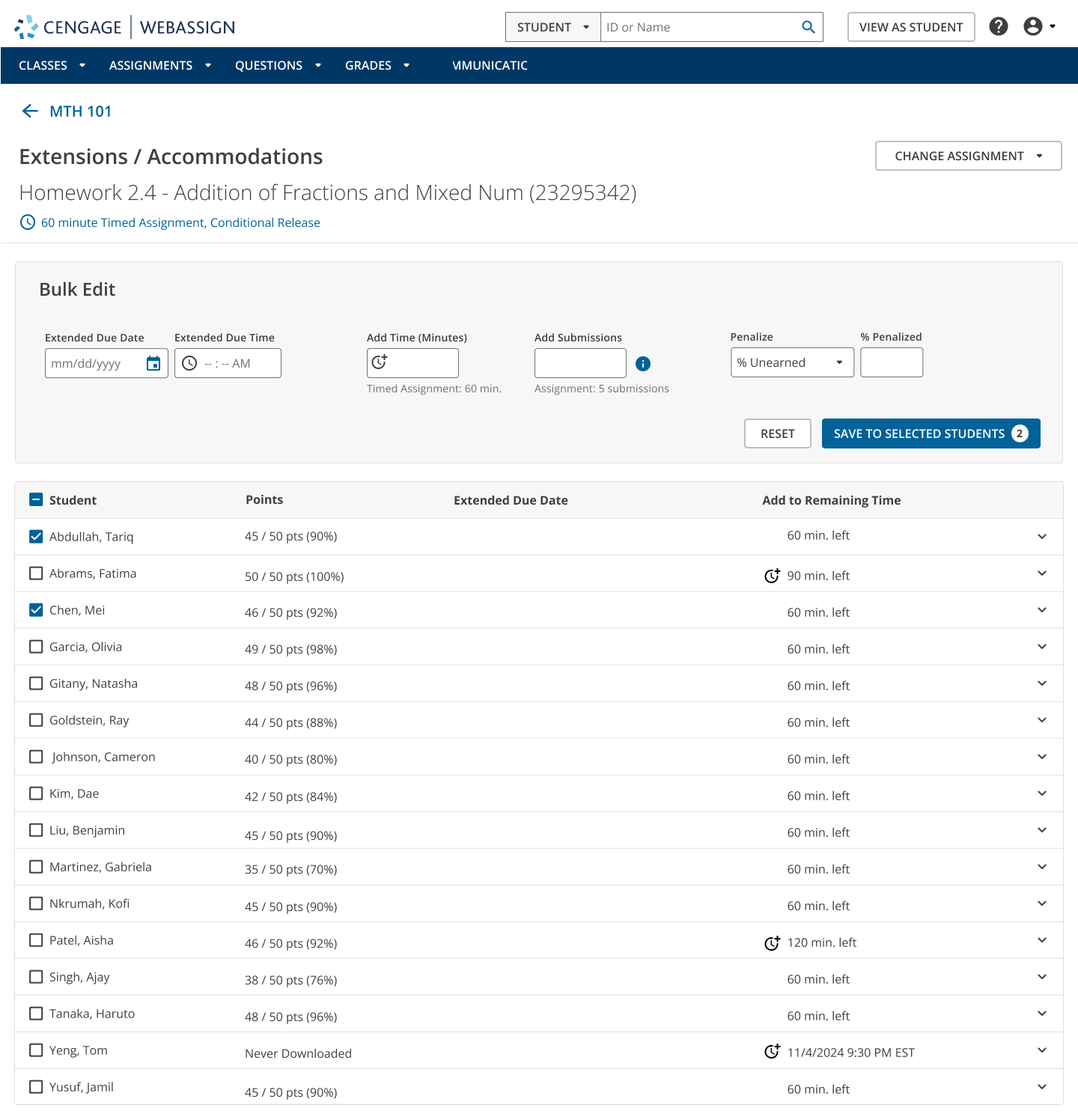
    We know how much you do to support your students, and we want to make it easier for you to give them the help they need, when they need it. That’s why we’re releasing improvements to accommodations and extensions in WebAssign — so you can manage student requests efficiently and save time throughout your course.

    Let’s dive into what’s coming.

    Easily accommodate students who need extended time

     It can be challenging to manage accommodation requests for extended time at the start of classes. We’re introducing a new feature that makes this process so much easier, allowing you to grant extra time to one or more students directly from your course roster.

    Once applied, this setting will ensure that students who need additional time automatically receive it on all timed assignments. There’s no need for repeated manual adjustments to individual assignments. This change makes it easier to support your students, while saving you time.

    Updates to WebAssign accommodations

    “These [upgrades] will improve the amount of time I currently spend managing WebAssign each term for hundreds of students. Reducing the number of clicks and tabs I need to open is a huge change. Bulk extensions are a significant advancement in my mind.” – Kathleen Koenig, University of Cincinnati

    Manage student requests with extension improvements

    But what if your students don’t have an accommodation, but need an extra 10 minutes or an extra day to work on their assignment?

    Students often request extensions, extra time, additional submissions or even early access to assignments. To help you manage these requests more efficiently, we’re redesigning the manual extensions process with a more user-friendly interface and added flexibility.

    With the new extension improvements, you’ll be able to:

    • Add extra time to timed assignments (for example: 10 more minutes).
    • Allow additional attempts on assignments.
    • Provide bulk extensions for multiple students or assignments.
    • Issue a penalty to students for any accommodation you made above.

    And later, you’ll be able to grant early access to assignments for specific students.


    Extensions and Accommodation in WebAssign.
    Updates to WebAssign accommodations and extensions

    More updates are on the way

    These updates to WebAssign accommodations and extensions are just the beginning. We’re committed to continuously improving your experience and will have even more enhancements coming in the next phase of extension updates. We encourage you to stay tuned for what’s to come.

    Ready to learn more about what else is new in WebAssign? Check out the latest upgrades in this video.

    Source link

  • ai-transforming-student-engagement-in-the-online-classroom- The Cengage Blog

    ai-transforming-student-engagement-in-the-online-classroom- The Cengage Blog

    Reading Time: 3 minutes

    Let’s be real — online teaching isn’t about dumping lecture notes into a learning system and calling it a day. If we want students to actually engage, grow and retain what we teach, we’ve got to meet them where they are with tools and strategies that turn passive screens into powerful learning spaces.

    This is at the heart of our Spring 2025 Empowered Educator recorded webinar session, “Interactive Learning Redefined With A.I.”

    During our session, we explored tools and mindsets that make all the difference, whether you’re just starting as an educator or looking to breathe new life into your virtual classroom.

    Let’s talk about the “why”

    We’re teaching in an era where attention spans are short, expectations are high and personalization is the norm. Students don’t just want to listen. They want to participate, problem-solve and feel seen. The combination of interactive learning and Generative AI (GenAI) makes this not only possible, but sustainable.

    Interactive learning: Real-time tools that work

    Forget static slides. The key is giving students something to do, not just something to watch. Some of the most effective, real-time strategies listed in the CID Quick Tip Guide were explored during our session:

    Synchronous engagement ideas:

    • Live polls and Q&A: Check comprehension on the fly.
    • Gamified quizzes (Kahoot, Mentimeter): Turn reviews into fast-paced competitions that stick.
    • Virtual whiteboards (like Miro or Padlet): Co-create visuals in real time.

    Asynchronous options that still feel real:

    • Scenario-based videos and interactive PDFs help students explore at their own pace.
    • Reflective prompts build deeper understanding.
    • Gamified modules with badges or levels give students a sense of progress and motivation.

    This kind of learning keeps things dynamic, allows for quick feedback and, best of all, shows students you’re in it with them.

    How GenAI changes the game for personalization

    Now, here’s where we level up. AI isn’t just about automation — it’s about tailoring the learning journey to meet each student where they are. In our session, we explored ways to:

    • Use GenAI to generate custom study guides or quizzes based on student progress, ensuring that the use of copyrighted material falls within your license or other legal parameters.

    It’s like having a digital co-teacher who’s always ready to personalize.

    The evidence is in

    We also dove into case studies and data from real classrooms where these approaches led to:

    • Higher engagement and retention
    • More frequent participation
    • Better overall comprehension
    • Improved digital and collaborative skills

    When students feel included and in control of their learning, outcomes naturally improve.

    Final thoughts: Teaching that connects

    In the end, this isn’t just about tools or tech. It’s about creating experiences where students feel challenged, supported and seen.

    Watching this session on transforming student engagement in the online classroom will more than inspire you. You’ll learn how to:

    • Integrate interactive strategies with your LMS.
    • Engage with gamified quizzes, reflective prompts and real-time activities.
    • Evaluate your current engagement strategies and plan next steps.

    Let’s create classrooms that aren’t just digital — but dynamic.


    Written by Dr. Clevester Moten, Business Instructor at Jackson College and James Bender, Adjunct Instructor at Jackson College. 


    Dr. Clevester Moten is a transformative educator, scholar and thought leader whose research and work focus on equity, leadership and systemic reform. With more than 20 years of leadership spanning public, private and nonprofit sectors, he specializes in fostering collaboration and addressing societal challenges. Dr. Moten holds advanced degrees in public policy and business administration.


    Watch Dr. Clevester Moten and James Bender’s recorded webinar session, “Interactive Learning Redefined with AI,” part of our Spring 2025 Empowered Educator series, to learn more about transforming student engagement in the online classroom. 

    Source link

  • The Power of SAM Paths

    The Power of SAM Paths

    Reading Time: 3 minutes

    As a computing professor with over 20 years of experience, I’m always searching for ways to continuously engage and motivate my students in the ever-changing educational landscape. In recent years, I’ve found that my students have a wide range of computer skill levels. I am continuously striving to ensure everyone has a positive experience. Incorporating SAM Paths in my courses has allowed me to provide both a positive and personalized learning experience for each of my students.

    What is a SAM Path?

    SAM Path is an adaptive learning assignment that consists of sequential combinations of exams and trainings. The three possible combinations are as follows:

    • Pre-Exam > Training > Post-Exam
    • Training > Exam
    • Exam > Training

    Each SAM Path is customizable. An instructor can select which tasks they would like to include. There are a variety of scheduling options that allow them to tailor the SAM Path to their specific needs. These include setting time limits, randomizing questions, modifying exam scenarios and allowing multiple attempts of an exam.

    How to Use SAM Path

    There is no right or wrong way to use a SAM Path. You can add SAM Paths to a traditional computing course at an interval that is appropriate for your course (weekly, by unit or by module). In a non-computing course, such as data analytics, you can implement SAM Paths that meet your needs. For example, create a SAM Path with Excel tasks that students will be required to use for a data analytics exercise.

    I will take this time to share how I’ve been using SAM Path. The sequential combination I prefer is Pre-Exam > Training > Post-Exam. The scheduling options I use are as follows:

    • A student can make one attempt on the Pre-Exam, which consists of 25 tasks.
    • A training is then automatically populated. This contains tasks the student answered incorrectly in the Pre-Exam. This way, they only focus on learning those specific tasks.
    • A Post-Exam is then automatically populated, which contains tasks the student learned how to properly complete in the training. Multiple attempts of the Post-Exam are permitted.
    • A student’s grade for the SAM Path is a combination of their Pre-Exam score and Post-Exam score.

    SAM Path benefits for students

    Students in my courses appreciate the personalized nature of SAM Paths. It allows them to work through each SAM Path at their own pace and current computer application skill-level. If a student is well-versed in a particular Office application, it allows them to complete the SAM Path quicker. It only requires them to complete training on tasks that they didn’t know how to properly complete, since they already demonstrated their knowledge in the Pre-Exam.

    The Pre-Exam also provides students with a benchmark to understand what their current skill-level is with a specific Office application. Many are surprised and humbled that they’re not as well-versed in an application that they originally thought they were. This results in students becoming more engaged with the material.

    Students also appreciate that they’re provided with an opportunity to learn how to complete incorrect tasks without penalty. They’re given a chance to demonstrate that they’ve achieved that skill. From an instructor perspective, I can also run a report on the Pre-Exam scores to gauge what the current skill-level of my class is, so that I can make appropriate adjustments to my lesson plan. If there was a certain task that students struggled with, I can ensure I reinforce that learning in my lesson.

    SAM Path best practices

    I have used SAM Paths in my courses for several years. It’s important to ensure students understand each component of the SAM path and the scheduling options that you’ve selected. An effective way that I have done this is by adding the following components to my course:

    • A video showing students how to access and complete each component of the SAM Path.
    • A SAM Path that does not count towards the students’ grade, so they can practice working through each component without penalty.
    • Instructions in the scheduling options window that reminds students of the number of attempts that I’ve selected for that component of the SAM Path. These instructions pop up on the screen as a friendly reminder for students.

    SAM Paths have been a welcome assignment type in my educational toolkit which has resulted in motivating and engaging my students. If you are a new or experienced SAM user, I would encourage you to consider adding SAM Paths to your courses. You won’t be disappointed!

    Written by Eva Turczyniak, Professor, Pilon School of Business at Sheridan College

    Explore more SAM content for your computing course and check out our SAM Paths flyer for additional information on this feature.

    Source link

  • earth-day-2025-virtual-field-trips-feature-earth-sciences-courses- The Cengage Blog

    earth-day-2025-virtual-field-trips-feature-earth-sciences-courses- The Cengage Blog

    Reading Time: 2 minutes

    Each year on April 22, Earth Day invites us to reflect on the beauty, complexity and fragility of our planet. It’s a time to appreciate the natural world, recognize the contributions of the environmental movement and think deeply about how we care for the planet, not just for today but for future generations.

    One of the most meaningful ways we can honor that mission?  Help students see and appreciate the Earth — including its landscapes, features, wonders and history — in new ways.

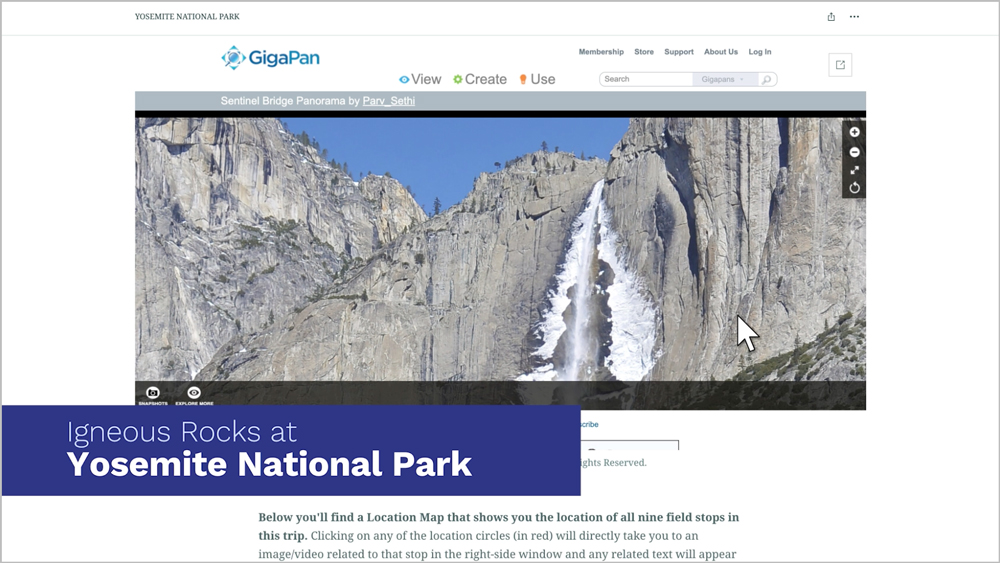
    Virtual Field Trips in MindTap, an immersive feature for earth sciences courses, provide a unique opportunity for students to do just that.

    Inspiring a deeper connection to our planet

    Virtual Field Trips takes students on an unforgettable journey to some of the most iconic and geologically significant places across the United States. No travel required!

    Through vivid imagery and animation, expert commentary and interactive moments of discovery, students can zoom in on rock formations in striking detail and study patterns shaped over millions of years, as if they were there in-person. Along the way, they can deepen their understanding of key earth science concepts.

    Oh, the places they’ll go

    From towering cliffs to ancient coral reefs, students visit awe-inspiring locations that highlight the planet’s beauty and study critical earth science topics. Field trips include:

    • Igneous Rocks at Yosemite National Park
    • Volcanoes at Hawaii Volcanoes National Park
    • Weathering and Erosion at Arches National Park
    • Sedimentary Rocks at Capitol Reef National Park
    • Fossilization at Petrified Forest National Park
    • Copper Mining at Bingham Canyon
    • Hydrothermal Activity at Yellowstone National Park
    • Deserts at Death Valley National Park
    • Geological Time at the Grand Canyon
    • Depositional Coasts on the US. East Coast
    • Erosional Coasts on the U.S West Coast
    • The Hazards of Living along an Erosional Coast
    • Coral Reef Communities

    These locations are only the beginning, with more soon to come. And they aren’t just destinations, they’re reminders of the Earth’s complexity.


    Watch this video to explore this feature for earth sciences courses:


    Happy Earth Day

    What started as a movement to raise awareness about environmental issues has grown into a global day of action. It’s a reminder that we’re all connected, and that taking care of our planet is something we can all do — together.

    This Earth Day, let’s inspire students to explore the planet in ways that deepen their understanding and spark that sense of wonder. Thank you for teaching the next generation of explorers, scientists and stewards.

    Discover how you can bring the Earth into your classroom.

    Source link

  • The power of online courses in our school

    The power of online courses in our school

    Key points:

    • Online courses in schools are especially effective when they have dedicated time and space for online learning
    • Online learning programs increase student access, engagement
    • Online learning in high school helps students explore career pathways
    • For more news on online learning, visit eSN’s Digital Learning hub

    We started working with an online education high school program about 10 years ago and have been expanding our use of online courses ever since. Serving about 1,100 students in grades 6-12, our school has built up its course offerings without having to add headcount. Along the way, we’ve also gained a reputation for having a wide selection of general and advanced courses for our growing student body.

    More News from eSchool News

    HVAC projects to improve indoor air quality. Tutoring programs for struggling students. Tuition support for young people who want to become teachers in their home communities.

    Almost 3 in 5 K-12 educators (55 percent) have positive perceptions about GenAI, despite concerns and perceived risks in its adoption, according to updated data from Cengage Group’s “AI in Education” research series.

    When it comes to visual creativity, AI tools let students design posters, presentations, and digital artwork effortlessly. Students can turn their ideas into professional-quality visuals, sparking creativity and innovation.

    Ensuring that girls feel supported and empowered in STEM from an early age can lead to more balanced workplaces, economic growth, and groundbreaking discoveries.

    In my work with middle school students, I’ve seen how critical that period of development is to students’ future success. One area of focus in a middle schooler’s development is vocabulary acquisition.

    For students, the mid-year stretch is a chance to assess their learning, refine their decision-making skills, and build momentum for the opportunities ahead.

    Middle school marks the transition from late childhood to early adolescence. Developmental psychologist Erik Erikson describes the transition as a shift from the Industry vs. Inferiority stage into the Identity vs. Role Confusion stage.

    Art has a unique power in the ESL classroom–a magic that bridges cultures, ignites imagination, and breathes life into language. For English Language Learners (ELLs), it’s more than an expressive outlet.

    In the year 2025, no one should have to be convinced that protecting data privacy matters. For education institutions, it’s really that simple of a priority–and that complicated.

    Teachers are superheroes. Every day, they rise to the challenge, pouring their hearts into shaping the future. They stay late to grade papers and show up early to tutor struggling students.

    Want to share a great resource? Let us know at [email protected].

    Source link