Your website is no longer just a digital brochure. It’s the heart of your institution’s marketing, recruitment, and student engagement efforts. For most prospective students, it’s the very first touchpoint, and their decision to inquire, apply, or move on often hinges on what they find there.
More than 90% of students visit a college or university website during their school search. That means your site must not only attract attention but deliver a seamless experience that inspires trust and action.
What does that look like? It’s a blend of smart navigation, compelling visuals, personalized content, and performance that works flawlessly across all devices. It’s also about serving many different audiences, students, parents, alumni, and staff, without sacrificing clarity or focus.
In this article, we break down the 7 best practices for higher education websites, with examples from institutions putting them into action. These proven strategies will help your school build a web presence that engages users and drives real results, from exploration to enrollment.
Struggling with enrollment?
Our expert digital marketing services can help you attract and enroll more students!

1. Ensure a Mobile-Responsive, Mobile-First Design
Smartphones are the default browsing tool for most prospective students and their parents. If your institution’s website doesn’t offer a seamless mobile experience, you’re not just frustrating users; you’re losing them.
Why is mobile responsiveness crucial for higher education websites? Most students browse on mobile devices. A mobile-responsive site ensures readability, easy navigation, and fast loading, key for user experience and search rankings. Without it, your site could rank lower on Google and lose over half of the visitors who abandon slow or poorly displayed pages.
Mobile responsiveness means your content adjusts fluidly to any screen size, from smartphones to tablets. This isn’t a nice-to-have feature; it’s a necessity. Google now uses your site’s mobile version to determine how it ranks in search results (a process known as mobile-first indexing). If your site isn’t optimized for mobile, both your visibility and your credibility take a hit.
But it’s not just about rankings. A mobile-first experience shapes how users perceive your brand. Nearly half of students (49%) say a positive mobile experience improves their view of a college, while a poor one can turn them away entirely.
At a minimum, your site should:
- Use a responsive design that automatically adjusts layouts for smaller screens
- Collapse navigation into a clean, mobile-friendly format
- Display readable text without requiring zoom
- Feature buttons and links that are easy to tap
Example: California Baptist University delivers a standout mobile experience. Its responsive design stacks content cleanly for smaller screens, while large, tappable calls-to-action make it easy for prospective students to explore programs or request information. The site balances function and aesthetics, showing that CBU understands what mobile users need and delivers it.
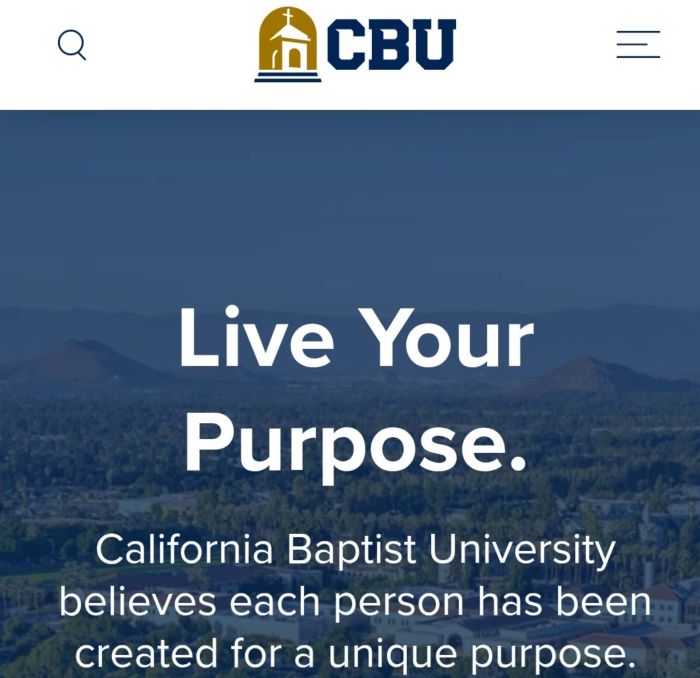
Source: California Baptist University
How can improving website speed benefit my higher education institution? Faster websites reduce bounce rates and keep users engaged longer. Prospects find what they need quickly, improving their impression of your institution. Speed also boosts SEO rankings and increases the chances of conversions like form submissions or brochure downloads.
A smooth mobile journey doesn’t just meet expectations, it sends a clear message: your institution is accessible, student-focused, and ready to meet users where they are.
2. Optimize Your Site’s Speed and Performance
Speed matters. Gen Z users expect instant access, and if your pages lag, they’ll bounce, sometimes before they’ve even seen your programs.
How fast is fast enough? According to Google, 53% of mobile visitors abandon a page if it takes more than 3 seconds to load. On the flip side, mobile sites that load in 5 seconds or less enjoy 70% longer average sessions and 35% lower bounce rates than slower counterparts.
Beyond user frustration, slow sites impact your visibility. Google uses page speed as a ranking factor, so sluggish load times can tank your SEO and conversions.
To keep your site performing at its best, follow these key practices:
- Compress images and media. Use modern formats like WebP and apply compression tools to reduce file sizes without sacrificing quality.
- Minify code and enable caching. Clean up your HTML, CSS, and JavaScript, and use browser caching to speed up page loads for returning visitors.
- Implement a Content Delivery Network (CDN). CDNs serve content from servers closest to the user, minimizing delays caused by physical distance.
- Limit heavy third-party scripts. Only use plugins and scripts that are essential—too many can drag your site’s performance down.
- Test regularly. Tools like Google PageSpeed Insights, GTmetrix, or Lighthouse help you spot bottlenecks like oversized images or slow server response.
Example: University of Arkansas at Little Rock (UA Little Rock): In March 2025, UA Little Rock rolled out a major website overhaul that improved both user experience and performance speed. A key move was transitioning to modern cloud hosting, which “ensures greater reliability, multiple backups, and improved site performance,” especially during peak or emergency periods. The web team also streamlined the site’s content (trimming 8,000+ pages down by 30%) and modernized the codebase, which reduces load times by eliminating bloat.
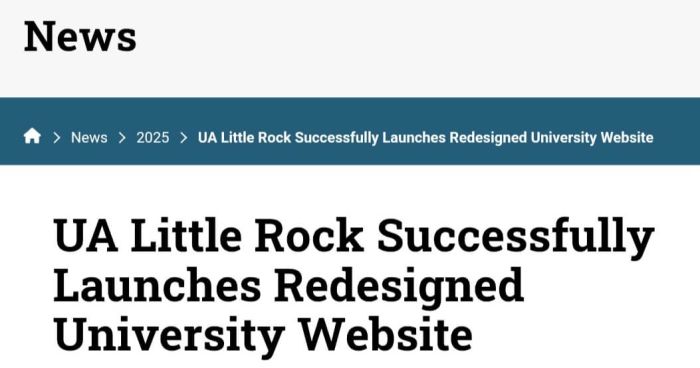
Source: University of Arkansas at Little Rock
Why this matters for higher ed: Even a one-second improvement in page load time can make a measurable difference in how long users stay and what actions they take. A fast website tells students you’re efficient, professional, and respectful of their time, a small detail that leaves a big impression.
If your site is slow, it’s time to speed things up.
3. Implement Strong SEO to Boost Search Visibility
You can have the most beautifully designed website in the world, but if prospective students can’t find it, it won’t deliver results.
That’s where search engine optimization (SEO) becomes critical. Most college students rely on search engines to explore programs, compare schools, and research next steps. If your institution doesn’t appear in those search results, you risk missing out on a massive share of qualified leads.
Think about the intent behind queries like:
- “Best MBA programs in Canada”
- “Colleges in Toronto for computer science”
- “Online diploma in healthcare administration”
If your pages don’t show up, students won’t even know to consider you.
Here’s how to strengthen your SEO strategy and stay visible throughout the student journey:
Keyword Optimization
Start with the language students use. Research long-tail keywords that reflect real queries (e.g., “online MBA in finance” or “career college digital marketing course”). Then, use those terms naturally in your:
- Program page titles and H1 headers
- Metadata and image alt text
- Body content and subheadings
This improves your rankings and helps students quickly identify whether your offerings match their needs.
High-Quality, Student-Centric Content
Search engines prioritize helpful content. So do students. Build rich pages and blog posts that answer common questions about admissions, tuition, career outcomes, or student life. Content that educates, informs, and reassures will keep users engaged and build trust.
Gen Z doesn’t want to dig for answers. Make them easy to find, and you’ll win the click.
On-Page SEO Basics
Each page on your site should have:
- A unique meta title and description featuring relevant keywords
- Structured headings (H1, H2, H3…)
- Descriptive image alt text for both accessibility and SEO
These basic elements are easy to overlook, but they make a real difference in how Google interprets and ranks your content.
Technical SEO and User Experience
Your site’s infrastructure plays a big role in search visibility. Prioritize:
- Mobile-friendliness (as covered in Section 1)
- Fast page load times
- Secure browsing (HTTPS)
- Logical, crawlable URLs
- Fixes for broken links and outdated pages
Google rewards user-friendly experiences. So do your prospective students.
Local and International SEO
Have a physical campus? Make sure your Google Business Profile is claimed and accurate. Serving international audiences? Offer multilingual content or geo-targeted landing pages to attract global prospects.
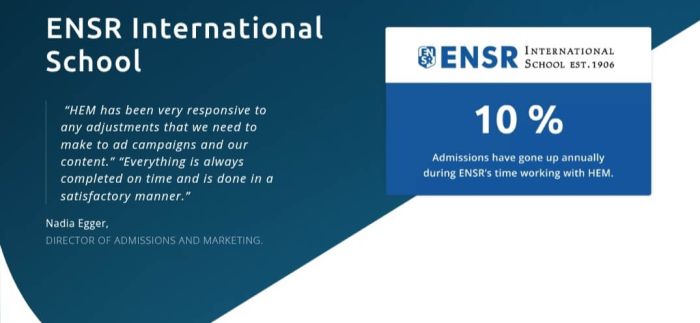
Example: When ENSR partnered with Higher Education Marketing (HEM) in 2019, the school sought to improve its online visibility and attract more qualified leads. HEM implemented a comprehensive SEO strategy that included technical website improvements, bilingual content creation, and targeted Google Ads campaigns. These efforts significantly enhanced ENSR’s search rankings and increased high-quality inquiries from families seeking international education in Switzerland.
Source: HEM
Why this matters: SEO isn’t a quick win; it’s a long-term strategy. But done right, it builds sustained visibility across every stage of the student journey.
A prospect might first find your blog post about how to choose a business school. Weeks later, they search for [Your University] campus life. Eventually, they return to your site to click Apply Now. SEO ensures you’re present at each step.
And since over 90% of students visit your website before applying, showing up in search isn’t just a marketing boost, it’s mission-critical.
What role does SEO play in the success of a higher education website?
SEO helps your site appear in search results when students research programs. Strong SEO brings qualified traffic, builds credibility, and ensures your programs are seen, without relying solely on paid ads.
SEO brings it all together. A fast, accessible, content-rich, and mobile-optimized site naturally ranks better. That means more visibility, more engagement, and more students taking the next step with you.
4. Make Your Content Accessible and Inclusive to All Users
Accessibility is now a fundamental expectation. Your website should serve everyone, including users with visual, auditory, motor, or cognitive disabilities.
In the U.S., more than 61 million adults live with a disability, and in Canada are more than 27 million. Globally, the number reaches into the hundreds of millions. If your website isn’t accessible, you may be shutting out prospective students, parents, or staff who are eager to connect but simply can’t.
Beyond ethics, it’s also the law. New ADA Title II regulations in the U.S. now require public colleges and universities to comply with WCAG 2.1 Level AA standards. Similarly, Canada’s AODA (Accessibility for Ontarians with Disabilities Act) sets a comparable benchmark for accessibility. Failure to comply with these standards can result in lawsuits, financial penalties, loss of federal funding, and significant reputational damage.
An inclusive website is no longer optional. It’s a legal, ethical, and strategic imperative.
Best practices for accessible higher education websites:
- Follow WCAG 2.1 AA guidelines. This includes alt text for images, captions or transcripts for videos, strong color contrast, and keyboard-friendly navigation.
- Use semantic HTML. Headings, lists, and ARIA landmarks help users navigate with screen readers and assistive tech. Avoid flashy layouts that confuse accessibility tools.
- Write descriptive link text. Replace vague links like “click here” with actionable, informative phrasing: Download the admissions brochure, for example.
- Test with real users. Use accessibility checkers and consult individuals who rely on screen readers or other assistive devices; automated tools often miss real-world issues.
Why this benefits everyone: Captions aren’t just for deaf users; they help second-language learners, mobile viewers, and anyone watching a video in a noisy space. High-contrast design improves readability in bright light or on low-quality screens. And clean navigation benefits all users, whether or not they rely on assistive technology.
Accessibility makes your site better for everyone and signals your commitment to equity and inclusion.
Example: Otis College of Art and Design proves that accessible websites don’t have to be boring. Their visually bold, design-forward site includes thoughtful accessibility features, like the ability to pause animated content and high-contrast elements that enhance readability. It’s proof that inclusive design and creativity can go hand in hand.

Source: Otis College of Art and Design
By prioritizing accessibility from the start, your institution not only meets regulatory standards, but it also opens the door to more prospects and strengthens its reputation as a place where everyone belongs.
5. Design Intuitive Navigation and User-Friendly Interfaces
Higher education websites often contain a massive amount of information, program details, admissions requirements, campus services, student life, alumni resources, and more. Without clear navigation, this wealth of content can quickly become overwhelming.
If prospective students can’t find basic information like how to apply, what programs you offer, or where to request info, they won’t stick around. They’ll simply move on to another institution that makes things easier.
Your goal? Make exploration effortless: Navigation should be clean, logical, and centered around user needs, not internal structures or department silos. Every menu, page layout, and search function should guide visitors toward their goals with clarity and speed.
Tips for intuitive higher ed site navigation:
- Use simple, student-focused labels. Stick to clear menu items like “Programs,” “Admissions,” “About Us,” and “Contact.” Avoid institutional jargon. Limit top-level menu items to avoid overload, and organize deeper pages using dropdowns or mega menus.
- Design for user journeys, not just departments. Group content around tasks or audience needs. Instead of listing academic departments, consider categories like Plan, Start, Succeed, or even Explore Programs and Find Support.
- Add a powerful, visible search bar. Nearly 50% of high school students use site search to navigate college websites. Make your search box easy to find on every page and power it with intelligent search tools that can handle typos and suggest relevant results as users type.
- Create clear user paths for different audiences. Persona-based navigation (e.g., Prospective Students, Current Students, Parents, Alumni) lets visitors self-identify and jump directly to what matters to them. This reduces cognitive load and improves time-to-information.
- Make CTAs impossible to miss. Buttons like Apply Now, Request Info, and Visit Campus should be visually distinct and consistently visible across key pages.
- Maintain styling and structural consistency. Don’t make users relearn how to navigate with every new section. Ensure the styling, placement, and behavior of menus remain predictable and responsive for mobile users.
Example: Eastern Iowa Community Colleges: EICC structures its top-level navigation around the student journey with three clear categories: Plan, Start, and Succeed. This not only simplifies decision-making but also shows a deep understanding of student concerns. The site also includes an “I’m most concerned about…” section: addressing common hesitations head-on, with empathy and clarity.

Source: Eastern Iowa Community Colleges
A user-friendly website doesn’t just look polished; it feels helpful. Smart navigation says, “We understand your needs, and we’ve made it easy to find what you’re looking for.” Higher education website design can be the difference between a visitor who bounces and one who applies.
6. Provide Engaging Content and Clear Calls-To-Action
Content is what transforms a higher ed website from a digital brochure into a dynamic recruitment tool. Prospective students don’t just want information; they want answers, inspiration, and a glimpse of what their future might look like at your institution.
They’re searching for:
- Program details
- Admission requirements
- Tuition costs
- Campus life
- Career outcomes
- Student experiences
Your job is to deliver that content in a way that’s clear, engaging, and actionable.
Best Practices for Content That Drives Enrollment:
Showcase your academic programs clearly.
Each program should have a dedicated page that covers curriculum highlights, faculty expertise, admissions requirements, and career prospects. Schools should prioritize program-level content because it’s the first place prospects look.
Use rich media to bring your campus to life.
Photos, videos, virtual tours, and infographics add emotional and visual depth that text alone can’t match. Consider a homepage hero video, a student life highlight reel, or virtual walkthroughs of your campus and classrooms.
Incorporate authentic student voices.
Today’s students want real stories. Feature testimonials, student spotlights, or day-in-the-life content that reflects your community’s diversity and vibrancy. Whether it’s a video diary from a nursing student or a blog from an international applicant, authenticity builds trust.
Keep your content fresh.
Outdated information erodes credibility. Make it a priority to update admissions deadlines, program details, and tuition info regularly. Maintain a blog or news section to show your campus is active, but don’t let fresh content bury essential evergreen pages like Programs or How to Apply.
Guide users with clear, strategic CTAs.
Every important page should ask: What’s the next step? Then answer it with a bold, well-placed button. Whether it’s “Apply Now,” “Download a Program Brochure,” or “Book a Virtual Tour,” your CTAs should stand out visually and match the context of the page.
Example: OCAD University (Canada) redesigned its admissions website with a bold visual identity, simplified navigation, and CTAs tailored to the user journey, like “Get Portfolio Help” or “Start Your Application.” The results? Within weeks of launch, the site saw a 21% increase in visits and a 15% increase in applicants. The combination of user-first content and clear actions paid off.
Source: OCAD University
Content also reinforces every other best practice:
- Accessible content means adding alt text and transcripts.
- SEO-optimized content means using keywords that align with search intent.
- Fast-loading content means using lightweight visuals and optimized media.
When your content delivers real value and your calls-to-action guide users clearly, you don’t just inform; you inspire. And that’s what drives conversions.
7. Integrate With a CRM for Lead Management and Personalization
A well-designed website gets visitors. A strategically integrated website gets conversions.
One of the most powerful ways to level up your higher ed site is by connecting it to a Customer Relationship Management (CRM) system. CRMs are central hubs for capturing, organizing, and nurturing prospective students through the enrollment journey.
When your website and CRM are integrated, lead data flows automatically from inquiry forms, newsletter signups, and event registrations into a centralized system, no more manual data wrangling, missed follow-ups, or siloed information.
Why CRM Integration Matters:
- Instant lead capture and time savings
Every time a prospect fills out a form, to download a course brochure or RSVP to an open house, their information is logged automatically in your CRM. This eliminates the need for staff to transfer spreadsheets or copy-paste emails. The result? Less administrative busywork and fewer mistakes, giving your admissions team more time to focus on real engagement. - Faster, personalized follow-up
CRM integration lets you respond in real time. Someone requests info? They get a tailored email within minutes. And your recruiters are instantly notified with the lead’s details, so they can follow up while your institution is still top of mind. Prompt follow-up, especially within 24 hours, greatly increases contact and conversion rates. A connected CRM makes that speed possible. - Personalized web experiences
Advanced CRMs like HubSpot or Mautic allow you to show smart CTAs and dynamic content based on the visitor’s behavior. If someone has already attended a webinar, your site might offer “Schedule a One-on-One Consultation” instead of “Register for Info Session.” Personalization like this increases engagement and accelerates movement through the funnel.
One institution used smart CTAs to tailor messaging for return visitors. New users saw English test prep offers, while returning prospects saw “Start Your Application” prompts, resulting in higher click-through and application rates.
- Full visibility into the student journey
Every interaction, form fill, email open, and event attendance is tracked in the CRM. Your team gets a 360° view of each lead’s engagement, helping them tailor conversations and prioritize follow-ups. You can also track which web pages and campaigns are driving the most conversions, helping you optimize over time.
For example, CRM data may reveal that campus tour sign-ups convert at twice the rate of general inquiries. Insights like these help you double down on what works.
- A seamless, consistent user experience
From a student’s perspective, CRM integration reduces friction. They won’t have to fill in the same information twice. Communications feel timely and relevant. Even if a staff member changes, the CRM ensures continuity, so the conversation picks up where it left off.
Behind the scenes, your team gains confidence that every lead is being handled properly, with full history and context at their fingertips.
The tools and payoff
Higher education institutions are increasingly using education-focused CRMs like HubSpot or HEM’s Mautic CRM. These tools enable automation at every stage, from capturing leads to triggering nurture emails to customizing website CTAs.
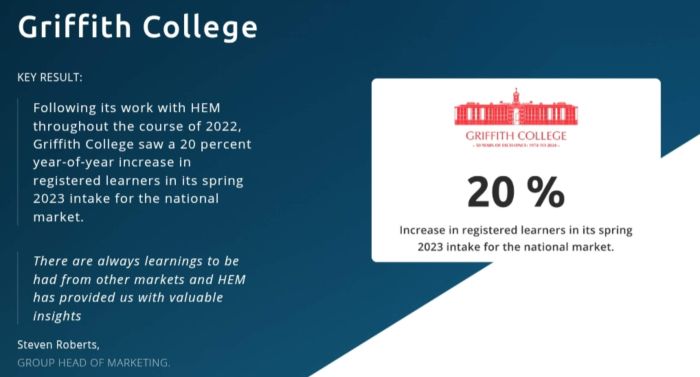
Example: Griffith College, Ireland’s largest independent college, partnered with Higher Education Marketing (HEM) to implement HubSpot CRM for more efficient lead management and personalized student recruitment. Through a comprehensive strategy that included conversion funnel audits, CRM staff training, automated workflows, and segmented lead nurturing, HEM helped Griffith streamline communications and improve follow-up with prospective students. As a result, the college achieved a 20% year-over-year increase in registered learners for its Spring 2023 intake.
Source: HEM
CRM integration does require some technical setup and cross-department coordination. But the payoff is immense: your website becomes a two-way communication platform, collecting insights, responding to actions, and guiding visitors toward enrollment with relevance and precision.
For institutions serious about scaling recruitment and deepening personalization, connecting your CRM to your website is no longer optional. It’s a modern best practice and a clear path to smarter, more successful digital engagement.
Build a Website That Drives Enrollment
Your website isn’t just a marketing asset; it’s your institution’s top recruiter. Every click, scroll, and form fill is a chance to move a prospective student closer to enrollment.
By applying these best practices for higher education websites, from mobile-first design and fast performance to SEO, accessibility, and CRM integration, you create more than just a polished digital presence. You build a site that informs, inspires, and converts.
In a crowded higher ed market, the schools that win are the ones that treat their website like the powerful recruitment engine it is. Make yours work harder, smarter, and more strategically, starting now.
Struggling with enrollment?
Our expert digital marketing services can help you attract and enroll more students!
Frequently Asked Questions
Question: Why is mobile responsiveness crucial for higher education websites?
Answer: Most students browse on mobile devices. A mobile-responsive site ensures readability, easy navigation, and fast loading, key for user experience and search rankings. Without it, your site could rank lower on Google and lose over half of the visitors who abandon slow or poorly displayed pages.
Question: How can improving website speed benefit my higher education institution?
Answer: Faster websites reduce bounce rates and keep users engaged longer. Prospects find what they need quickly, improving their impression of your institution. Speed also boosts SEO rankings and increases the chances of conversions like form submissions or brochure downloads.
Question: What role does SEO play in the success of a higher education website?
Answer: SEO helps your site appear in search results when students research programs. Strong SEO brings qualified traffic, builds credibility, and ensures your programs are seen, without relying solely on paid ads.