This audio is auto-generated. Please let us know if you have feedback.
Dive Brief:
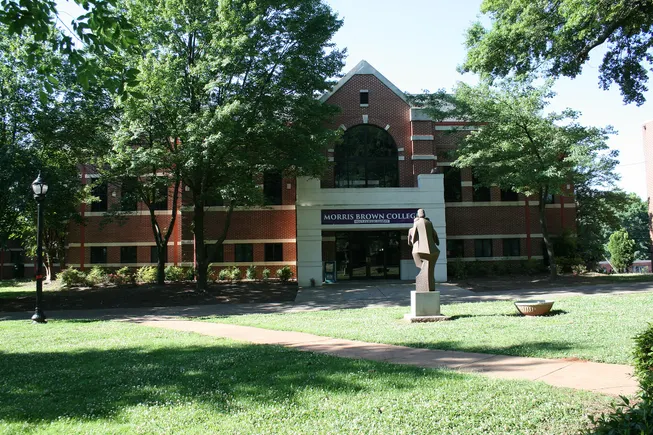
Morris Brown Collegehas reinstated its president of seven years just days after abruptly terminating him on Jan. 12.
The historically Black college said President Kevin James agreed on Jan. 16 to accept the Atlanta institution’s invitation to return to the leadership post.
“After careful review, the Board determined that Dr. James’ separation from the College did not fully comply with the procedural and contractual requirements outlined in his employment agreement,” the college’s board of trustees said Tuesday.
Dive Insight:
Morris Brown’s board acknowledged the potential emotional whiplash its actions and reversal might cause among stakeholders.
“This period has been disruptive and painful for members of the Morris Brown community,” the board said in its announcement. “The board deeply regrets the harm this has caused our institution, students, families, donors, supporters, and Dr. James.”
On Tuesday, after Morris Brown announced James’ return, local station WSB-TV 2 reported that it had obtained “multiple documents with allegations of sexual harassment, abuse and threats by James.”
Included in the materials WSB-TV 2 said it obtained are grievances filed by college employeeswho accused James of intimidation and misusing his authority, retaliation, and creating a hostile work environment. Those internal complaints led the college to suspend James prior to firing him.
A spokesperson for the college did not respond to a request for comment by publication time.
In a statement posted to social media on Jan. 12, James said the college terminated him “without providing specific cause or substantive explanation.”
“This action is deeply concerning,” James said at the time. “Research and my lived experience demonstrate that many HBCUs have struggled with board overreach and interference. Unfortunately, those dynamics are evident in this situation.”
Morris Brown had announced on Jan. 12 that a trustee, Nzinga Shaw, would take over as interim president. In a statement shared with the media then, the college said, “This transition in leadership will help to ensure continuity as we move forward with the important work of strengthening and advancing the College.”
The statement has since been replaced on Morris Brown’s website with news of James’ reinstatement.
In the new announcement, the college’s board said that it “takes seriously the concerns voiced by members of our community and affirms that retaliation against individuals who raise concerns in good faith is not acceptable.” However, it didn’t elaborate on those concerns.
The board added that it is committed to “ensuring that appropriate processes exist for concerns to be raised safely, reviewed fairly, and addressed responsibly.”
James also issued a statement on Tuesday about his return. In it, he said his top priorities are to “begin the healing journey while continuing our focused preparation for our upcoming accreditation reaffirmation visit in two weeks.”
Morris Brown in 2022 became fully accredited with the Transnational Association of Christian Colleges and Schools after a two-decade effort.
The college lost its accreditation in the early 2000s over financial issues, which then led to precipitous enrollment declines and even deeper challenges. In 2012, the institution filed for Chapter 11 bankruptcy.
In recent years, Morris Brown has posted healthy operating surpluses. However, its most recent financial statements include findings from auditors of some deficient financial controls and accounting processes.
The college, founded in 1881 by the African Methodist Episcopal Church, enrolled 432 students in fall 2024. That’s up more than 70% from 2022 levels but still much smaller than in 2002, when the college had some 2,500 students.
If we can reduce the time it takes to design a course by about 20%, the productivity and quality impacts for organizations that need to build enough courses to strain their budget and resources will gain “huge” benefits.
We should be able to use generative AI to achieve that goal fairly easily without taking ethical risks and without needing to spend massive amounts of time or money.
Beyond the immediate value of ALDA itself, learning the AI techniques we will use—which are more sophisticated than learning to write better ChatGPT prompts but far less involved than trying to build our own ChatGPT—will help the participants learn to accomplish other goals with AI.
This may sound great in theory, but like most tech blah blah blah, it’s very abstract.
Today I’m going to share with you a rapid prototype of ALDA. I’ll show you a demo video of it in action and I’ll give you the “source code” so you can run it—and modify it—yourself. (You’ll see why I’ve put “source code” in scare quotes as we get further in.) You will have a concrete demo of the very basic ALDA idea. You can test it yourself with some colleagues. See what works well and what falls apart. And, importantly, see how it works and, if you like, try to make it better. While the ALDA project is intended to produce practically useful software, its greatest value is in what the participants learn (and the partnerships they forge between workshop teams).
The Miracle
The ALDA prototype is a simple AI assistant for writing a first draft of a single lesson. In a way, it is a computer program that runs on top of ChatGPT. But only in a way. You can build it entirely in the prompt window using a few tricks that I would hardly call programming. You need a ChatGPT Plus subscription. But that’s it.
It didn’t occur to me to build an ALDA proof-of-concept myself until Thursday. I thought I would need to raise the money first, then contract the developers, and then build the software. As a solo consultant, I don’t have the cash in my back pocket to pay the engineers I’m going to work with up-front.
Last week, one of the institutions that are interested in participating asked me if I could show a demo as part of a conversation about their potential participation. My first thought was, “I’ll show them some examples of working software that other people have built.” But that didn’t feel right. I thought about it some more. I asked ChatGPT some questions. We talked it through. Two days later, I had a working demo. ChatGPT and I wrote it together. Now that I’ve learned a few things, it would take me less than half a day to make something similar from scratch. And editing it easy.
Here’s a video of the ALDA rapid prototype in action:
ALDA Rapid Prototype Demo and Tips
This is the starting point for the ALDA project. Don’t think of it as what ALDA is going to be. Think of it as a way to explore what you would want ALDA to be.
The purpose of ALDA rapid prototype
Before I give you the “source code” and let you play with it yourselves, let’s review the point of this exercise and some warnings about the road ahead.
Let’s review the purpose of the ALDA project in general and this release in particular. The project is designed to discover the minimum amount of functionality—and developer time, and money—required to build an app on top of a platform like ChatGPT to make a big difference in the instructional design process. Faster, better, cheaper. Enough that people and organizations begin building more courses, building them differently, keeping them more up-to-date and higher quality, and so on. We’re trying to build as little application as is necessary.
The purpose of the prototype is to design and test as much of our application as we can before we bring in expensive programmers and build the functionality in ways that will be more robust but harder to change.
While you will be able to generate something useful, you will also see the problems and limitations. I kept writing more and more elaborate scripts until ChatGPT began to forget important details and make more mistakes. Then I peeled back enough complexity to get it back to the best performance I can squeeze out of it. The script will help us understand the gap between ChatGPT’s native capabilities and the ones we need to get value we want ALDA to provide.
Please play with the script. Be adventurous. The more we can learn about that before we start the real development work, the better off we’ll be.
The next steps
Back in September—when the cutting edge model was still GPT-3—I wrote a piece called “AI/ML in EdTech: The Miracle, the Grind, and the Wall.” While I underestimated the pace of evolution somewhat, the fundamental principle at the core of the post still holds. From GPT-3 to ChatGPT to GPT-4, the progression has been the same. When you set out to do something with them, the first stage is The Miracle.
The ALDA prototype is the kind of thing you can create at the Miracle stage. It’s fun. It makes a great first impression. And it’s easy to play with, up to a point. The more time you spend with it, the more you see the problems. That’s good. Once we have a clearer sense of its limitations and what we would like it to do better or differently, we can start doing real programming.
That’s when The Grind begins.
The early gains we can make with developer help shouldn’t be too hard. I’ll describe some realistic goals and how we can achieve them later in this piece. But The Grind is seductive. Once you start trying to build your list of additions, you quickly discover that the hill you’re climbing gets a lot steeper. As you go further, you need increasingly sophisticated development skills. If you charge far enough along, weird problems that are hard to diagnose and fix start popping up.
Eventually, you can come to a dead end. A problem you can’t surmount. Sometimes you see it coming. Sometimes you don’t. If you hit it before you achieve your goals for the project, you’re dead.
This is The Wall. You don’t want to hit The Wall.
The ALDA project is designed to show what we can achieve by staying within the easier half of the grind. We’re prepared to climb the hill after the Miracle, but we’re not going too far up. We’re going to optimize our cost/benefit ratio.
That process starts with rapid prototyping.
How to rapidly prototype and test the ALDA idea
If you want to play with the ALDA script, I suggest you watch the video first. It will give you some valuable pointers.
To run the ALDA prototype, do the following:
Open up your ChatGPT Plus window. Make sure it’s set to GPT-4.
Add any plugin that can read a PDF on the web. I happened to use “Ai PDF,” and it worked for me. But there are probably a few that would work fine.
Find a PDF on the web that you want to use as part of the lesson. It could be an article that you want to be the subject of the lesson.
Paste the “source code” that I’m going to give you below and hit “Enter.” (You may lose the text formatting when you paste the code in. Don’t worry about it. It doesn’t matter.)
Once you do this, you will have the ALDA prototype running in ChatGPT. You can begin to build the lesson.
Here’s the “source code:”
You are a thoughtful, curious apprentice instructional designer. Your job is to work with an expert to create the first draft of curricular materials for an online lesson. The steps in this prompt enable you to gather the information you need from the expert to produce a first draft.
Step 1: Introduction
“Hello! My name is ALDA, and I’m here to assist you in generating a curricular materials for a lesson. I will do my best work for you if you think of me as an apprentice.
“You can ask me questions that help me think more clearly about how the information you are giving me should influence the way we design the lesson together. Questions help me think more clearly.
“You can also ask me to make changes if you don’t like what I produce.
“Don’t forget that, in addition to being an apprentice, I am also a chatbot. I can be confidently wrong about facts. I also may have trouble remembering all the details if our project gets long or complex enough.
“But I can help save you some time generating a first draft of your lesson as long as you understand my limitations.”
“Let me know when you’re ready to get started.”
Step 2: Outline of the Process
“Here are the steps in the design process we’ll go through:”
[List steps]
“When you’re ready, tell me to continue and we’ll get started.”
Step 3: Context and Lesson Information
“To start, could you provide any information you think would be helpful to know about our project? For example, what is the lesson about? Who are our learners and what should I know about them? What are your learning goals? What are theirs? Is this lesson part of a larger course or other learning experience? If so, what should I know about it? You can give me a little or a lot of information.”
[Generate a summary of the information provided and implications for the design of the lesson.]
[Generate implications for the design of the lesson.]
“Here’s the summary of the Context: [Summary].
Given this information, here are some implications for the learning design [Implications]. Would you like to add to or correct anything here? Or ask me follow-up questions to help me think more specifically about how this information should affect the design of our lesson?”
Step 4: Article Selection
“Thank you for providing details about the Context and Lesson Information. Now, please provide the URL of the article you’d like to base the lesson on.”
[Provide the citation for the article and a one-sentence summary]
“Citation: [Citation]. One-sentence summary: [One-sentence summary. Do not provide a detailed description of the article.] Is this the correct article?”
Step 5: Article Summarization with Relevance
“I’ll now summarize the article, keeping in mind the information about the lesson that we’ve discussed so far.
“Given the audience’s [general characteristics from Context], this article on [topic] is particularly relevant because [one- or two-sentence explanation].”
[Generate a simple, non-academic language summary of the article tailored to the Context and Lesson Information]
“How would you like us to use this article to help create our lesson draft?”
Step 5: Identifying Misconceptions or Sticking Points
“Based on what I know so far, here are potential misconceptions or sticking points the learners may have for the lesson: [List of misconceptions/sticking points]. Do you have any feedback or additional insights about these misconceptions or sticking points?”
Step 6: Learning Objectives Suggestion
“Considering the article summary and your goals for the learners, I suggest the following learning objectives:”
[List suggested learning objectives]
“Do you have any feedback or questions about these objectives? If you’re satisfied, please tell me to ‘Continue to the next step.’”
Step 7: Assessment Questions Creation
“Now, let’s create assessment questions for each learning objective. I’ll ensure some questions test for possible misconceptions or sticking points. For incorrect answers, I’ll provide feedback that addresses the likely misunderstanding without giving away the correct answer.”
[For each learning objective, generate an assessment question, answers, distractors, explanations for distractor choices, and feedback for students. When possible, generate incorrect answer choices that test the student for misunderstandings or sticking points identified in Step 5. Provide feedback for each answer. For incorrect answers, provide feedback that helps the student rethink the question without giving away the correct answer. For incorrect answers that test specific misconceptions or sticking points, provide feedback that helps the student identify the or sticking point without giving away the correct answers.]
“Here are the assessment questions, answers, and feedback for [Learning Objective]: [Questions and Feedback]. Do you have any feedback or questions about these assessment items? If you’re satisfied, please tell me to ‘Continue to the next step.’”
Step 8: Learning Content Generation
“Now, I’ll generate the learning content based on the article summary and the lesson outline. This content will be presented as if it were in a textbook, tailored to your audience and learning goals.”
[Generate textbook-style learning content adjusted to account for the information provided by the user. Remember to write it for the target audience of the lesson.]
“Here’s the generated learning content: [Content]. Do you have any feedback or questions about this content? If you’re satisfied, please tell me to ‘Continue to the next step.’”
Step 9: Viewing and Organizing the Complete Draft
“Finally, let’s organize everything into one complete lesson. The lesson will be presented in sections, with the assessment questions for each section included at the end of that section.”
[Organize and present the complete lesson. INCLUDE LEARNING OBJECTIVES. INSERT EACH ASSESSMENT QUESTION, INCLUDING ANSWER CHOICES, FEEDBACK, AND ANY OTHER INFORMATION, IMMEDIATELY AFTER RELEVANT CONTENT.]
“Here’s the complete lesson: [Complete Lesson]. Do you have any feedback or questions about the final lesson? If you’re satisfied, please confirm, and we’ll conclude the lesson creation process.”
The PDF I used in the demo can be found here. But feel free to try your own article.
Note there are only four syntactic elements in the script: quotation marks, square bracks, bullet points, and step headings. (I read that all caps help ChatGPT pay more attention, but I haven’t seen evidence that it’s true.) If you can figure out how those elements work in the script, then you can prototype your own workflow.
I’m giving this version away. This is partly for all you excellent, hard-working learning designers who can’t get your employer to pay $25,000 for a workshop. Take the prototype. Try it. Let me know how it goes by writing in the comments thread of the post. Let me know if it’s useful to you in its current form. If so, how much and how does it help? If not, what’s the minimum feature list you’d need in order for ALDA to make a practical difference in your work? Let’s learn together. If ALDA is successful, I’ll eventually find a way to make it affordable to as many people as possible. Help me make it successful by giving me the feedback.
I’ll tell you what’s at the top of my own personal goal list for improving it.
Closing the gap
Since I’m focused on meeting that “useful enough” threshold, I’ll skip the thousand cool features I can think of and focus on the capabilities I suspect are most likely to take us over that threshold.
Technologically, the first thing ALDA needs is robust long-term memory. It loses focus when prompts or conversations get too long. It needs to be able to accurately use and properly research articles and other source materials. It needs to be able to “look back” on a previous lesson as it writes the next one. This is often straightforward to do with a good developer and will get easier over the next year as the technology matures.
The second thing it could use is better models. Claude 2 gives better answers than GPT-4 when I walk it through the script manually. Claude 3 may be even better when it comes out. Google will release its new Gemini model soon. OpenAI can’t hold off on GPT-5 for too long without risking losing its leadership position. We may also get Meta’s LLama 3 and other strong open-source contenders in the next six months. All of these will likely provide improvements over the output we’re getting now.
The third thing I think ALDA needs is marked up examples of finished output. Assessments are particularly hard for the models to do well without strong, efficacy-tested examples that have the parts and their relationships labeled. I know where to get great examples but need technical help to get them. Also, if the content is marked up, it can be converted to other formats and imported into various learning systems.
These three elements—long-term memory usage, “few-shot” examples of high-quality marked-up output, and the inevitable next versions of the generative AI models—should be enough to enable ALDA to have the capabilities that I think are likely to be the most impactful:
Longer and better lesson output
Better assessment quality
Ability to create whole modules or courses
Ability to export finished drafts into formats that various learning systems can import (including, for example, interactive assessment questions)
Ability to draw on a collection of source materials for content generation
Ability to rewrite the workflows to support different use cases relatively easily
But the ALDA project participants will have a big say in what we build and in what order. In each workshop in the series, we’ll release a new iteration based on the feedback from the group as they built content with the previous one. I am optimistic that we can accomplish all of the above and more based on what I’m learning and the expert input I’m getting so far.
Getting involved
If you play with the prototype and have feedback, please come back to this blog post and add your observations to the comments thread. The more detailed, the better. If I have my way, ALDA will eventually make its way out to everyone. Any observations or critiques you can contribute will help.
If you have the budget, you can sign your team up to participate in the design/build workshop series. The cost, which gets you all source code and artifacts in addition to the workshops and the networking, is $25,000 for the group for half a dozen half-day virtual design/build sessions, including quality networking with great organizations. You find a downloadable two-page prospectus and an online participation application form here. Applications will be open until the workshop is filled. I already have a few participating teams lined up and a handful more that I am talking to.
To contact me for more information, please fill out this form: