Tag: Software

  • 3 reasons to switch to virtual set design

    3 reasons to switch to virtual set design

    Key points:

    If you’ve attended a professional show or musical recently, chances are you’ve seen virtual set design in action. This approach to stage production has gained so much traction it’s now a staple in the industry. After gaining momentum in professional theater, it has made its way into collegiate performing arts programs and is now emerging in K-12 productions as well.

    Virtual set design offers a modern alternative to traditional physical stage sets, using technology and software to create immersive backdrops and environments. This approach unlocks endless creative possibilities for schools while also providing practical advantages.

    Here, I’ll delve into three key benefits: increasing student engagement and participation, improving efficiency and flexibility in productions, and expanding educational opportunities.

    Increasing student engagement and participation

    Incorporating virtual set design into productions gets students excited about learning new skills while enhancing the storytelling of a show. When I first joined Churchill High School in Livonia, Michigan as the performing arts manager, the first show we did was Shrek the Musical, and I knew it would require an elaborate set. While students usually work together to paint the various backdrops that bring the show to life, I wanted to introduce them to collaborating on virtual set design.

    We set up Epson projectors on the fly rail and used them to project images as the show’s backdrops. Positioned at a short angle, the projectors avoided any shadowing on stage. To create a seamless image with both projectors, we utilized edge-blending and projection mapping techniques using just a Mac® laptop and QLab software. Throughout the performance, the projectors transformed the stage with a dozen dynamic backdrops, shifting from a swamp to a castle to a dungeon.

    Students were amazed by the technology and very excited to learn how to integrate it into the set design process. Their enthusiasm created a real buzz around the production, and the community’s feedback on the final results were overwhelmingly positive.

    Improving efficiency and flexibility

    During Shrek the Musical, there were immediate benefits that made it so much easier to put together a show. To start, we saved money by eliminating the need to build multiple physical sets. While we were cutting costs on lumber and materials, we were also solving design challenges and expanding what was possible on stage.

    This approach also saved us valuable time. Preparing the sets in the weeks leading up to the show was faster, and transitions during performances became seamless. Instead of moving bulky scenery between scenes or acts, the stage crew simply switched out projected images making it much more efficient.

    We saw even more advantages in our spring production of She Kills Monsters. Some battle scenes called for 20 or 30 actors to be on stage at once, which would have been difficult to manage with a traditional set. By using virtual production, we broke the stage up with different panels spaced apart and projected designs, creating more space for performers. We were able to save physical space, as well as create a design that helped with stage blocking and made it easier for students to find their spots.

    Since using virtual sets, our productions have become smoother, more efficient, and more creative.

    Expanding educational opportunities

    Beyond the practical benefits, virtual set design also creates valuable learning opportunities for students. Students involved in productions gain exposure to industry-level technology and learn about careers in the arts, audio, and video technology fields. Introducing students to these opportunities before graduating high school can really help prepare them for future success.

    Additionally, in our school’s technical theater courses, students are learning lessons on virtual design and gaining hands-on experiences. As they are learning about potential career paths, they are developing collaboration skills and building transferable skills that directly connect to college and career readiness.

    Looking ahead with virtual set design

    Whether students are interested in graphic design, sound engineering, or visual technology, virtual production brings countless opportunities to them to explore. It allows them to experiment with tools and concepts that connect directly to potential college majors or future careers.

    For schools, incorporating virtual production into high school theater offers more than just impressive shows. It provides a cost-effective, flexible, and innovative approach to storytelling. It is a powerful tool that benefits productions, enriches student learning, and prepares the next generation of artists and innovators.

    Latest posts by eSchool Media Contributors (see all)

    Source link

  • The triple Rs of scholastic esports

    The triple Rs of scholastic esports

    Key points:

    I know what it feels like to stand in front of a classroom that does not have enough. Not enough computers. Not enough up-to-date software and technical tools. Not enough resources to give every student the experience they deserve. When students notice these gaps, they notice more than the missing tools. They begin to question whether their education and, by extension, their potential really matters. That doubt can quietly drain their confidence.

    This is why dependable resources are not simply a bonus in education. They are a lifeline. In my role leading the Scholastic Esports Academy in the Five Carat Choice Program at Palm Beach Lakes High School, I have watched how access to quality equipment and meaningful project-based learning transforms students from the inside out. It is not only about what they learn but about how they begin to see themselves.

    I have been fortunate to develop partnerships with organizations like Cleverlike Studios, changing the game for my students by bringing advanced technology and creativity directly into the classroom. For example, they learned how to create new characters for Minecraft and designed custom esports jerseys for their Minecraft characters. Students were engaged while learning in games they know and love. These experiences allow them to express their creativity and see their ideas come to life while building complex skills such as coding, digital media, and game design.  

    When students make the leap from simple play to design, careers in technology and digital media suddenly seem accessible, even if they have never seen themselves in these fields before. Scholastic esports is an avenue within the educational landscape that merges the captivating realm of the video game industry with project based learning and educational objectives. It capitalizes on students’ existing interests for STEM subjects, including gamification, digital media, robotics, and financial literacy, directing them towards a structured and educational setting.

    In just five years, the Palm Beach Lakes Scholastic Esports Academy has grown from a small club of ten students to more than five hundred, becoming a full CTE academy that operates both during the school day and after school. Through this experience, students are earning four to five industry certifications along their four year pathway. Their success demonstrates what happens when resources are reliable, relatable, and creativity is encouraged. Students are now able to see themselves in real time through 3D models and their own digital designs, creating new characters for Minecraft and customizing their own esports jerseys.

    Recognizing this success, the Pew Foundation invested nearly $500,000 to expand our infrastructure and transform the program from an after school club into a full daytime classroom experience, creating even greater opportunities for growth and student success. Now, when our students walk into the Esports classroom, they enter a space built around their passions. They see powerful gaming computers, professional streaming equipment, and projects that speak their language. Suddenly, the skills they once thought were only for others become reachable. They begin to realize that their love for video games, robotics, and digital media can open doors to real world careers and college opportunities.

    The results speak for themselves:

    • In FY23 Palm Beach Lakes High School used a Pew Grant to launch the esports course and compared outcomes with a matched group of students.
    • Students who participated in esports had significantly lower rates of in-school or out-of-school suspension, with about half as many incidents as their non-esports peers.
    • Absenteeism among esports students was also slightly lower.
    • While GPA and certification pass rates were similar, the behavioral improvements were clear and meaningful.

    These numbers match what I see every day. Students who once struggled to stay engaged now show up early to practice. They stay late to collaborate. They treat each other with a level of respect and teamwork that carries over into their other classes.

    None of this would be possible without reliable and relatable resources that connect directly to students’ interests and experiences. In a Title I school, these tools make learning meaningful by turning abstract ideas into hands-on projects that students can see, touch, and create. Expanding their minds through hands-on learning and project based materials from companies like Cleverlike Studios, our students gain access to educational tools that connect classroom lessons to real world applications. Coding challenges, game design projects, and digital media activities inspire creativity, critical thinking, and collaboration. Most importantly, this work helps students see that their ideas and talents have value and that their creativity can open doors to future opportunities. 

    For many of my students’ resources have always been scarce. But in the Scholastic Esports Academy they find more than equipment. They find opportunity. They discover that their skills have value beyond the game and that their voices and ideas matter. They begin to picture themselves as leaders in technology, media, and STEM fields.

    Student Alyssa Chavez said, “Last year, we completed an assignment to design a jersey for our esports teams to wear on Minecraft. The Esports Jersey assignment was very helpful and even inspiring to me because it helped me learn to adapt and appeal to the suggestions and requirements that a client or partner would want me to apply to a project.   The use of the Blockbench program helped me to understand the importance of knowing how to navigate and use a program to do my best work for certain projects. When making the jersey, I took the elements and colors of our ‘Retro Rams’ branding and applied them to the jersey to create a design that represents unity and teamwork, showcasing the unity of our esports team.”

    This is why I believe scholastic esports is not just about gaming. It is about creating a bridge between curiosity and opportunity. It is about giving students in under-resourced communities the confidence to dream bigger and the tools to make those dreams real.

    The ongoing success of our academy is proof that when education is supported with vision, dedication, and the right resources, students will rise. We have created a space where learning feels real, where creativity thrives, and where confidence is built through experience. Partners like Cleverlike Studios have played a part in this progress by providing educational tools that enhance what we do every day. Together, we are demonstrating that reliable and relatable learning environments not only inspire achievement but also prepare students to succeed beyond the classroom.

    Latest posts by eSchool Media Contributors (see all)

    Source link

  • Otus Wins Gold Stevie® Award for Customer Service Department of the Year

    Otus Wins Gold Stevie® Award for Customer Service Department of the Year

    CHICAGO, IL (GLOBE NEWSWIRE) — Otus, a leading provider of K-12 student data and assessment solutions, has been awarded a prestigious Gold Stevie® Award in the category of Customer Service Department of the Year at the 2025 American Business Awards®. This recognition celebrates the company’s unwavering commitment to supporting educators, students, and families through exceptional service and innovation.

    In addition to the Gold award, Otus also earned two Silver Stevie® Awards: one for Company of the Year – Computer Software – Medium Size, and another honoring Co-founder and President Chris Hull as Technology Executive of the Year.

    “It is an incredible honor to be recognized, but the real win is knowing our work is making a difference for educators and students,” said Hull. “As a former teacher, I know how difficult it can be to juggle everything that is asked of you. At Otus, we focus on building tools that save time, surface meaningful insights, and make student data easier to use—so teachers can focus on what matters most: helping kids grow.”

    The American Business Awards®, now in their 23rd year, are the premier business awards program in the United States, honoring outstanding performances in the workplace across a wide range of industries. The competition receives more than 12,000 nominations every year. Judges selected Otus for its outstanding 98.7% customer satisfaction with chat interactions, and exceptional 89% gross retention in 2024. They also praised the company’s unique blend of technology and human touch, noting its strong focus on educator-led support, onboarding, data-driven product evolution, and professional development.

    “We believe great support starts with understanding the realities educators face every day. Our Client Success team is largely made up of former teachers and school leaders, so we speak the same language. Whether it’s during onboarding, training, or day-to-day communication, we’re here to help districts feel confident and supported. This recognition is a reflection of how seriously we take that responsibility and energizes us to keep raising the bar,” said Phil Collins, Ed.D., Chief Customer Officer at Otus.

    Otus continues to make significant strides in simplifying teaching and learning by offering a unified platform that integrates assessment, data, and instruction—all in one place. Otus has supported over 1 million students nationwide by helping educators make data-informed decisions, monitor progress, and personalize learning. These honors reflect the company’s growth, innovation, and steadfast commitment to helping school communities succeed.

    About Otus

    Otus, an award-winning edtech company, empowers educators to maximize student performance with a comprehensive K-12 assessment, data, and insights solution. Committed to student achievement and educational equity, Otus combines student data with powerful tools that provide educators, administrators, and families with the insights they need to make a difference. Built by teachers for teachers, Otus creates efficiencies in data management, assessment, and progress monitoring to help educators focus on what matters most—student success. Today, Otus partners with school districts nationwide to create informed, data-driven learning environments. Learn more at Otus.com.

    Stay connected with Otus on LinkedIn, Facebook, X, and Instagram.

    eSchool News Staff
    Latest posts by eSchool News Staff (see all)


    Source link

  • How colleges can improve financial efficiency with accounting software

    How colleges can improve financial efficiency with accounting software

    Today’s higher education requires financial efficiency. Outdated accounting processes cause financial inefficiencies in 73% of higher education institutions, according to a 2024 EDUCAUSE analysis. Right software can fix that. Here are 7 benefits of utilizing the best college accounting software, backed by numbers, automation, and improved decision-making.


    Why College Accounting Systems Need Improvement

    College economics are more complicated than ever due to shifting enrollments, diversified revenue streams, and escalating operational expenditures. Reports confirm that up to 30% of administrative time is wasted on manual accounting, resulting in errors, lost income, and lost productivity. Automation for college accounting is no longer optional—it’s game-changing.


    How Colleges Can Improve Financial Efficiency with Accounting Software. 7 Advantages


    1. Usability—simplify complex financial processes

    Do you know 43% of institutions prioritize user-friendliness when purchasing accounting software? The finest solutions enable non-financial workers to manage accounts using intuitive dashboards, drag-and-drop features, and automated reporting.


    2. Flexibility and scalability—grow without financial limits

    Many institutions have 12% yearly enrollment fluctuations, making scalability important. The ideal software expands with your organization as you add programs and revenue streams. Cloud-based upgrades minimize downtime, ensuring operations.


    3. Custom reporting – faster data-driven decision making

    Real-time reporting, according to 67% of officials in higher education, greatly enhances financial decision-making. Imagine being able to instantly have thorough knowledge on grant distributions, operating expenses, and tuition rates, therefore enabling leadership to act on facts rather than speculation.


    4. Reliability – Bid farewell to mistakes and lost data.

    Errors in manual accounting can cost organizations up to 5% of their yearly budget, an intolerable loss. Reliable accounting systems guarantee accurate, real-time tracking of payments, debts, and financial projections. For better processes, it also easily interacts with other campus administration systems.


    5. Automate and synchronize data to reduce administrative tasks

    Accounting automation reduced administrative tasks by 40%. Colleges can distribute resources faster, speed up approvals, and eliminate human error-related income leakage with synchronized data across admissions and payroll systems.


    6. Security – Guard private financial information

    Given 63% of higher education institutions having attacked recently, financial security is not negotiable. Modern accounting systems guarantee that your financial documents are untouchable by illegal hands by means of role-based access, encrypted data storage, and automatic backups.


    7. Efficiency — Save time, cut costs, increase revenue

    Saving time makes money. Academic institutions with accounting automation collect fees 25% faster and spend 18% less. Monitoring finances on the go using mobile and cloud capabilities reduces overhead and improves transparency and cash flow.


    The Bottom Line

    Choice of college accounting software is about developing a smarter, faster, and more robust financial ecosystem, not just convenience. The appropriate software helps universities maximize financial efficiency and future-proof operations through automation, real-time analytics, and cost reductions.

    Has your college been trapped in outmoded accounting? We must embrace intelligent automation-powered financial efficiency. Contact team Creatrix Campus today! 

    Source link

  • Online Teaching Challenges Using Virtual Classroom Software

    Online Teaching Challenges Using Virtual Classroom Software

    What is a virtual classroom software?

    A virtual classroom is a digital replica of a traditional classroom, the only difference is that it uses technical tools to interact with students in real-time. The virtual classroom software for teachers helps higher education institutions to manage classes remotely using interactive tools for collaboration, brainstorming, ideation, and discussion. All this is followed by instant assessments and result publications to measure the learning that happened in the session.


    The sudden school closures and the need of Virtual classroom software for teachers

    There can never be a PAUSE mode for Education nor Learning. But what if a situation demands it? Let’s take the example of our current COVID-19 scenario.

    The UNESCO states that globally, over 1.3 billion children are out of the classroom, across 186 countries, as on March 2020.


    There are schools and universities closures everywhere, forcing educational institutions to look for an option to deal with the crisis.

    Thanks to the distinctive rise in the online teaching environment and virtual classroom software, what we could now call the only future of higher education and universities.

    Even the traditional universities and higher eds that were once tabooed to using online teaching are now racing to adapt their programmes and classes to online alternatives. The situation may be pressing, but retorting to any technology wouldn’t help.

    An intuitive, high-end, modern, virtual classroom software for teachers would serve the purpose—a tool that acts as a bridge to offering uninterrupted teaching/learning even during the difficult times.

    Creatrix Campus is end-to-end higher education software that brings campus online on-the-go. You could plan online exams, assignments, execute tasks, conduct online quizzes, group discussions, polling, all virtually.

    Creatrix Campus virtual campus management system has always helped faculty indulge in successful ways of teaching, revolutionizing digital education.

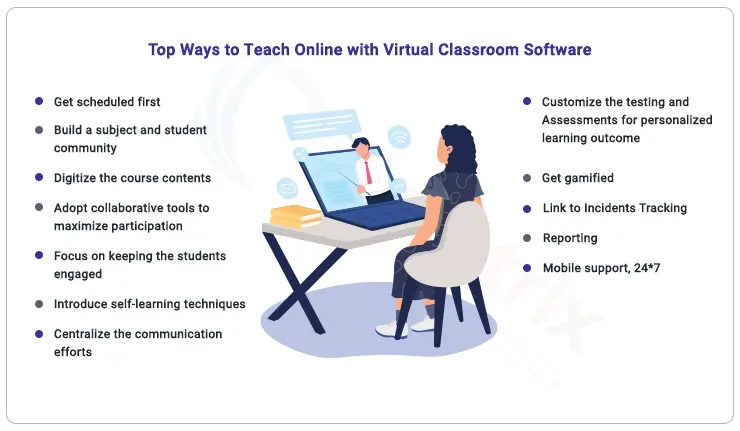
    There’s data analysis, visualization, forecast of assessments that predict learning outcomes, personalized learning pathways for students, and much more. We have figured out 12 successful ways by which Creatrix facilitates successful online teaching and learning, virtually. Here are they;


    How to Create an Engaging Virtual Classroom Environment with Virtual classroom software for teachers


    top-ways-to-teach-online-with-virtual-classroom-software


    1. Get scheduled first

    Now, this is a great feature to start an online classroom—setting up schedules and a set of predefined rules.

    Faculty are allowed to create schedules that most suits their online sessions. Creatrix Scheduling allows schedule creation based on faculty and student preferences.

    Multiple class schedules could be created for different time periods with options to add, edit or cancel schedules, and assign student groups, all this without conflicts.

    There’s enough flexibility here. While any new and complicated topic can be scheduled up in the forenoon, the rest can make up for the afternoon session. Achieving a balanced timetable schedule is also possible with faculty management software that will accommodate all changes instantly and meet your criteria.


    2. Build a course and student community

    The next crucial step in virtual teaching lies in the creation of a course and student community. The faculty is the moderator and the courses she creates are the community. On logging in, the faculty would see the list of batches he handles on her personal dashboard.

    The act of the faculty clicking on a particular batch is alike to the real-life scenario of getting into a classroom, with the bunch of students waiting to be marked attendance, hear their performance reports, and submission of assignments, etc. Before the class commences, the faculty marks attendance of the day.

    Nothing goes lacking in this sort of online teaching. Faculty plans well ahead of the classes with a solid curriculum management system from Creatrix.

    The faculty strategically adapt to the industry trends as well as the unique needs of the students. There’s enough option to track the daily progress of the students in line with the curriculum.


    3. Digitize the course contents

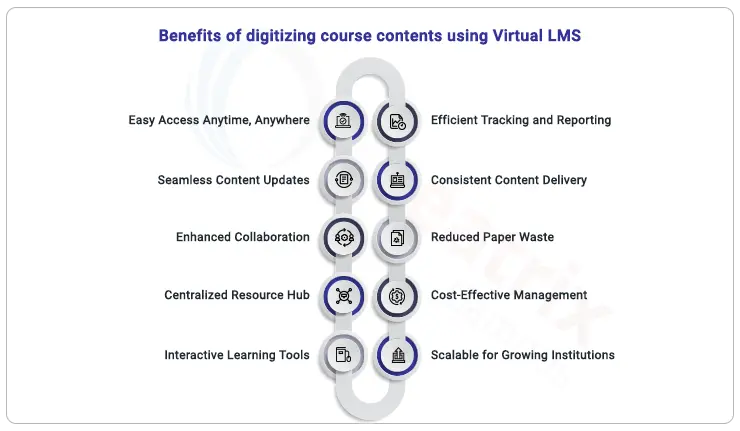
    At Creatrix we know the real purpose of a virtual LMS; we make learning enjoyable, accessible, and meaningful to students, improving their learning outcomes.

    The faculty takes control of the class, adding course materials to suit her course’s plan. Creatrix virtual Learning Management System (LMS) is brings in a lot of tools for applying various learning models in a wide range of digital formats.

    Instructors are allowed to create, upload, the course’s content, back it up with videos and files, deliver them to students, assign tasks and assessments, administer and track their progress, followed by record-keeping. There’s complete transparency on all these processes.

    The topic planned and covered are kept track of and those that need attention are extended for longer hours. The simplified workflows in Creatrix helps to focus students by giving constructive feedback and personalized recommendations.


    4. Adopt collaborative tools to maximize participation

    Virtual teaching is successful only when there’s maximum student participation. Creatrix has many collaborative and communication tools to keep the students glued to the actual teaching process.

    Creatrix virtual LMS allows students to team up on live sessions and video conferencing through external integrated tool.

    Faculty can put forward techniques including quizzes, debates, interactive discussions, etc. There are options to share additional resources for any topic by uploading videos, share relevant PDFs, PPTs, website links, etc. The sessions could be made more fun by bringing in polling, surveys, and map each topic with learning outcomes.


    benefits-of-digitizing-course-contents-using-virtual-LMS


    Creatrix Campus’s Virtual LMS comes with adaptive teaching models like blended learning, self-paced learning, collaborative learning, and flipped learning to arouse student participation. The lesson planner option in Creatrix helps users to plan and execute both physical and virtual classes for the same course.


    5. Focus on keeping the students engaged

    Online remote classes at any cost should be made interesting, mainly because the faculty-student is not in direct interaction. Classes hence have to be delivered in such a way that it builds engagement for learning.

    Creatrix has the Digital Whiteboard tools which come with a virtual pointer to facilitate brainstorming activities. In addition, there are discussion forums and messaging, which is another way of keeping students engaged. 

    Just like how Quora, Yahoo Answers, and Reddit act as amazing discussion forums, Creatrix LMS does the same. 

    The activity wall acts as a message board for further collaboration; students get to post doubtful questions, create polls, and share documents with faculty and his peers.

    There are enough ways a faculty could add advantage to online teaching by sharing learning videos, texts, podcasts to students.


    6. Introduce self-learning techniques

    Not all courses in the syllabus would call for a synchronous way of teaching. Some subject’s objectives maybe just research and self-learning. Creatrix virtual LMS creates a self-learning environment that gives enough room for real-time student engagement and self-reflection.

    On completion of topics, student take up auto-assigned, online assessments and quizzes that are used to track their understanding level on the current topic. Uploading videos related to the topic expands the learners to self-learn.

    The progress the student makes can be seen in their personalized dashboards on their real-time status bar reports displaying current, past, and future course progresses, along with the tasks due.

    The faculty’s journey is similar to a facilitator who provides relevant resources and course materials, create tutorials, short lessons, all made possible through online course repositories.

    Students could take part in live streaming and self-paced learning (video upload), conveniently accessible from a single point.


    7. Centralize the communication efforts

    There should be an organized way of communication keeping both the students and their parents/guardians informed about the teaching happening.

    This allows the stakeholders to stay informed with auto-notified alerts and reminders about deadlines on assignment submission, feedback, as well as missed topics. They get real-time status via email, SMS, and push notifications.


    8. Customize the testing and assessments for personalized learning outcome

    This is an unmissable feature in any online teaching. Assessments help to gauge the learner’s proficiency. Customizing them is incidentally what most software systems lack.

    With customized assessments, faculty have the option to personalize tests for students with different attainment levels. This gives the option to focus on weaker students in a much better way.

    Creatrix has options to conduct both online and offline Assessments/assignments in the form of quizzes, MCQs, long papers, articles, followed by instant onscreen evaluation. Based on the learning outcomes mapping, the system would then intimate the students attainment levels, individually.


    9. Get gamified

    A good online teaching platform should work on making things simple for the learners. They won’t really enjoy teaching that’s monotonous, after all, their eyes are starring the digital devices all day long.

    Pick out elements of game playing to add spice to your teaching. Students look for such a twist in their learning experience.

    Assign tasks and projects online, track the submission rates, and provide them badges or scores.

    Integrate with the course schedule and bring forth activity-based learning in line with the Curriculum. This will help instructors and students track topics better. Students, on the other hand, will have access to course information times during absenteeism. Wouldn’t that be great?


    10. Link to Incidents Tracking

    There are also options to deal with tardy behavior. Online teaching doesn’t mean you have to compromise on bad behavior incidents, students cheating during online exams by conducting online proctoring etc. A university management software with conduct management system make sense here.


    link-to-incidents-tracking


    Instantly parents get notified in real-time via email, SMS alerts, and push notifications.
    Besides capturing incidents, rules could be configured, discipline letters created, referrals initiated, analyze trends, and generate reports for faster decision-making to resolve behavior problems.


    11. Reporting

    With real-time reporting, instructors should be able to generate real-time reports, right in their hand. They get to know the stand of their students and work on their continuous improvement gradually.

    The instructor could track those students who are accessing the course content and who isn’t.

    Creatrix classroom management software is capable of generating real-time reports including students’ demographics, assignments, attendance, assignments, fee payments, grades, discipline incidents, coursework, assignments, etc.

    All these reports from the virtual classroom software help at deriving insights into learning for a bigger picture of the institutional reporting.

    The best thing about using Creatrix Online LMS is student’s progress data is right in their hands. They have the ability to track their own progress, their dips and ups with the progress status bar on their personal dashboard.

    They get to view the current, past, and future course progresses, along with the tasks due.


    12. Mobile support, 24*7

    Wrap up all the above-mentioned features into an all-time accessible mobile app!  A mobile tool is a necessity to support students with uninterrupted learning these days.

    Creatrix Online Learning Management System (OLMS) gives any time, anywhere access to learning where students team up for live sessions via mobile devices and tablets.

    They get the feel of in-the-classroom training with options to view the session’s content visually and communicate via text chat and audio; they can submit assignments, view grades & course materials, and interact with each other just the way they would do in the real classroom.


    Conclusion

    It’s high time we try and reset higher education learning to meet the present 2020 demands by giving uninterrupted online learning.

    A virtual classroom software for teachers is the call of the day; a tool like Creatrix Campus is sure to break the shackle that disrupts the flow of higher education by waking up to a better tomorrow.

    Let the higher education institutions get into virtual learning mode and blend with technology for incessant learning even during a crisis like Covid-19 and beyond. Connect with team Creatrix Campus to learn more about virtual classroom software for teachers!

    Source link

  • Engineering College Management Software: Features

    Engineering College Management Software: Features

    Engineering college management software is an essential tool that automates the higher education sector from admission to graduation and beyond. It helps institutions achieve their mission and goals, increase student enrollment, and streamline college administration. For engineering colleges and higher education institutions, this software provides a comprehensive suite of features across web and mobile platforms, enabling them to manage records, enhance the student learning experience, improve operational efficiency, and reduce costs.

    The program is customizable, scalable, and versatile. It provides accurate administrative and academic information to college leadership, improving decision-making. Administrative, professor, and student communication is improved by this program, improving efficiency and effectiveness.


    Why Choose Engineering College Management Software?

    Managing admissions, academic progress, and finances are just a few of the many hats an engineering college administrator must wear. By providing a unified, user-friendly platform, Engineering College Management Software streamlines operations, increases productivity, and keeps campuses one step ahead of the competition. This allows institutions to concentrate on what’s important—providing a high-quality education and boosting student success—by automating laborious operations and providing real-time insights.


    Why Is It Game-Changing? Benefits of Engineering College Management Software


    • Reduces Difficulty: From enrolling students to keeping tabs on their classes, you may do it all from a central location.
    • Access Data Effortlessly: Make better decisions and respond faster with access to real-time analytics.
    • Efficient Communication: Facilitate the easy connection of staff, students, and professors to encourage collaboration.
    • Preparing for the Future: It is designed to be easily expanded to accommodate your growing institution.
    • Saves Money and Time: Reduces human effort and administrative burdens by automating routine tasks.
    • Tracking progress and offering timely interventions can greatly enhance student support, leading to better outcomes.

    The engineering college management software isn’t just software—it’s a smarter way to run your campus.


    Key Features of Engineering College Management Software

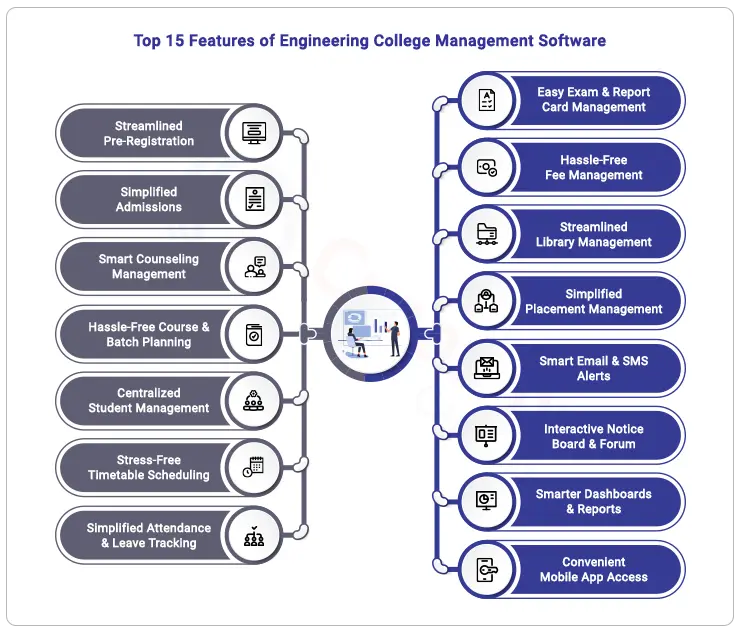
    The strong features of Engineering College Management Software simplify operations, improve student experience, and improve engineering institution decision-making. These characteristics, from pre-registration to placements, help engineering colleges compete in a competitive academic environment. See it closer:


    top-15-features-of-engineering-college-management-software


    1. Streamlined Pre-Registration Process

    • Use simple web forms to manage inquiries and registrations.
    • Gather students’ personal, contact, and course information.
    • Receive real-time status updates and automatic follow-up reminders.
    • Use dashboards and reports to keep track of inquiries and encourage student enrollment.


    2. Simplifying Admissions, One Click at a Time

    • Let students apply online and breeze through the admissions process.
    • Break it down: Create multiple phases for a clear, step-by-step journey.
    • Use entrance tests and ratings to admit the best-fit students effortlessly.
    • Offer flexible, personalized tuition payment options.
    • Keep everyone in the loop with instant email, SMS, and push notifications.
    • Say goodbye to manual work—generate admission forms, letters, and templates in a snap.


    3. Streamlined Counseling, Smarter Decisions

    • Automatically assign requests to counselors for faster, smoother processing.
    • Dive deep into admission standards and rules to guide applicants better.
    • Set clear fee discount policies for specific student groups.
    • Simplify seat allocation for government and management quotas with ease.


    4. Hassle-Free Course & Batch Planning

    • Easily set up lesson plans and manage courses across batches without the stress.
    • Create class schedules that actually work—no conflicts, no headaches.
    • Keep tabs on course progress and student performance in real-time, effortlessly.


    5. All-in-One Student Management Hub

    • Centralize student demographics and enrollment details in one place.
    • Automate emails and notifications to keep everyone informed.
    • Schedule personalized meetings and check-ins to support student success.
    • Monitor progress and learning outcomes to foster academic growth.


    6. Stress-Free Timetable Scheduling

    • Auto-generate timetables that work like magic—no conflicts, no chaos.
    • Juggle faculty and classroom availability with ease.
    • Get a clear picture of faculty workloads across programs and subjects.
    • Create classroom-specific timetables without breaking a sweat.


    7. Simplified Attendance & Leave Tracking

    • Track attendance for students and staff on the go—web or mobile, your choice.
    • Use RFID or biometric systems for attendance that’s automatic and hassle-free.
    • Generate detailed attendance and leave reports in seconds.
    • Streamline leave applications and approvals without manual back-and-forth.


    8. Exams & Report Cards Made Easy

    • Run online exams and assessments without the usual stress.
    • Let the system do the math—automate mark calculations with predefined weightages.
    • Create professional marksheets and report cards with built-in approval steps.
    • Manage result announcements for students and parents with zero fuss.


    9. Hassle-Free Fee Management

    • Choose from multiple invoicing options for tuition and other charges.
    • Automate recurring invoices to simplify scheduled payments.
    • Collect fees effortlessly with integrated online payment gateways.
    • Send students automated fee reminders so no deadlines are missed.


    10. Streamlined Library Management

    • Search the catalog like a pro with advanced search and barcode/QR integration.
    • Reserve and renew books on the go using a mobile app.
    • Automate issuing, returns, renewals, and fines with smart rules.
    • Get all the library stats you need with detailed reports and dashboards.


    11. Placement Made Simple

    • Plan placements with ease—set criteria, schedule assessments, and more.
    • Keep students updated with placement trends and training notifications.
    • Organize tests, interviews, and group discussions without the hassle.


    12. Smart Alerts via Email & SMS

    • Set up automated email and SMS alerts in just a few clicks.
    • Schedule reminders and updates to go out like clockwork.
    • Use an internal mailbox to keep communication streamlined and organized


    13. Interactive Online Notice Board & Forum

    • Schedule and share event updates and important announcements effortlessly.
    • Spark instant discussions and engage students and faculty in lively forums.
    • Post images, collect feedback, and keep the conversation flowing with comments.


    14. Smarter Dashboards, Sharper Insights

    • Dive into everything you need with one-click reports and dashboards.
    • Keep an eye on attendance, leaves, exams, fees, and more—all from one spot.
    • Stay on top of your finances with clear, detailed income and expense reports.


    15. Convenient Mobile App Access

    • Keep everything at your fingertips—access data on the go.
    • Mark attendance, approve leave, and manage student information anytime.
    • Create assessments, check grades, and send instant notifications with ease.


    Ready to Revolutionize Your Engineering Campus?

    Ready to take your engineering college to the next level? Creatrix Campus is the ultimate cloud-based education management system for managing everything from admissions to campus operations, designed with your unique needs in mind. Whether it’s simplifying administrative tasks, enhancing student engagement, or keeping faculty workloads in check, we’ve got it all covered. With real-time data, seamless integrations, and an intuitive interface, your institution will be equipped to tackle the challenges of today and embrace the opportunities of tomorrow.

    So, why wait? Let’s talk about how Creatrix Campus can streamline your operations and drive your institution’s success, all while giving you the flexibility and control you need to thrive. Your engineering campus deserves the best—let’s make it happen!

    Source link

  • Enrollment Management Software: Enhance Student Experience

    Enrollment Management Software: Enhance Student Experience

    Tune In To Our Audio Blog


    Introduction

    Enrollment management is the core function of any educational institution. It involves not merely processing applications but also influencing students’ futures and facilitating a smooth experience from the initial expression of interest in your institution. This work can frequently appear daunting for registrars.

    You are responsible for the daily management of extensive documentation, the navigation of complex systems, and the pursuit of ensuring that each student feels supported and welcomed. Nevertheless, it is clear that a straightforward routine can be transformed into a substantial inconvenience by manual procedures, communication failures, and data management complications.

    Enrollment management software is thus critically essential in this context. This robust solution is engineered to confront the difficulties you encounter directly, facilitating process optimization and improving the student experience. We will be addressing student enrollment issues faced by registrars during registration and investigate how an appropriate software solution might significantly benefit both your staff and the students you assist. Let us engage collaboratively to address these concerns.


    Common Pain Points in Enrollment Management


    Since we are all aware that enrollment management is a genuine challenge, let us discuss some of the most significant sore points you encounter. And rest assured, you are not alone in this. A whopping 67% of registrars report feeling overwhelmed by manual processes and documentation, as indicated by a recent survey conducted by the National Association of Student Personnel Administrators (NASPA). We can deconstruct a few of these “student enrollment issues” for you!


    Manual Procedures and Paperwork

    Manual data entry can be inordinately time-consuming, as we are all aware. No matter how diligently you propel, you appear to make minimal progress when endeavoring to swim upstream. Disorganized spreadsheets, handwritten notes, and stacks of forms not only impede productivity but also heighten the probability of errors. In reality, organizations that implement manual processes may allocate up to 30% more time to administrative duties than those that adhere to automated systems. Imagining the potential of that additional leisure!


    Lack of Real-Time Data Access

    How frequently do you wait for info before making a big decision? Real-time data is essential in today’s fast-paced educational environment. Working with obsolete or delayed data might slow your response to student needs and strategic opportunities. According to a recent research, 56% of registrars said delayed data retrieval hindered decision-making. Yikes!


    Communication Gaps

    Communicating can be like playing broken telephone. Departments and students can lose vital information, causing confusion and frustration. Critical updates may not reach the appropriate people at the right time. Eduventures found that 43% of enrollment officers have communication gaps, which affect student happiness and engagement.


    Poor Application Tracking

    How often have you yearned for a magic wand to effortlessly track application statuses? Finding a needle in a haystack might be difficult without a system. Incomplete applications, missing paperwork, and inability to track progress can stress registrars and students. College and University Professional Association for Human Resources (CUPA-HR) found that 62% of registrars struggle with application monitoring, delaying admissions and missing student prospects.


    Few Reports and Analytics

    Let’s conclude with data analysis—or lack thereof. How can you examine trends and patterns to inform enrollment plans if your reporting capabilities are limited? You must estimate what works and what doesn’t without complete data. According to an AACRAO poll, 70% of registrars want better reporting tools to guide their strategy.

    That’s it. These typical issues can severely affect enrollment management and the student experience. Do not worry! The correct enrollment management software can address these issues. Explore how it can streamline your procedures and improve everyone’s experience.


    How Can Universities Reduce Pain Points in the Student Enrollment Process Using Enrollment Management Software?


    Say Goodbye to Paperwork with Automation

    It’s no secret that entering data by hand and dealing with piles of papers can be a real pain. By bettering these steps, enrollment management software takes that load off your shoulders. You could save a lot of time if you let the software do the boring work. That way, you could focus on what really matters: helping kids and making their experience better.


    Have insights at your fingertips in real time

    Delayed data can make it hard to make quick choices. When you use registration management software, you can get to important data at any time. You don’t have to wait for reports or changes anymore. You can get instant information that helps you make decisions right away.


    Talk to people in other departments without any problems

    Communication is very important in a busy registration office, which we all know. These systems come with built-in ways to talk to each other and kids, so everyone stays in touch. There will be less confusion and knowledge will flow more easily, which is good for everyone.


    Master Application Tracking

    There shouldn’t be any element of guesswork involved in monitoring applications. Using the application tracking features provided by enrollment management software, you can easily keep tabs on the status of each application in real time.

    The outcome = you can stay organized plus give ultimate experience to applicants that they demand.


    Master the Art of Advanced Reporting for Radical Insights

    Data is your greatest ally when enhancing enrollment strategies. Enrollment management software’s powerful reporting and analytics features help you gain valuable insights into patterns and outcomes. This simply implies that you may influence your organization’s success through data-driven decisions.


    Advanced Reporting Provides Powerful Insights

    Data is your best friend for enrollment strategy improvement. Advanced reporting and analytics in enrollment management software let you analyze trends and outcomes. You can use data to make decisions that affect your institution’s success.


    What Enrollment Management Software Can Do for You, Registrar! Additional Benefits


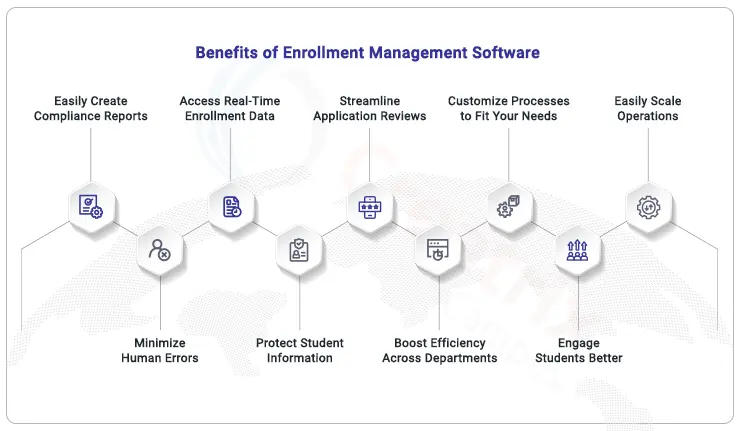
    benefits-of-enrollment-management-software


    Easily Create Compliance Reports: No more scrambling during audits. With built-in reporting tools, you’ll have audit-ready reports at your fingertips.

    Create Compliance Reports with No Effort: No more rushing through audits. Built-in reporting features will let you have audit-ready reports right at hand.

    Reduced Human Errors: Automate data entry and tracking to greatly lower errors that might pass through in-hand procedures. 

    Access Real-Time Enrollment Data: Real-time updates will keep you current with enrollment figures, so guiding quick, wise selections.

    Secure Student Data: Forget data breaches. Cloud storage ensures security and compliance, providing you peace of mind.

    Make Reviewing Applications Easy: Let the program indicate critical details so you may focus on the big picture instead of sorting through heaps of papers.

    Get Everyone on One Agenda: Forget about departmental conflicts. Centralized data guarantees that everyone has the same information, so facilitating smooth teamwork.

    Create Methodologies That Fit You: Customize the system to fit the demands of your university so the enrolling process seems seamless, quick, and completely customized.

    Engage Students More: Use the software’s chat features to keep students up to date and interested throughout the whole process.

    Scale operations easily: The software adapts to your needs, so you don’t have to worry about losing accuracy or speed as the number of enrollments goes up or down.


    Wrapping It Up: Boost Enrollment Management with the Right Tool from Creatrix Campus

    At the heart of improving the student experience is how well you manage enrollment. We know the pain points—manual processes, communication breakdowns, and keeping track of every application can slow you down. As a registrar, you’re juggling enough already. Why not make things easier?

    Enrollment management software helps. We simplify operations, improve collaboration, and provide real-time data access, so you can focus on delivering a successful student journey. When modernizing your system, Creatrix Campus includes everything a modern registrar needs to ease the process. Contact our staff for more!

    Source link

  • Advanced Software for Higher Education

    Advanced Software for Higher Education

    Tune In To Our Audio Blog


    Why Student Discipline Matters in Higher Education?

    Good discipline is essential to a secure and encouraging campus environment. According to NCES, colleges can easily monitor and address problems as they come up by using behavior-tracking software. This has resulted in a 15% increase in campus safety and a 20% increase in student satisfaction. It takes more than just following the rules to create an environment where students can succeed. Behavior monitoring is directly linked to higher retention rates, as evidenced by students in well-managed environments being 25 percent more likely to finish their education.

    Campus administrators will benefit from happier students, a safer and more encouraging environment, and continued vigilance about compliance standards.


    The Changing Landscape of Student Behavior in Higher Education

    Keeping an eye on student behavior gets harder as universities get bigger and more diverse. The days of having a few basic rules and occasionally checking in were long gone. Maintaining a courteous, secure, and welcoming campus community presents many challenges for today’s higher education institutions. 


    This is what adds to its complexity:

    • Handling Students from Diverse Populations: Managing Different Cultural Expectations.
    • Addressing plagiarism and cheating in the digital age is academic misconduct.
    • Behavioral Concerns: Dealing with disruptive behavior on the internet and in classrooms.
    • Campus Safety: Protecting students’ health from abuse and harassment.

    Behavior tracking plays a critical role in helping institutions confront these challenges head-on in this dynamic environment. Maintaining documentation is not enough; you also need to build an environment of responsibility, encourage good behavior, and eventually make a contribution.


    The Need for Efficient Behavior Tracking Software

    These days, handling student discipline with just paper records and spreadsheets is not going to be sufficient. Colleges should reconsider their strategy for the following reasons:

    Challenges of Outdated Practices: Paper trails and manual tracking can result in misplaced incidents and postponed actions, which makes it more difficult to provide students with timely support and responses.

    Consequences of Ineffective Discipline Oversight: Ineffective discipline management can drive away students and damage the institution’s reputation. Students who experience a lack of accountability may feel unsupported and insecure.


    Modern Behavior Tracking Software Advantages

    Improved Student Experience: Students can flourish in a more secure and caring environment when simplified discipline management is put into place.

    Improved Policy Adherence: A strong system makes sure that institutional rules are followed, reducing the possibility of possible legal issues.

    Data-Driven Insights: With the use of sophisticated tracking tools, organizations can examine patterns of behavior to make well-informed decisions and take preventative action.

    Adopting behavior monitoring software can transform educational institutions’ approaches to managing student behavior and promote a campus climate that puts safety and support first.


    Key Strategies for Improving Student Discipline


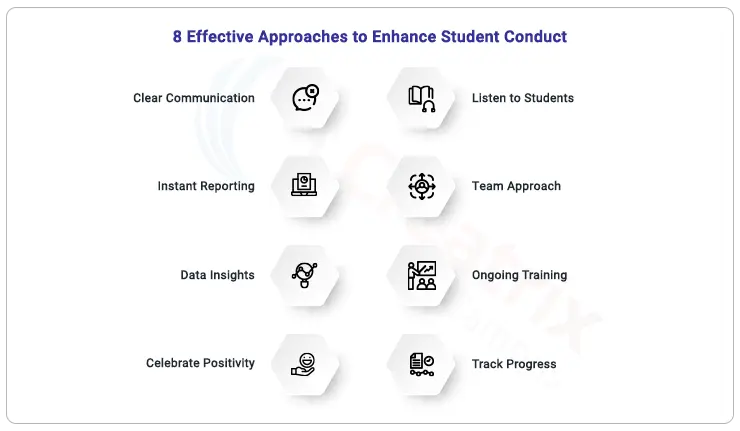
    strategies-for-improving-student-discipline


    • Establish the tone by making student conduct policies very apparent from the outset.
    • Give employees the tools they need to immediately report issues so that they can be addressed quickly.
    • Analyze behavior trends with analytics to adjust your strategy.
    • Highlight positive behavior because it inspires more of the same when it is acknowledged and rewarded.
    • Establish avenues for students to express their ideas and worries to promote a feeling of community.
    • Work together to present a unified front for discipline management with the staff, teachers, and parents.
    • Provide regular training to staff members on behavior management and conflict resolution techniques.
    • Put in place a system to keep an eye on incidents and their results so that changes and improvements can be made continuously.


    How Technology Supports Discipline Management


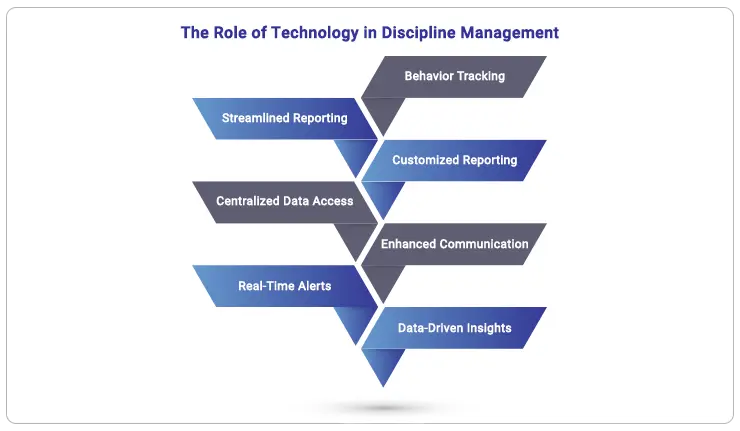
    role-of-technology-in-discipline-management


    • When an incident occurs, you and your team can report it right away, focusing immediately on finding solutions. For example, a teacher could record a conflict in the hallway immediately rather than waiting for class to end.
    • You can quickly review and have educated discussions with ease when you have easy access to a student’s discipline history through a centralized system.
    • Parents and staff are kept informed about incidents instantly, allowing for timely action when necessary.
    • With the use of behavior tracking software, you can identify patterns over time and provide early interventions for students who consistently struggle.
    • Customized reports evaluate the success of disciplinary measures, enabling you to improve policies in light of actual outcomes.
    • Maintain open lines of communication among students, faculty, and parents as they work together to address discipline issues.
    • Use data insights to make informed decisions that improve behavior and campus safety. Institutions that implement technology solutions experience a 30% increase in compliance and satisfaction.


    Introducing Creatrix Campus Student Conduct Management System

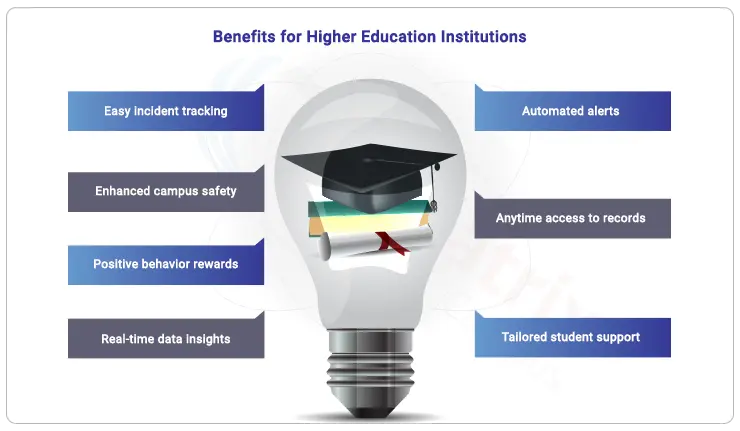
    • Log incidents quickly while on the go to simplify documentation.
    • Create customized reports with an emphasis on particular incident types, locations, and student demographics.
    • To inform parents, teachers, and students about significant incidents, send out automatic alerts.
    • Using your mobile device, you can view and edit incident records from anywhere on campus.
    • An integrated reward system that acknowledges and motivates students can help to promote positive behavior.


    Benefits for Higher Education Institutions


    benefits-for-higher-education-institutions


    Higher Ed Leaders, Take Action!

    We feel you definitely deserve a utopian campus where monitoring student behavior is a breeze for you! You can now effectively replace your legacy procedures with a more effective approach to handling student behavior when you use Creatrix Campus behavior tracking software. Want to know how it operates? Set up a demo with Creatrix now to see how it can help you and your team have a more seamless experience on campus! Let’s talk!

    Source link

  • 10 Key Benefits of Using Fee Management Software in Higher Education

    10 Key Benefits of Using Fee Management Software in Higher Education

    Tune In To Our Audio Blog


    Higher Education institutions are increasingly moving towards an automated age of cloud, mobile, and big data analytics. There are many reasons institutions should implement the strategy of collecting payments through cloud and mobile-based fee management software. It would be desirable for any type of institution to automate billing/fee collection and drive greater revenue while saving greater hours of manual work.

    A fee management software solves many problems for higher education and helps parents to keep track of fee payments in real-time. No more manual records or calculations on sheets of paper. Using the fee accounting and financial management software, students and parents can use the latest technology tools to connect various departments such as admission, finance, transport, hostel, library, and more. This will result in wider engagement and improved efficiency in educational institutions with the synchronization of data on fee collections. Student fee collection and unpaid fee details can be accessed on mobile devices including iPhone and Android from anywhere and anytime, beyond the campus.


    Key Benefits of Using Fee Management Software


    Effortless Payment Integration

    Fee management software integrates effortlessly with most of the common payment gateway platforms, allowing students to select the payment options that best suit them, including digital wallets, bank transfers, and credit/debit cards, and pay in a click. To those in the finance team, the software ensures safe cash flow, timely payments, and streamlined financial operations, without spending too much time.


    Financial Data at the Fingertips

    Real-time financial insights can be obtained through the use of dynamic reporting technologies and real-time analytics of the finance module. Your team including key decision-makers and institutional heads can now make precise, data-driven decisions with this state-of-the-art capability, which guarantees precise financial forecasting and institutional strategic planning that helps you deal with tomorrow.


    100% Security on Finances

    Improve your institution’s financial security with cutting-edge encryption and AI-driven threat detection that most fee management software comes with. By using the most recent cybersecurity technologies integrated into the fee management systems, you can almost eliminate the risk of data breaches and fraud, providing rock-solid safety and total peace of mind for both the higher ed’s institution and its students.


    Personalized Payment Plans

    Transform student financial management with fully customizable payment alternatives that meet individual students’ needs. Whether it’s flexible installment plans, financial aid, or delayed payments, these specialized fee solutions increase student satisfaction and retention by giving the financial flexibility, empowerment, and assistance that every student deserves. The Mobile-first approach is another attractive feature of the fee management software that makes it a totally attractive package. 


    Laborsaving Fee Reconciliation

    Turbocharge your financial process with intelligent automation that promptly and accurately aligns invoices and payments, slashing administrative burdens and decreasing human errors so that employees can concentrate on key responsibilities.


    Mobile Access

    In a world where mobile devices are becoming more and more common, redefine payment management with a strong mobile platform that enables administrators and students to accept payments whenever and wherever they choose.


    Personalized Fee Structures

    Your higher education can execute a bunch of unique financial models and individualized solutions by utilizing flexible fee structures that are made to meet the unique requirements of different programs, courses, and students.


    Effortless Refund Automation

    Instill confidence in students with a cutting-edge, automated refund system that ensures rapid and precise disbursements, in no time. This benefit indeed reflects your institution’s dedication to transparency and superior financial stewardship.


    Seamless Regulatory Navigation

    Using state-of-the-art compliance tools, institutions can easily adhere to local and international financial regulations, protecting your institution from fines and legal trouble while maintaining the greatest levels of honesty and integrity.


    Strategic Financial Planning

    Make the most of cutting-edge analytics and comprehensive reporting to find insightful financial data, improve the distribution of resources, and create plans for strategic expansion that will help your higher education institution grow and prosper.


    Revolutionize Your Finances with Creatrix Fee Management Software Today

    In summary, putting in place strong fee management software is not just a contemporary comfort but also a tactical requirement for higher education institutions. Operational efficiency, financial correctness, and student satisfaction can all be significantly increased by integrating automated procedures, real-time financial information, and customized payment plans too!

    A recent research demonstrated the transformative power of such technology by showing that institutions that implemented advanced fee management systems witnessed a 75% reduction in administrative workload and a 30% rise in timely payments.

    If you wish to be one such institution, Creatrix Campus can help. Find out how the Creatrix Campus Fee Management System can improve security, expedite your billing procedures, and give you the real-time data you require to spur productivity and growth. To find out more and arrange a demo right away, click this link!

    Source link