This blog was kindly authored by Professor Amanda Broderick, Vice-Chancellor & President of the University of East London.
Across higher education, there is a growing realisation that no cavalry is coming over the hill. Government support arrives with one hand while being withdrawn with the other, and universities are being asked to do more, for more people, with fewer resources. The choice facing the sector is stark: we must transform, or be transformed.
At the University of East London (UEL), we have been on this journey for some time. In many ways, it was almost serendipitous that the University reached a point of existential pressure years before similar headwinds struck the rest of the sector. That early crisis forced us to confront difficult truths, make bold decisions, and learn quickly what genuinely works. As we approach the final quarter of our ten-year strategy, Vision 2028, our transformation is evident. We have seen a 25 percentage point improvement in positive graduate outcomes (the largest in England), an unparalleled rise in NSS rankings, a move from 90th to 2nd in the country for annual student start-ups, and a financial sustainability strategy which now places us as one of only 15 universities in the country without any external borrowing, whilst delivering a £350m investment programme.
One area underpins each of these elements of our transformation: digital.
When we launched Vision 2028, digital transformation sat at its core – not as a technology programme, but as a strategic enabler. Our ‘Digital First’ approach was designed to ensure that the entire UEL community has the tools, confidence and freedom to innovate and develop continuously. That philosophy has shaped everything we have done since.
We have migrated from on-premises data centres to a cloud infrastructure, becoming the first UK university to be fully cloud-based in 2019. This has improved resilience, reduced environmental impact, and transformed how we use big data, from student retention predictive modelling to generative AI personal learning assistance to business intelligence and management information. We have invested in innovation spaces that allow students to build their own compute environments, redesigned our website to offer a more personalised browsing experience, and strengthened our digital architecture to mitigate downtime.
Sustainability has been a constant consideration – reducing data centre usage and re-using compatible hardware wherever possible. We have also made key software available anytime, anywhere, and consolidated multiple CRM-type environments into a single solution.
But digital transformation only matters if it serves a purpose. At UEL, that purpose is careers.
How can we prepare students for future careers if we do not embed digital skills throughout their education? That question underpins our Mental Wealth and Professional Fitness curriculum, co-designed with employers to ensure students develop future-ready digital capabilities alongside cultural capital, confidence and professional inter-personal behaviours. Introductory modules are paired with sector-specific specialisation depending on course, with Level 3 and 4 modules already covering AI and digital tools for industry, digital identity and professional networks, data literacy, visualisation, and data ethics. Employability is not an add-on at UEL; it is embedded throughout the learner journey – which means that in-demand digital skills are too.
Our ambition extends beyond our enrolled students. We want to spread transformation across our communities so that opportunity is not confined to campus. Click Start, delivered by Be the Business and the University of East London in partnership with the Institute of Coding, is a powerful example. This four-week course equips young Londoners aged 18–30 with digital marketing and data analysis skills, delivering more than 90 hours of teaching alongside industry-recognised certificates from Google and Microsoft. Since June 2023, more than 230 young people have completed the programme – 41% women, 88% from ethnic minority backgrounds, and 70% from East London. Graduates have progressed into jobs, apprenticeships and further study, with some joining UEL itself and others using the programme as a springboard to transform their lives elsewhere.
This ethos of applied, inclusive innovation is reflected across our courses and underpinned by active research centres and innovation hubs, from our UK Centre for AI in the Public Sector and Centre for FinTech, to our Child Online Harms Policy Think Tank and Intelligent Technologies Research Group. Alongside our industry partnerships, this cutting-edge research ensures that what students learn remains relevant, responsible, and future-focussed.
When a student’s whole experience is designed as digital first, technology stops being a blocker and becomes an enabler. It supports our shift from a ‘university-ready student’ model to becoming a ‘student-ready university’. UEL’s Track My Future app exemplifies this approach, bringing academic, careers, and support services into a single personalised platform. Putting students’ own data into their own hands and providing a digital route-map to university life, daily active use regularly exceeds 40,000 interactions – clear evidence that digital tools can strengthen engagement and belonging.
Compared with when I joined UEL in 2018, the scale of the digital transformation today is unmistakable. This is what purposeful digital transformation looks like: not technology for its own sake, but a platform for inclusion, resilience and impact. In a sector facing relentless pressure, that is not optional – it is essential.
The 2025-2026 school year brought a wave of powerful AI-enhanced tools to Google Workspace for Education. These aren”t just shiny new features—they’re practical classroom tools designed to save you time, personalize learning, and unlock student creativity. Best of all? Most are free for educators and students. Now that 2026 is upon us, I am excited to share with you some of my favorite new features that can be used in your classroom with your students. If you are already using these, I’d love to hear from you and learn how you are exploring AI and Google Workspace in your classrooms.
Let’s walk through the standout Google features you should try with your students this year.
Google Gemini for Education: Your AI Teaching Assistant
Google Gemini isn’t just another chatbot. It’s an AI assistant built directly into the Google apps you already use—Docs, Slides, Sheets, Gmail, and Classroom. No more copying and pasting between tabs.
Why it matters: Gemini 2.5 Pro incorporates LearnLM, making it the world’s leading model for learning. It’s purpose-built for education with enterprise-grade data protection. Your data isn’t reviewed or used to train AI models.
Try this on Monday: Ask Gemini to “Create a lesson plan on photosynthesis aligned to NGSS standards” or “Generate a 25-question multiple choice practice exam from this syllabus.”
Key Features for K-12 Classrooms:
Deep Research — Students can research complex topics and receive synthesized reports with sources and citations in minutes. Instead of spending hours searching, they get a comprehensive report they can then explore further.
Gemini Canvas — Create quizzes, practice tests, study guides, and visual timelines in one interactive space. Go from blank slate to dynamic preview in minutes. Students can build interactive prototypes and code snippets without knowing how to code.
Gemini Live — Students can talk through complex concepts, get real-time help, and even share their screen or camera for personalized feedback on problem sets.
What Are Google Gems?
Think of a Gem as a specialized AI assistant you create for a specific purpose. Instead of writing the same prompt over and over in Gemini, you build a Gem once with custom instructions, and it becomes your go-to expert for that task.
The difference: Regular Gemini is a generalist. A Gem is a specialist.
For example, instead of typing “Create a Jeopardy game about the water cycle for 5th grade” every time you need a review game, you create a “Jeopardy Game” Gem that already knows your grade level, subject area, and preferred format. Then you just give it the topic.
Creating Custom Gems: Build Your Own AI Experts
Once you’re comfortable with Gemini, Google Gems let you create custom AI assistants tailored to your classroom needs.
How it works: Give Gemini instructions, examples, and resources so it behaves exactly how you need it to. Upload unit plans, pacing guides, rubrics, or anchor texts so your Gem can reference them when creating content.
Teacher-facing Gems:
Lesson Plan Generator — Aligned to your specific standards and teaching style
Parent Communicator — Drafts emails that match your tone and school policies
Emergency Sub Plan — Creates ready-to-go activities when you’re out sick
Standards Unpacker — Breaks down complex standards into teachable chunks
Student-facing Gems: Create a Gem and share it with your class through Google Classroom. Students interact with your custom AI expert independently.
AI Tutor — Provides step-by-step help without giving away answers
Writing Coach — Gives feedback on essays and helps students revise
Study Partner — Creates practice questions from their notes
Career Explorer — Helps students research potential career paths
EduGems: Pre-Made Gems by Eric Curts
Don’t want to build Gems from scratch? Eric Curts (Control Alt Achieve) created EduGems—a growing library of ready-to-use Gems organized by category.
Professional Tasks (11 Gems) — Newsletters, recommendation letters, PD plans
Pro tip: Start with EduGems to see how effective Gems work, then customize them for your specific needs. You can also submit your own Gems to be added to the collection.
Teachers and students work with overwhelming amounts of information. NotebookLM becomes an instant expert on whatever documents you upload.
What makes it special: It grounds all responses in the specific documents you provide—no hallucinations, no random internet sources.
Features you’ll use:
Audio Overviews — Turn lecture recordings, textbook chapters, or research papers into podcast-style audio summaries. Students can study anywhere—on the bus, at practice, during their commute.
Document synthesis — Upload PDFs, articles, unit plans, and curriculum resources. Ask questions and get answers pulled directly from your materials. Create summaries, study guides, and student-friendly resources instantly.
Student independence — Help students understand complex texts without constant teacher intervention. They can ask clarifying questions and get explanations grounded in their assigned readings.
Google Vids: Create Professional Video Content in Minutes
Student attention spans are shrinking, and teachers need tools to deliver content that sticks. Google Vids is Google’s answer: an AI-powered video creation tool that lives right in your Google Workspace.
What Makes Google Vids Different?
Think Google Slides turned 90 degrees—instead of slides arranged vertically, you work with scenes arranged horizontally. If you can use Google Slides, you can use Google Vids. But here’s the game-changer: it’s powered by Gemini AI.
The “Help me create” feature: Type what you want to create (“Make a 3-minute tutorial on the water cycle for 5th grade”), and Google Vids generates a complete first draft in under 60 seconds—script, visuals, timing, transitions, and all. You customize from there instead of starting from scratch.
Key Features Teachers Love:
AI-Powered Creation — Describe your video in a sentence, and Gemini builds the first draft for you. Add your own screenshots, adjust the timing, choose AI voice or record your own.
Convert Slides to Videos — Already have a Google Slides presentation? Import it into Vids and transform it into an engaging video with music, transitions, and narration in minutes.
Stock Media Library — Access thousands of royalty-free videos, images, music tracks, sound effects, GIFs, and stickers without leaving the platform.
Professional Templates — Start with beautifully designed templates for tutorials, announcements, student projects, and more.
Real-Time Collaboration — Work together on video projects just like you would in Google Docs. Perfect for group projects or co-planning with colleagues.
Seamless Google Classroom Integration — Assign videos as templates so each student gets their own copy. Review student work directly in Classroom and see their progress in real-time.
For Teachers: Scale Your Impact
Create professional development videos, flipped classroom content, and instructional materials in 20-30 minutes instead of 2-3 hours.
Practical use cases:
Tool tutorials — Record once, share forever. Every new teacher gets instant access to training.
Flipped lessons — Create micro-lectures students watch at home, freeing up class time for hands-on work.
Lab procedures — Record safety demos and complex procedures students can review anytime.
Personalized feedback — Send quick video messages instead of lengthy written comments.
Professional development — Build a library of PD resources teachers can access on-demand.
For Students: Voice, Choice, and Creativity
Google Vids gives students an accessible way to demonstrate understanding without needing advanced tech skills.
Student projects:
Video essays — Students explain their thinking, cite sources, and present arguments visually.
Book reports — Create “movie trailers” for novels or informational texts.
Science demonstrations — Record experiments with narration explaining the process.
Digital portfolios — Showcase learning growth throughout the year.
Public service announcements — Combine research with persuasive communication skills.
Scaffolding tip: Start simple. Have students brainstorm in Google Keep, create a 3-slide presentation in Slides, import those slides into Vids, replace slides with video B-roll, add music and transitions. This progression teaches cross-tool workflows while building video literacy skills.
Getting Started is Simple
Access Google Vids at vids.google.com or vids.new. No software to download, no complicated setup.
Three ways to start:
Record — Easiest for screencasts and quick tutorials on Chromebooks
Use templates — Start with professional designs for various purposes
“Help me create” — Describe what you want and let AI build the first draft
Videos save automatically to Google Drive. Share through Classroom, Drive links, or export as MP4 files.
Why It Matters for K-12
Google Vids democratizes video creation. Students and teachers without technical expertise or expensive software can now create professional-looking content. This levels the playing field and opens doors for creativity that were previously closed.
Want the complete guide? Check out these in-depth resources:
Try Deep Research on a topic you’re teaching next week
This month:
Create your first custom Gem for a unit you teach frequently
Have students upload their notes to NotebookLM and create an Audio Overview
Record one instructional video in Google Vids
This semester:
Share the college student offer with your seniors
Build a library of custom Gems for different units
Let students create their own Gems as study partners
Assign a Google Vids project—have students create a 2-minute video explaining a concept, book report trailer, or science demonstration
One Important Reminder
With all these powerful AI tools at our fingertips, don’t forget that the most meaningful learning still happens through conversation, hands-on exploration, and human connection. Technology should enhance—not replace—the relationships and dialogue that make your classroom special.
Use these tools to reclaim your time and energy so you can focus on what matters most: your students.
Frequently Asked Questions
Do I need to pay for Google Gemini to use these features?
No. Google Gemini is free for all Google Workspace for Education users. The paid Gemini Advanced plan offers additional features like longer conversations and priority access, but the free version is powerful enough for most classroom needs. Students can also get Gemini Advanced free for one year with a valid .edu email address.
Can students use Google Gemini and these AI tools?
Yes, but with age restrictions. Students 13+ can use Gemini with their school Google accounts if their district has enabled it. Students 18+ can access Gemini Advanced for free with a .edu email. Google Vids, NotebookLM, and Gems are also available to students through Workspace for Education accounts, though your district controls access.
How do I know if my school district has enabled these AI features?
Try visiting gemini.google.com or vids.google.com with your school Google account. If you can access them, your district has enabled the features. If not, contact your technology administrator or instructional technology coordinator to request access. Many districts are still evaluating AI policies, so your inquiry might help move that conversation forward.
Will Google Gemini replace me as a teacher?
No. These AI tools are designed to handle repetitive tasks—planning, formatting, creating first drafts—so you can focus on what only you can do: building relationships, facilitating discussions, and responding to individual student needs. Think of Gemini as a teaching assistant, not a replacement.
How do I prevent students from using AI to cheat?
Shift your assignments from “what can be Googled” to “what requires thinking.” Focus on process over product: have students show their work, explain their reasoning, and revise based on feedback. Use AI-generated content as a starting point for discussion rather than an end product. Teach students to use AI as a research and brainstorming tool, not a shortcut to avoid learning.
Are these tools accessible for students with disabilities?
Yes. Google Workspace tools are designed with accessibility in mind. Gemini can help create differentiated materials and accommodations. NotebookLM’s Audio Overviews provide auditory learning options. Google Vids supports captions and screen readers. However, always test tools with your specific students’ needs in mind and provide alternatives when necessary.
How much time does it really take to learn these tools?
You can start using Gemini productively in under 10 minutes. Google Vids takes about 30 minutes to create your first video. Custom Gems require 15-20 minutes to set up initially, but then save hours over time. NotebookLM has virtually no learning curve—just upload documents and start asking questions. Start with one tool, get comfortable, then expand.
What if the AI generates incorrect information?
AI tools can make mistakes (called “hallucinations”). Always review AI-generated content before using it with students. When using NotebookLM, the tool cites specific sources, making it easier to verify information. Teach students to fact-check AI responses and use multiple sources. Treat AI outputs as drafts that need human review, not final products.
Can I use these tools if my district blocks certain websites?
Google Workspace AI features are integrated into your existing Google account and typically aren’t blocked if you can access Google Docs, Slides, and Drive. However, some districts may specifically disable AI features. If you encounter access issues, request that your technology team enable “Gemini for Google Workspace” and “Additional Google Services” in your admin console.
How do these tools handle student data and privacy?
Google Workspace for Education accounts have strong privacy protections. Student data is not used to train AI models, and conversations are not shared with third parties. However, review your district’s AI acceptable use policy and teach students not to share personal information in AI prompts. For sensitive topics, consider using teacher accounts rather than student accounts.
Ready to try one of these features? Pick just one from this list and test it this week. Reply and let me know which one you chose and how it went.
Jeff Bradbury, your digital learning coach 🎸
Don’t Miss the Next EdTech Breakthrough
Google isn’t done innovating, and neither are dozens of other EdTech companies building tools specifically for K-12 educators. New features drop every month—some game-changers, some duds.
I test them all so you don’t have to.
Join 20,000+ educators who get my weekly newsletter with:
✅ Early access to tutorials on new classroom tech
✅ Honest reviews (I’ll tell you when something isn’t worth your time)
✅ Ready-to-steal lesson ideas and project templates
✅ Time-saving workflows that actually work in real classrooms
No fluff. No vendor pitches. Just practical strategies from a teacher who’s actually using these tools with students.
Get weekly EdTech tips, tool tutorials, and podcast highlights delivered to your inbox. Plus, receive a free chapter from my book Impact Standards when you join.
Like this:
LikeLoading…
Discover more from TeacherCast Educational Network | Developing Standards-Based Instructional Technology Integration
Subscribe to get the latest posts sent to your email.
NotebookLM for Instructional Coaches revolutionizes resource management by allowing coaches to use their specific materials instead of generic AI outputs.
The tool helps create professional development materials quickly, enabling coaches to synthesize various sources effortlessly.
NotebookLM offers unique features like audio overviews, video explanations, and infographics, enhancing the way coaches present information.
Coaches can organize notebooks by purpose, rename their sources for clarity, and customize responses for different audiences.
Joining communities like GEG helps coaches share strategies and stay updated on innovative practices using NotebookLM.
As an instructional coach, you’re constantly juggling multiple responsibilities—supporting teachers, creating professional development materials, organizing resources, and staying current with educational technology. What if there was a tool that could help you synthesize information, create engaging content, and save hours of prep time? Enter NotebookLM, Google’s AI-powered workspace that’s revolutionizing how coaches work with information.
What Makes NotebookLM Different for Coaches?
Unlike general AI tools like ChatGPT or Gemini that pull from the entire web, NotebookLM gives you complete control over your sources. You choose exactly what information goes in—whether it’s your district’s strategic plan, professional development materials, curriculum documents, or teacher resources—and NotebookLM works exclusively with that content.
This is a game-changer for instructional coaches. You’re not getting generic advice or hallucinated information. You’re getting insights, summaries, and resources based on your specific materials, aligned to your district’s goals, and tailored to your teachers’ needs.
Real-World Applications for Instructional Coaches
Creating PD Materials in Minutes
Imagine this scenario: You’ve gathered resources about implementing Google Workspace tools in the classroom. You have PDFs, website links, video tutorials, and Google Docs with implementation guides. Instead of manually synthesizing all this information, you can upload these sources to NotebookLM and ask it to create a newsletter for teachers, generate a quick-start guide, or develop talking points for your next coaching session.
One coach recently used NotebookLM to record a 40-minute lesson observation, uploaded the audio as a source, and asked it to create professional development slides with detailed presenter notes. The tool generated beautiful, comprehensive slides that captured the key teaching strategies demonstrated in that lesson—all without the coach spending hours creating materials from scratch.
Building Notebooks for School Leaders
Several coaches are now creating custom notebooks for their school leaders that include strategic plans, policy documents, and instructional frameworks. School leaders can then interact with these notebooks to get quick answers, generate reports, or explore connections between different initiatives—all while staying grounded in the district’s actual documents.
Powerful Features That Save Coaches Time
Audio Overviews (The Podcast Feature)
One of NotebookLM’s most popular features creates AI-generated podcast discussions from your sources. Upload your curriculum materials, coaching protocols, or meeting notes, and NotebookLM will generate a conversational audio overview that makes complex information more digestible. These “deep dive” or “brief” options let you control the length and depth—perfect for sharing with busy teachers who prefer audio learning.
Video Overviews with Visual Styles
The newest feature generates explainer videos complete with visuals, making it easier to create engaging PD content. You can choose from multiple visual styles and customize what the video focuses on—ensuring the content stays relevant to your coaching goals rather than pulling in extraneous information.
Infographics and Slide Decks
Need to create professional-looking materials quickly? NotebookLM can generate infographics in landscape, portrait, or square formats, and create slide decks in both detailed and presenter modes. The image generation has improved dramatically, producing visuals that look polished and professional—often better than what many of us could create manually in the same timeframe.
Smart Strategies for Instructional Coaches
Organize by Purpose
Should you create one massive notebook with all your coaching resources, or multiple smaller ones? Most coaches find success with focused notebooks organized by purpose—perhaps one for Google Workspace training, another for literacy coaching, and another for new teacher support. This approach allows you to keep sources relevant and responses targeted.
Rename Your Sources
When you upload documents, rename them to something meaningful for your audience. Instead of “Google_Docs_Editor_Help_Final_v3.pdf,” rename it to “How to Create a Google Doc for Teachers.” This becomes especially important when sharing notebooks with teachers who need to understand what sources are included.
Customize for Your Audience
The new “Configure Chat” feature lets you set how NotebookLM responds. You can create prompts that tell the tool to speak at a second-grade reading level, communicate with teachers who aren’t tech-savvy, or address cabinet-level administrators. This customization ensures the responses match your audience’s needs.
Share Strategically
In education domains, you can share notebooks within your district, either giving full access or chat-only access (with Google Workspace for Education Plus). This makes it easy to create resource hubs that teachers can explore independently, reducing the number of repeat questions you field.
Ready to explore NotebookLM with fellow instructional coaches? Join the Google Educator Group (GEG) for Instructional Coaches—a global community of nearly 500 coaches who share strategies, resources, and support.
Our community hosts monthly meetings, shares practical demonstrations, and provides ongoing support as you implement new tools and strategies in your coaching practice.
Getting Started with NotebookLM
The best way to understand NotebookLM’s potential is to experiment with it. Start small:
Record a coaching conversation or PD session and upload the audio
Gather 3-5 documents on a topic you’re currently coaching on
Upload them to a new notebook and ask NotebookLM to summarize key themes
Try the audio overview feature to see how it synthesizes your sources
Share it with a trusted colleague for feedback
Remember, this tool continues to evolve rapidly. Features that launched just weeks ago are already more powerful, and new capabilities are added regularly. The key is to start using it, share what works with your coaching community, and stay curious about new possibilities.
Take Your Coaching Impact Further
As you explore new tools like NotebookLM to enhance your coaching practice, consider diving deeper into frameworks that amplify your impact. My book, Impact Standards, provides actionable strategies for educators and coaches who want to make a lasting difference in their schools and districts.
Want to stay connected and receive regular insights, tools, and strategies for instructional coaching? Subscribe to my newsletter for exclusive tips that will help you continue growing as an educational leader.
The future of instructional coaching involves smart use of AI tools that amplify—not replace—the human connections at the heart of our work. NotebookLM is one more tool in your coaching toolkit, helping you spend less time on content creation and more time on the relationships and conversations that truly transform teaching and learning.
Upgrade Your Teaching Toolkit Today
Get weekly EdTech tips, tool tutorials, and podcast highlights delivered to your inbox. Plus, receive a free chapter from my book Impact Standards when you join.
Like this:
LikeLoading…
Discover more from TeacherCast Educational Network
Subscribe to get the latest posts sent to your email.
Every educator hopes to instill a lifelong love of learning within their students. We strive to make each lesson engaging, while igniting a sense of curiosity, wonder, and discovery in every child.
Unfortunately, we don’t always succeed, and recent reports suggest that today’s students are struggling to connect with the material they’re taught in school–particularly when it comes to STEM. While there are many potential culprits behind these numbers (shortened attention spans, the presence of phones, dependency on AI, etc.), educators should still take a moment to reflect and strategize when preparing a new lesson for their class. If we truly want to foster a growth mindset within our students, we need to provide lessons that invite them to embrace the learning process itself.
One way to accomplish this is through gamification. Gamification brings the motivational elements of games into your everyday lessons. It increases student engagement, builds perseverance, and promotes a growth mindset. When used strategically, it helps learners take ownership of their progress and encourages creativity and collaboration without sacrificing academic rigor.
Here are just 4 ways that educators can transform their classroom through playful gamification:
Introduce points and badges: Modern video games like Pokémon and Minecraft frequently use achievements to guide new players through the gaming process. Teachers can do the same by assigning points to different activities that students can acquire throughout the week. These experience points can also double as currency that students can exchange for small rewards, such as extra free time or an end-of-year pizza party.
Create choice boards: Choice boards provide students with a range of task options, each with a point value or challenge level. You can assign themes or badges for completing tasks in a certain sequence (e.g., “complete a column” or “complete one of each difficulty level”). This allows students to take ownership of their learning path and pace, while still hitting key learning targets.
Host a digital breakout: Virtual escape rooms and digital breakouts are great for fostering engagement and getting students to think outside the box. By challenging students to solve content-based puzzles to unlock “locks” or progress through scenarios, they’re encouraged to think creatively while also collaborating with their peers. They’re the ideal activity for reviewing classwork and reinforcing key concepts across subjects.
Boss battle assessments: This gamified review activity has students “battle” a fictional character by answering questions or completing tasks. Each correct response helps them defeat the boss, which can be tracked with points, health bars, or progress meters. This engaging format turns practice into a collaborative challenge, building excitement and reinforcing content mastery.
When implemented correctly, gamification can be incredibly fun and rewarding for our students. With the fall semester drawing closer, there has never been a better time to prepare lessons that will spark student curiosity, creativity, and critical thinking.
We can show our students that STEM learning is not a chore, but a gateway to discovery and excitement. So, get your pencils ready, and let the games begin.
Cory Kavanagh, Van Andel Institute for Education
Cory Kavanagh is a Learning Specialist at Van Andel Institute for Education, a Michigan-based education nonprofit dedicated to creating classrooms where curiosity, creativity, and critical thinking thrive.
Latest posts by eSchool Media Contributors (see all)
This audio is auto-generated. Please let us know if you have feedback.
Ashley Kannan teaches 8th grade American History and African American Studies at Percy Julian Middle School in Oak Park, Ill. He is a 2025-26 Teach Plus Leading Edge Fellow.
One of America’s largest teachers’ unions recently announced it’s starting an artificial intelligence training hub for educators with funding from Microsoft, OpenAI and Anthropic. This news signals that AI in schools is real — something Aadhira already knows.
Aadhira is a rising 8th grader I will teach this fall. Toward the end of last year, I saw her sitting in the hallway, on her laptop. I asked her what she was doing.
“History homework. I’m using AI.”
I asked if her teachers knew she used AI.
“Mr. Kannan, teachers don’t know anything about this AI stuff.”
Ashley Kannan
Permission granted by Ashley Kannan
Aadhira is not wrong. As with most new technologies, most students know more about AI than most adults. But we’re early enough in the process that we have an opportunity: Teachers like me can design the AI experience alongside students like Aadhira and inform the development of projects like the AI training hub. Together, we can create a new and better school experience for our students.
In my 29-year career, I have seen education react late to technology over and over again. We were slow to the internet, smartphones, social media and remote learning. AI is already a part of Aadhira’s life, yet my school district is part of the 80% that lack AI guidance and policies.
Amidst this uncertainty, AI is a pathway for teacher leadership. By embracing AI in my teaching and determining its specific purpose, I can control how it achieves my purpose: advancing my students’ journeys toward scholarship.
I know my classroom and content, and I can speak to how AI tools fit in my teaching. My voice is needed, because I teach students like Aadhira who use AI every day. Since I see what is and is not working, I can successfully influence AI decision-making.
While Aadhira is right that teachers like me “don’t know much about this AI stuff,” I can respond by not only crafting how AI will help me make her a scholar, but also use that expertise to guide how it should look for all of our district’s students. I can be an AI influencer in my classroom and beyond.
AI literacy can be a journey of growth for my students and me. Aadhira will be my AI teacher. I plan on learning her hacks and shortcuts, peeking behind the curtain in drawing from her AI savvy, grasping what she uses AI for, and figuring out how AI can help her be a scholar.
Aadhira can learn from me, too.
For instance, I can teach her how AI tools work with large datasets, how they recognize patterns, and how she can construct better AI prompts. As Aadhira learns the art of developing precise prompts to feed into AI, her language and processing skills will grow. Instead of “Do my homework on the American Revolution,” she can more specifically put in, “I need help on understanding the main causes of the American Revolution.”
As Aadhira shows more precision in her commands, she will learn to better control the AI tool she’s using — something she will need in an AI world. Using AI in this way helps her understand concepts, challenges her thinking, and supports her in creating authentic work.
I can teach Aadhira how to effectively consume AI content. For example, what if she generated artifacts from AI about the causes of the American Revolution and then graded them with a rubric she and I co-created? Aadhira would be examining AI products as opposed to digesting them as unquestioned fact, thinking critically as a scholar as she assesses AI work.
I can also learn through conversations with Aadhira about her AI user experience. These can guide my leadership work, adding teacher and student voice to initiatives such as the AI instructional hub. Aadhira teaches me while I teach her, reflecting our shared AI learning journeys.
Aadhira and I can be pioneers in the birth of a collaborative school setting driven by student and teacher voice. If AI can enhance teacher leadership and develop transformative and worthwhile learning for students, it will permanently transform school into a space where teachers and learners have more voice, agency and, ultimately, power.
Aadhira is coming my way in the fall. As I shape how I want AI to help her be a scholar, I will be ready.
Higher education is at an inflection point. As college enrollment continues to decline and pressure mounts to demonstrate return on investment, the federal government has responded with a potentially transformative shift: the creation of Workforce Pell Grants.
Included in the sweeping One Big Beautiful Bill Act (OBBBA) recently signed into law, this expansion of Pell Grant eligibility could open the door to new student populations, new revenue streams, and new institutional strategies — if colleges and universities act quickly and strategically.
What is the Workplace Pell Grant?
Traditionally, Pell Grants have been limited to students enrolled in credit-bearing, degree-seeking programs. That changed with the passage of OBBBA. Workforce Pell expands access to federal financial aid for students enrolled in short-term, non-degree training programs that lead directly to high-demand jobs.
Under the law, students may now use Pell Grants to pay for qualifying workforce training programs that meet the following criteria:
Are between 150 and 600 clock hours (roughly 8 to 15 weeks of instruction);
Are offered by eligible institutions of higher education (IHEs)
Lead to industry-recognized credentials tied to in-demand occupations as defined by the U.S. Department of Labor and/or state workforce boards.
This development reflects a growing bipartisan consensus that higher education must play a more responsive role in preparing learners for rapidly evolving labor market needs.
Why Workforce Pell matters for colleges and universities
The proposed expansion of Pell Grant funding isn’t just a policy update — it’s a strategic opportunity. Here are some key opportunities institutions should be paying attention to:
1. New enrollment markets
Workforce Pell unlocks funding for adult learners, displaced workers, and non-traditional students who may not have the time, resources, or need to pursue a two- or four-year degree. For institutions facing enrollment declines, particularly at the community college level, this represents a powerful new market.
2. Revenue diversification
Short-term credentialing programs — especially those that can scale — offer a way to generate net new revenue without over-reliance on traditional tuition models. With federal aid now available, these programs become more accessible and financially sustainable.
3. Employer partnerships
The law encourages alignment between institutions and regional labor market demands. Institutions that already collaborate with employers or workforce boards will be well-positioned to fast-track qualifying programs and potentially receive direct funding support or partnership commitments.
4. Strategic positioning
Institutions that embrace short-term, skills-based credentialing can position themselves as hubs of workforce development and talent pipelines. This enhances their relevance with local governments, employers, and adult learners alike.
Ready for a Smarter Way Forward?
Higher ed is hard — but you don’t have to figure it out alone. We can help you transform challenges into opportunities.
How can institutions prepare for the Workplace Pell?
Now is the time for higher ed leaders and innovators to act on these policy changes. Here’s where you can start:
1. Audit existing offerings
Begin by reviewing current non-credit or certificate programs. Identify which ones could meet the new Workforce Pell criteria with limited modification—particularly programs already tied to industry credentials and high-demand jobs.
2. Build approval infrastructure
Programs must be approved by the U.S. Department of Education and/or state agencies. Start building a compliance plan, including documentation of program outcomes (e.g., job placement rates, earnings gains) and accreditation alignment. Consider appointing a cross-functional task force including financial aid, academic leadership, compliance, and workforce liaisons.
3. Seek out strategic partnerships
Engage with local employers, chambers of commerce, and workforce boards to validate demand and align curriculum. Public-private partnerships can strengthen program justification and outcomes data—key elements for gaining approval and maintaining eligibility.
4. Invest in marketing and outreach
Many potential Workforce Pell students are not currently in your database. Institutions must rethink marketing strategies to reach adult learners, incumbent workers, and individuals navigating career transitions. Messaging should highlight affordability, short duration, and job outcomes.
5. Track the data
Institutions must monitor the performance of Workforce Pell students and programs. The Department of Education will evaluate outcomes like employment rates and earnings. Underperforming programs may lose eligibility, so building robust reporting systems is not optional — it’s critical.
A new era of credentialing is coming
The Workplace Pell Grant represents more than a funding change — it’s a shift in federal policy philosophy. It signals growing recognition that short, focused training can be just as powerful as a traditional degree in driving upward mobility.
This policy has the potential to reshape the education market within a few years, favoring modular, job-connected learning and expanding access for nontraditional students. For institutions ready to lead, the opportunity is clear.
At Collegis, we partner with institutions to navigate policy shifts like the Workplace Pell with confidence, bringing the strategy, technology, and operational support needed to move quickly, ensure compliance, and deliver real impact.
The future of workforce-connected education is coming fast. Let’s lead it together.
Innovation Starts Here
Higher ed is evolving — don’t get left behind. Explore how Collegis can help your institution thrive.
Tricia serves as vice president and general counsel at Collegis Education, bringing years of deep experience in setting strategy, overseeing compliance, and leading policy development. She also directs contract and litigation management, driving efficiency and alignment across legal and operational functions.
At a recent “fireside chat” at a sector event, after I had outlined to those present some details of the transformational journey the University of East London (UEL) has been on in the past six years, one of those attending said to me: “Until UEL has produced Nobel Prize winners, you can’t say it has transformed.”
While I chose not to address the comment immediately – the sharp intake of breath and rebuttals that followed from other colleagues present seemed enough at the time – it has played on my mind since.
It wasn’t so much the comment’s narrow mindedness that shocked, but the confidence with which it was delivered. Yet, looking at the ways in which we often celebrate and highlight sector success – through league tables, mission groups, or otherwise – it is little wonder my interlocutor felt so assured in his worldview.
Value judgement
This experience leads me to offer this provocation: as a sector, many of our metrics are failing us, and we must embrace the task of redefining value in 21st century higher education with increased seriousness.
If you disagree, and feel that traditional proxies such as the number of Nobel Prizes awarded to an institution should continue to count as the bellwethers for quality, you may wish to pause and consider a few uncomfortable truths.
Yes, the UK is a global leader in scientific excellence. But we are also among the worst in the OECD for translating that science into commercial or productivity gains. The UK is a leading global research hub, producing 57 per cent more academic publications than the US in per capita terms. Yet compared to the US, the UK lags significantly behind in development and scale-up metrics like business-funded R&D, patents, venture capital and unicorns.
Universities have been strongly incentivised to increase research volume in recent years, but as the outgoing chief executive of UKRI Ottoline Leyser recently posited to the Commons Science, Innovation and Technology committee do we need to address this relatively unstrategic expansion of research activity across a range of topics, detached from economic growth and national priorities? Our global rankings – built on proxies like Nobel Prizes – are celebrated, while our real-world economic outcomes stagnate. We excel in research, yet struggle in relevance. That disconnect comes at a cost.
I recently contributed to a collection of essays on entrepreneurial university leadership, edited by Ceri Nursaw and published by HEPI – a collection that received a somewhat critical response in the pages of Research Professional, with the reviewer dismissing the notion of bold transformation on the basis that: “The avoidance of risk-taking is why universities have endured since the Middle Ages.”
Yes. And the same mindset that preserved medieval institutions also kept them closed to women, divorced from industry, and indifferent to poverty for centuries. Longevity is not the same as leadership – and it’s time we stopped confusing the two. While we should all be rightfully proud of the great heritage of our sector, we’re at real risk of that pride choking progress at a critical inflection point.
Lead or be led
Universities UK chief executive Vivienne Stern’s recent keynote at the HEPI Annual Conference reminded us that higher education has evolved through tectonic shifts such as the industrial revolution’s technical institutes, the social revolution that admitted women, the 1960s “white heat” of technological change, and the rise of mass higher education.
Now we are on the edge of the next seismic evolution. The question is: will the sector lead it, or be shaped by it? At the University of East London, we’ve chosen to lead by pressing ahead with a bold transformation built on a central premise that a careers-first approach can drive success in every part of the university – not on precedents that leave us scrambling for relevance in a changing world.
Under this steam, we’ve achieved the UK’s fastest, most diversified, debt-free revenue growth. We’ve become an engine of inclusive enterprise, moving from 90th to 2nd in the UK for annual student start-ups in six years, with a more than 1,000 per cent increase in the survival of student-backed businesses. We’ve overseen a 25-point increase in positive graduate outcomes – the largest, fastest rise in graduate success – as well as ranking first in England for graduating students’ overall positivity. We use money like we use ideas: to close gaps, not widen them. To combat inequality, not entrench it.
So, let me return to the Nobel Prize comment. The metrics that matter most to our economy and society, the achievements that tangibly improve lives, are not displayed in glass cabinets – rather those that matter most are felt every day by every member of our society. Recent polling shows what the public wants from growth: improved health and wellbeing, better education and skills, reduced trade barriers. Our government’s policy frameworks – from the industrial strategy to the AI strategy – depend on us as a sector to deliver those outcomes.
Yet how well do our reputational rankings align with these national imperatives? How well does our regulatory framework reward the institutions that deliver on them? Are we optimising for prestige – or for purpose? We are living at a pivot point in history. The institutions that thrive through it will not be those that retreat into tradition. They will be those that rethink leadership, rewire purpose, and reinvent practice.
Too much of higher education innovation is incremental; transformational innovation is rare. But it is happening – if we choose to see it, support it, and scale it. I urge others to join me in making the case for such a choice, because the next chapter of higher education will be written by those who act boldly now – or rewritten for those who don’t.
School districts turn to AI to improve personalized education for students
With AI coaching, a math platform helps students tackle tough concepts
5 practical ways to integrate AI into high school science
For more news on AI in education, visit eSN’s Digital Learning hub
Simply put, AI can do a lot–it can personalize learning, help students expand on ideas for assignments, and reduce time spent on administrative tasks, freeing up educators to spend more time on instruction.
More News from eSchool News
A recent survey found that 88 percent of U.S. parents believe AI is essential to their children’s education, but most aren’t even sure whether the technology is being used in their child’s classroom.
As AI becomes more widespread in education, more than half of high school students (56 percent) polled think it can go a long way in reducing math anxiety, a new global survey shows.
Teachers often seem to have eyes in the back of their heads. They respond to a murmured question in a class full of conversation. They can tell if someone’s skipping class a floor away by reading faces in the room.
While digital literacy has become an aspirational cornerstone of modern education, the exponential growth of data-driven decision-making across industries reveals critical gaps that demand a stronger focus on data literacy.
Teaching K-12 coding without computers may seem like a daunting task, but it can be a powerful way to introduce students to the fundamental concepts of computer science and problem-solving without the distraction of technology.
The most effective way for students to learn career-ready skills in fields such as advanced manufacturing and robotics is by applying these skills in the context of authentic projects and real-world scenarios.
In the Future of Jobs 2025 report, the World Economic Forum predicts that 60 percent of jobs will require upskilling or retraining, or they’ll be threatened. The skills we have today may not keep us secure for long.
Middle and high school counselors juggle overwhelming caseloads, expanded mental health duties, and additional administrative burdens–all of which limit their ability to provide individualized support for students.
When Adrienne Staten’s fellow teachers first started talking about using artificial intelligence tools in their classrooms, Staten was not on board.
HVAC projects to improve indoor air quality. Tutoring programs for struggling students. Tuition support for young people who want to become teachers in their home communities.
Today, I want to talk about an innovative and exciting tool for teaching and learning the subject of computer networking. I’ve been teaching and learning the expansive subject of computer networking for more than 25 years at the community college level. I also write networking and operating system textbooks for Cengage. I’ve always wished there was a tool available that offers accurate networking simulations while not being overly complicated for introductory students; that was focused first and foremost on teaching and learning the sometimes-difficult topic of networking. LabHUB Network Emulator from DTI Publishing is just such a tool.
I recently retired from full-time teaching, and I feel cheated that I will miss out using this tool in the classroom with my students. The good news for me is that I’m still writing networking textbooks, and this tool will be my go-to for developing virtual networking labs as a supplement to physical networking equipment labs.
What is LabHUB Network Emulator?
Network Emulator is a web-based networking simulation tool that anyone with a web browser and internet connection can access — no software installation required. For students, it’s easy to use. It visually shows the movement of network data through the network and allows students to configure network devices and topologies. It also gives immediate feedback as students work through lab exercises. For instructors, it’s fully customizable. While a library of pre-created, self-grading labs will be available with certain textbooks from Cengage, instructors can create their own labs to focus on the topics they feel are most important for students to grasp.
In addition, instructors can create self-check questions that provide immediate feedback with detailed explanations to validate learning outcomes as students work through lab steps. As I mentioned, this tool is focused on teaching and learning, so if a student gets stuck on a task, there’s a “Show Me” option that provides an explanation or plays a short video about the task at hand.
The vision behind Network Emulator
Every feature of Network Emulator was developed with teaching and learning in mind, and that has been the focus of the founder of DTI Publishing, Pierre Askmo, with all of DTI’s products. There are a few competing products in this space, and I asked Pierre why he decided to take on the competition and develop Network Emulator.
“We saw a need in the space between educational platforms with a fair amount of learning components but were static, and highly interactive professional network simulators geared towards engineers, which had hardly any learning features. The LabHUB Network Emulator merges the two to offer a highly interactive and educational network emulation platform.”
I pressed him further by asking what makes Network Emulator unique amongst the competition.
“It’s the ability to add educational features to a network emulation tool. Our tool was developed with students and instructors in mind. It enables instructors to insert questions, hints, and remedial texts while getting complete grading of the student’s actions. The LabHUB Network Emulator is an emulator developed for education.”
From what I have seen so far, that’s spot on.
Network Emulator has a clean, straightforward interface, as you can see from the figure. Moving from left to right in the figure, the lab written instructions are on the left, and you see a menu of devices and other options next, followed by the workspace. At the top are some controls including the Show Me option I mentioned before. The workspace can be pre-populated with devices as in the figure, and devices can be partially configured if desired depending on the learning objectives of the lab. The workspace can also be left completely empty so students can add and configure the necessary devices to complete the objectives of the lab.
Feedback in action: guiding students to understand networking concepts
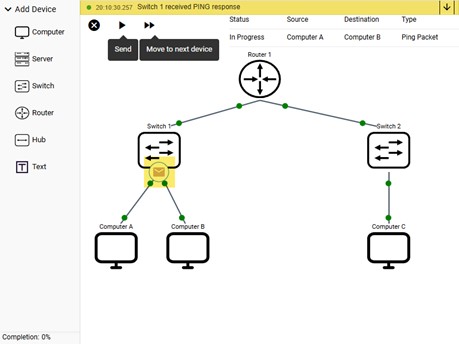
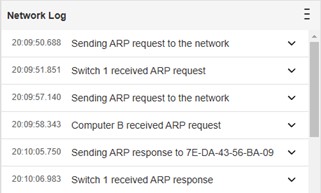
One of the great things about Network Emulator is the feedback students get as they watch packets travel from device to device. The next figure shows a ping reply packet as it travels through the network from Computer B to Computer A. At the top right of the workspace, you see the current status of the packet, the source and destination devices, and the type of packet. At the very top of the workspace is the Network Log which is a running narrative of what is happening as the packet makes its way through the network.
Students can click the arrow at the top right of the screen and see the narrative history to better understand what occurred to get to this point in the packet’s journey. TheSendcontrol at the top of the workspace sends the packet so students can watch it traverse the network automatically. The Move to next devicecontrol simply forwards the packet to the next device, allowing students to click on the packet to see the packet details at any device.
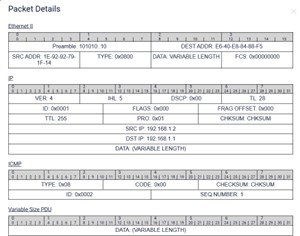
The next two figures show packet contents and a partial view of the expanded Network Log. You can use the scroll bar to see the full log. When a packet reaches its destination, you’ll see a green checkmark and the status line reports “Successful.”
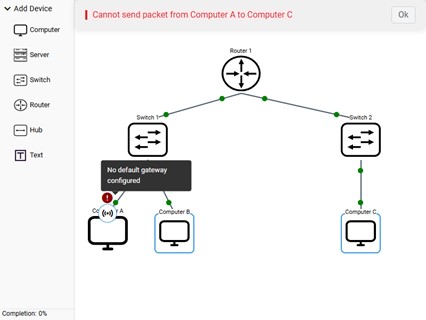
So, what happens if something goes wrong? For example, what if a student tries to send a ping packet, but the devices are not properly configured for a successful transmission? Again, feedback is the key. In the next figure, a ping was attempted between Computer A and Computer C. But, since a router is in between the computers, more configuration is required. The status bar at the top reports that the packet cannot be sent and if you hover your mouse over the exclamation point, you see a message: “No default gateway configured.” This type of feedback is excellent for students who are learning the basics of networking.
How instructors can build a personalized learning experience with Network Emulator
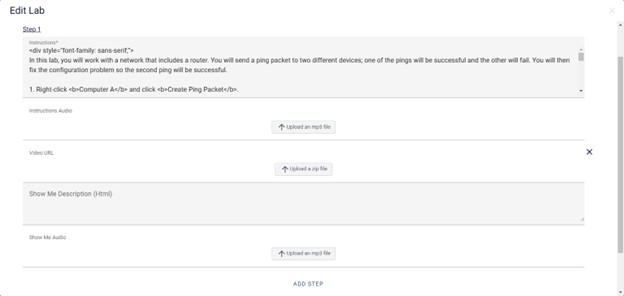
For instructors, Network Emulator allows them to create their own labs. Instructions can be written in Edit LabMode and audio instructions can be included. This is also where instructors can include a Show Me which can include a text narrative, a video, and audio.
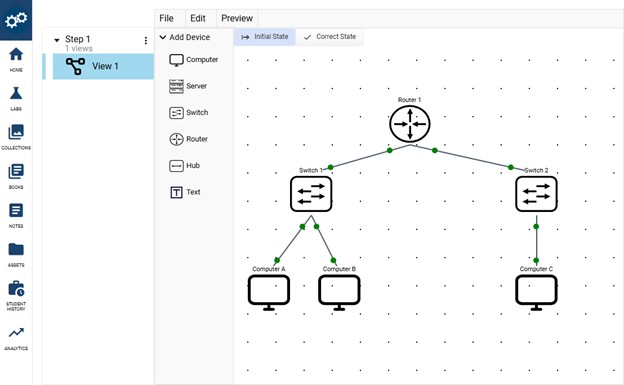
In Studio Mode, instructors can design the topology with an initial state that students will see when they start the lab, and a correct state which is the state of the topology when the student completes the lab step.
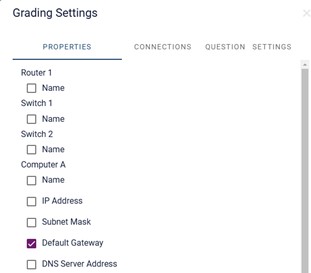
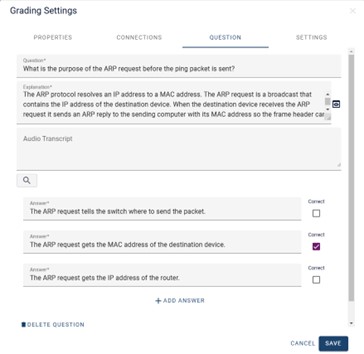
Studio Mode is also where you can create self-check questions and configure grading criteria. After each step, instructors can create a self-check question to reinforce the learning objective for the lab step. Students will get instant correct/incorrect feedback and an explanation for the correct answer. In the Grading Settings, instructors can choose which configuration tasks are graded for each step. The next two figures show the grading settings and a self-check question.
There isn’t room on this blog post to show all the features of LabHUB Network Emulator, but what I’ve seen so far has me excited to incorporate Network Emulator labs into my Guide to Networking Essentials book. It has the right mix of accurate networking simulation capabilities and teaching and learning features for most introductory networking courses and certifications. And development is ongoing, so new features and capabilities are being added based on instructor and student feedback.
Speaking of development, I had a conversation with the chief architect of Network Emulator and asked him what was the most challenging aspect of developing the tool. He said, “I’d say the most challenging aspect was providing a SaaS platform where authors could create a multitude of diverse labs visually that students could access from anywhere in the world.” I bet that was a challenge! And it’s one of the things that makes Network Emulator so unique; whether you’re a student or instructor, if you have a web browser, you can use it.
Coming soon: the LabHUB Network Emulator will be available in MindTap for our next edition CompTIA Cloud+ and CompTIA A+ titles. In the meantime, visit our Computing & Information Technology page to find more engaging course materials from Cengage.