Individualized Education Plans (IEP) have been the foundation of special education for decades, and the process in which these documents are written has evolved over the years.
As technology has evolved, writing documents has also evolved. Before programs existed to streamline the IEP writing process, creating IEPs was once a daunting task of paper and pencil. Not only has the process of writing the IEP evolved, but IEPs are becoming technology-driven.
Enhancing IEP goal progress with data-driven insights using technology: There are a variety of learning platforms that can monitor a student’s performance in real-time, tailoring to their individual needs and intervening areas for improvement. Data from these programs can be used to create students’ annual IEP goals. This study mentions that the ReadWorks program, used for progress monitoring IEP goals, has 1.2 million teachers and 17 million students using its resources, which provide content, curricular support, and digital tools. ReadWorks is free and provides all its resources free of charge and has both printed and digital versions of the material available to teachers and students (Education Technology Nonprofit, 2021).
Student engagement and involvement with technology-driven IEPs: Technology-driven IEPs can also empower students to take an active role in their education plan. According to this study, research shows that special education students benefit from educational technology, especially in concept teaching and in practice-feedback type instructional activities (Carter & Center, 2005; Hall, Hughes & Filbert, 2000; Hasselbring & Glaser, 2000). It is vital for students to take ownership in their learning. When students on an IEP reach a certain age, it is important for them to be the active lead in their plan. Digital tools that are used for technology-driven IEPs can provide students with visual representations of their progress, such as dashboards or graphs. When students are given a visual representation of their progress, their engagement and motivation increases.
Technology-driven IEPs make learning fun:This study discusses technology-enhanced and game based learning for children with special needs. Gamified programs, virtual reality (VR), and augmented reality (AR) change the learning experience from traditional to transformative. Gamified programs are intended to motivate students with rewards, personalized feedback, and competition with leaderboards and challenges to make learning feel like play. Virtual reality gives students an immersive experience that they would otherwise only be able to experience outside of the classroom. It allows for deep engagement and experiential learning via virtual field trips and simulations, without the risk of visiting dangerous places or costly field trip fees that not all districts or students can afford. Augmented reality allows students to visualize abstract concepts such as anatomy or 3D shapes in context. All these technologies align with technology-driven IEPs by providing personalized, accessible, and measurable learning experiences that address diverse needs. These technologies can adapt to a student’s individual skill level, pace, and goals, supporting their IEP.
Challenges with technology-driven IEPs: Although there are many benefits to technology-driven IEPs, it is important to address the potential challenges to ensure equity across school districts. Access to technology in underfunded school districts can be challenging without proper investment in infrastructures, devices, and network connection. Student privacy and data must also be properly addressed. With the use of technologies for technology-driven IEPs, school districts must take into consideration laws such as the Family Educational Rights and Privacy Act (FERPA).
The integration of technology into the IEP process to create technology-driven IEPs represents a shift from a traditional process to a transformative process. Technology-driven IEPs create more student-centered learning experiences by implementing digital tools, enhancing collaboration, and personalized learning experiences. These learning experiences will enhance student engagement and motivation and allow students to take control of their own learning, making them leaders in their IEP process. However, as technology continues to evolve, it is important to address the equity gap that may arise in underfunded school districts.
Shannon Keenan, Special Education Teacher
Shannon Keenan is a special education teacher in Columbia Heights, MN. She is also a graduate student at Concordia University in St. Paul, MN studying Educational Technology.
Latest posts by eSchool Media Contributors (see all)
Imagine you’re a student in high school or college. Class is about to start. You are faced with a notable dilemma: Should you whip out a notebook or a laptop to take notes?
The answer is not so simple. A year ago, paper and pen seemed to be the winner when the journal Frontiers in Psychology published a Norwegian study that documented how different areas of the brain were communicating more frequently when students were writing by hand. When students were typing, the brain was not nearly so active. This extra brain activity, the neuroscientists wrote, is “beneficial for learning.”
The study ricocheted around the world. Almost 200 news stories promoted the idea that we remember things better when we write them down by hand instead of typing. It confirmed what many of us instinctively feel. That’s why I still take notes in a notebook even though I can hardly read my chicken scratch.
Yet earlier this month, the same academic journal published a scathing rebuttal to the handwriting study. A pair of scientists in Spain and France pointed out that none of the Norwegian college students was asked to learn anything in the laboratory experiment. “Drawing conclusions on learning processes in children in a classroom from a lab study carried out on a group of university students that did not include any type of learning seems slippery at best,” the critics wrote.
The Norwegian study asked 36 college students in their early 20s to write words from the game Pictionary using either a digital pen on a touchscreen or typing on a keyboard. The participants wore stretchy hair nets studded with electrodes to capture their brain activity. The scientists documented the differences between the two modes of writing.
Neither mode approximated real life conditions. The students were instructed to write in cursive without lifting the stylus from the screen. And they were only allowed to type with their right index finger.
The critics also questioned whether elevated brain activity is proof of better learning. Increased brain activity could equally be interpreted as a sign that handwriting is slower and more taxing than typing. We don’t know.
I contacted Audrey van der Meer, one of the co-authors of the Norwegian study who runs a neuroscience lab at the Norwegian University of Science and Technology in Trondheim. She pointed out that her critics promote the use of keyboards in education, and so they may not be unbiased. But she admitted that her study didn’t test whether students learned anything.
Van der Meer is conducting a fresh experiment that involves actual learning with 140 teenagers. She had the high school students watch a recorded lecture. Half of them were randomly assigned to take notes by hand, using a digital pen and touchscreen, and the other half typed their notes. Afterward, they all took the same exam graded by teachers at the school.
So far, she’s noticed clear differences in note-taking styles. Those who typed their notes wrote significantly more words, often transcribing parts of the lecture verbatim. They didn’t make any drawings. Those who used a digital pen mainly wrote key words and short sentences and produced two drawings, on average.
According to van der Meer, students who use the keyboard are writing down everything the teacher says “because they can.” But, she said in an email, “the information appears to be coming in through the ears and, without any form of processing, going out through the fingertips.” She added that when taking notes by hand, “it is impossible to write down everything, so students have to process the incoming information, summarize it, and link it to knowledge they already have.” That helps the “new information to stick better, resulting in better retention.”
Van der Meer said she could not yet share the exam results with me as she is still analyzing them. She explained that there are “many confounding variables” that make it difficult to tell if those who used handwritten notes performed better on the exam.
Even the pro-typing scientists admit that handwriting is important. Previous research has shown that writing letters by hand, compared to typing them, helps young children learn their letters much better. A 2015 study found that adults were better able to recall words in a memory game when they wrote them down by hand first instead of typing them. And a 2010 book chapter documented positive associations between writing words and being able to read them.
While there’s fairly compelling evidence that handwriting can help children learn their letters and new words, there’s less proof that handwriting helps us absorb new information and ideas. That’s not to say the Norwegian neuroscientists are wrong. But we still need the proof.
I’d also add that not all learning is the same. Learning to write is different from learning Spanish vocabulary. There may be times when typing is the ideal way to learn something and other times when handwriting is. Also, learning something involves far more than either typing or handwriting, and the methodwe use to take notes might ultimately be of small importance compared to how we study our notes afterwards.
The Hechinger Report provides in-depth, fact-based, unbiased reporting on education that is free to all readers. But that doesn’t mean it’s free to produce. Our work keeps educators and the public informed about pressing issues at schools and on campuses throughout the country. We tell the whole story, even when the details are inconvenient. Help us keep doing that.
Universities have a critical role to play at the intersection of academic thought, organisational practice, and social benefits of technology.
It’s easy when thinking about universities’ digital strategies to see that as a technical question of organisational capability and solutions rather than one part of the wider public role universities have in leading thinking and shaping practice for the benefit of society.
But for universities the relationship with technology is multifaceted: some parts of the institution are engaged in driving forward technological developments; others may be critically assessing how those developments reshape the human experience and throw up ethical challenges that must be addressed; while others may be seeking to deploy technologies in the service of improving teaching and research. The question, then, for universities, must be how to bring these relationships together in a critical but productive way.
Thinking into practice
The University of Edinburgh hosts one of the country’s foremost informatics and computer science departments, one of the largest centres of AI research in Europe. Edinburgh’s computing infrastructure has lately hit headlines when the Westminster government decided to cancel planned investment in a new supercomputing facility at the university, only to announce new plans for supercomputing investment in last week’s AI opportunities action plan, location as yet undetermined.
But while the university’s technological research prowess is evident, there’s also a strong academic tradition of critical thought around technology – such as in the work of philosopher Shannon Vallor, director of the Centre for Technomoral Futures at the Edinburgh Futures Institute and author of The AI Mirror. In the HE-specific research field, Janja Komljenovic has explored the phenomenon of the “datafication” of higher education, raising questions of a mismatch and incoherence between how data is valued and used in different parts of an institution.
When I speak to Edinburgh’s principal Peter Mathieson ahead of his keynote at the upcoming Kortext Live leaders event in Edinburgh on 4 February he’s reflecting on a key challenge: how to continue a legacy of thought leadership on digital technology and data science into the future, especially when the pace of technological change is so rapid?
“It’s imperative for universities to be places that shape the debate, but also that study the advantages and disadvantages of different technologies and how they are adopted. We need to help the public make the best use of technology,” says Peter.
There’s work going on to mobilise knowledge across disciplines, for example, data scientists interrogating Scotland’s unique identifier data to gain insights on public health – which was particularly important during Covid. The university is a lead partner in the delivery of the Edinburgh and south east Scotland city region deal, a key strand of which is focused on data-driven innovation. “The city region deal builds on our heritage of excellence in AI and computer science and brings that to addressing the exam question of how to create growth in our region, attract inward investment, and create jobs,” explains Peter.
Peter is also of the opinion that more could be done to bring university expertise to bear across the education system. Currently the university is working with a secondary school to develop a data science programme that will see secondary pupils graduate with a data science qualification. Another initiative sees primary school classrooms equipped with sensors that detect earth movements in different parts of the world – Peter recounts having been proudly shown a squiggle on a piece of paper by two primary school pupils, which turned out to denote an earthquake in Tonga.
“Data education in schools is a really important function for universities,” he says.”It’s not a recruiting exercise – I see it as a way of the region and community benefiting from having a research intensive university in their midst.”
Connecting the bits
The elephant in the room is, of course, the link between academic knowledge and organisational practice, and where and how those come together in a university as large and decentralised as Edinburgh.
“There is a distinction between the academic mission and the day to day nuts and bolts,” Peter admits. “There is some irony that we are one of finest computer science institutions but we had trouble installing our new finance system. But the capability we have in a place like this should allow us to feel positive about the opportunities to do interesting things with technology.”
Peter points to the university-wide enablement of Internet of Things which allows the university to monitor building usage, and which helps to identify where buildings may be under-utilised. As principal Peter also brought together estates and digital infrastructure business planning so that the physical and digital estate can be developed in tandem and with reference to each other rather than remaining in silos.
“Being able to make decisions based on data is very empowering,” he says. “But it’s important that we think very carefully about what data is anonymised and reassure people we are not trying to operate a surveillance system.” Peter is also interested in how AI could help to streamline large administrative tasks, and the experimental deployment of generative AI across university activity. The university has developed its own AI innovation platform, ELM, the Edinburgh (access to) Language Models, which is free to use for all staff and students, and which gives the user access to large language models including the latest version of Chat-GPT but, importantly, without sharing user data with OpenAI.
At the leadership level, Peter has endeavoured to put professional service leaders on the same footing as academic leaders rather than, as he says, “defining professional services by what they are not, ie non-academic.” It’s one example of the ways that roles and structures in universities are evolving, not necessarily as a direct response to technological change, but with technology being one of the aspects of social change that create a need inside universities for the ability to look at challenges from a range of professional perspectives.
It’s rarely as straightforward as “automation leading to staffing reductions” though Peter is alive to the perceived risks and their implications. “People worry about automation leading to loss of jobs, but I think jobs will evolve in universities as they will elsewhere in society,” he says. “Much of the value of the university experience is defined by the human interactions that take place, especially in an international university, and we can’t replace physical presence on campus. I’m optimistic that humans can get more good than harm out of AI – we just need to be mindful that we will need to adapt more quickly to this innovation than to earlier technological advances like the printing press, or the Internet.”
Technology is an essential aspect of teaching and learning, and the integration of technology into early childhood education classrooms is reshaping childcare. And while many of today’s early childhood teachers are comfortable with technology, many are nervous to learn something new or do things differently.
That’s where teacher training can help. Let’s take a look at why your childcare center’s teachers must be trained to take advantage of education technology!
These parents expect real-time updates about what their child is doing in your daycare. Your teachers must be trained to send photos, videos, and notes throughout the day to keep families happy. Choose an app with family engagement capabilities that is easy to use and part of an all-in-one childcare software solution. Then sharing updates won’t require much training so your teachers can spend their time learning about other ways to use technology.
Plus, this transparency creates a supportive learning environment!
Access to a wealth of resources
If your teachers are not trained to use education technology, they will miss out on access to educational content from around the world and children will not reap the benefits either.
A study by the American Academy of Pediatrics found there is “emerging evidence to suggest that interactive apps may be useful and accessible tools for supporting early academic development.” Your teachers must be trained to take advantage of these apps, while understanding that screen time must be limited.
Online libraries, databases, and educational websites provide information on virtually any topic, allowing teachers to supplement their curriculum with up-to-date materials. This accessibility ensures that both teachers and young learners can expand their knowledge beyond traditional textbooks.
Education technology saves time
The 2024 Child Care Management Software Industry Trends Report from Procare Solutions found that about 30% of survey respondents said each teacher spends between three and five hours a week doing lesson planning, and a similar percentage noted their centers create their own curriculum.
So, beyond direct instruction, technology can significantly reduce the time teachers spend on these types of tasks, and on assessments and other paperwork. Childcare management software can streamline time-intensive processes, giving teachers more time to focus on what truly matters — the children in their care.
A strong digital curriculum that’s easy to use supports your teachers by handling lesson planning that takes time away from children. When childcare centers equip teachers with state-of-the-art online curriculum at their fingertips, teachers and young learners reap the benefits of education technology.
How to encourage your teachers to embrace education technology
To maximize the benefits of technology, ongoing professional development is essential. Employee retention rates rise by 30-50% when companies prioritize staff learning!
Workshops, webinars and websites that offer professional development and credentials can help teachers stay abreast of the latest technological advancements.
By investing in continuous training, your childcare center can ensure that teachers are confident and competent in integrating technology into their classrooms.
Early childhood educators are responsible for the positive development, health, and well-being of many children, making critical the appropriate use of technology in those settings.
Michelle Kang
CEO, National Association for the Education of Young Children (NAEYC)
Alissa Mwenelupembe
Managing Director of Early Learning, NAEYC
When we were children — and even when our own children were little — educational television shows like “Sesame Street,” “Mr. Rogers’ Neighborhood,” and “Reading Rainbow” provided time-limited relief for busy parents and an opportunity for children to learn.
Now, screens are ubiquitous as adults carry them in pockets and purses, and the content coming from those screens has changed considerably to become more interactive, brighter, and more likely to encourage continued engagement with the screen. It’s no longer as straightforward as turning off the corner television set.
The research on children and technology is ongoing, and the American Academy of Pediatrics has declined to set recommended screen time hours for children — not because unlimited screen time is good, but because not all screen time is equal.
For parents, this presents an individual challenge, but for early childhood educators, it is magnified across a whole program, where teachers are responsible for the positive development, health, and well-being of many young children at once.
What is appropriate?
A guiding rule is that the use of technology in an early childhood education setting, whether in a center, home, or school, should be in service to developmentally appropriate practices around learning.
That takes professional judgment by early educators who, through expertise and experience, can identify the value of incorporating active, hands-on technology into activities based on the readiness of the children and whether it will support their learning. That also means early educators must have appropriate training, support, and digital literacy themselves.
Any technological engagement by children should support creativity and/or cognitive and social development. Special consideration should be given to how it can help create equity, particularly by using translation and assistive technology supports to engage with multi-language learners or children with identified disabilities.
One great example of technology use in a preschool classroom was from a teacher who shared a story with the National Association for the Education of Young Children (NAEYC) of assigning a classroom job of “journalist” to one of the preschoolers in her integrated special education classroom. The child would document the day by taking photos on a tablet, and then report on one of the pictures during the closing circle. It’s interactive, sparks conversation, inspires creativity, and is adaptable to different developmental levels.
What are some guidelines?
NAEYC and the Fred Rogers Center for Early Learning and Children’s Media issued a technology and interactive media position statement in 2012. While it is on the docket for a renewal and refresh, the fundamentals still hold even as technology has advanced.
Early childhood educators should:
Select, use, integrate, and evaluate technology and interactive media tools in intentional and developmentally appropriate ways, giving careful attention to the appropriateness and the quality of the content, the child’s experience, and the opportunities for co-engagement.
Provide a balance of activities in programs for young children, recognizing that technology and interactive media can be valuable tools when used intentionally with children to extend and support active, hands-on, creative, and authentic engagement with those around them and with their world.
Prohibit the passive use of screens in early childhood programs for children younger than two, and discourage passive and non-interactive uses with children ages two through five.
Limit any use of technology and interactive media in programs for children younger than two to those that appropriately support responsive interactions between caregivers and children and that strengthen adult-child relationships.
Provide leadership in ensuring equitable access to technology and interactive media experiences for the children in their care and for parents and families.
There is no one-size-fits-all way to address technology in early education programs, even and especially as technology expands to include AI. However, well-prepared and supported educators using their professional judgment will remain the critical link between children and safe, effective engagement with technology.
Since going viral with her “Gen Z history” TikTok series, teacher Lauren Cella is using her platform to advocate for strategically utilizing — not restricting — technology in the classroom.
How did you get started in your career in teaching, and what led you to start sharing your journey on social media?
I didn’t initially plan on teaching. I studied journalism at San Diego State, inspired by movies featuring magazine editors. I later chose history as a minor just for fun. After college, I pursued journalism, but I eventually tried substitute teaching, loved it, and got my credential in history.
During COVID, my students encouraged me to post lessons on TikTok, where I shared content in a humorous, easy-to-understand way. My Russian Revolution video went viral, which led me to keep creating these quick, story-like history lessons. I love reaching people worldwide and making history engaging. My videos are only about a minute long, which helps with attention spans, although I know they simplify complex topics. My hope is these videos spark curiosity, encouraging viewers to explore history further.
What are some emerging trends in technology that you think are shaping the future of education or that you have used in your classroom to engage students?
AI is a major topic in education now, especially around how its used and the ethics of it. Initially, my school blocked ChatGPT but then allowed it when teachers started using it to adapt lessons for different reading levels or languages. In my journalism class, we discussed the ethics of AI. My students agreed it wasn’t ethical to let AI write an article for them, but they saw value in using it to generate interview questions. These discussions highlight that we can’t avoid new technologies — we need input from students, teachers, and administrators to navigate them responsibly.
Companies like Adobe are creating student-friendly versions of AI tools, helping ease the burden on teachers. I also use AI to caption videos, which saves time. Students heading into creative fields need to learn these tools, as AI proficiency is essential. Just as learning to type or use email became necessary, so will understanding AI.
Do you have any advice for balancing the benefits of technology with the need for face-to-face interaction in the classroom?
Teaching during the pandemic proved technology can’t replace teachers. Students need human connection. While tech has its place, it should be used to build specific skills, not just replace traditional methods. For example, students should still use a pen and paper daily, as it activates different brain functions and builds motor skills. Using technology in class should go beyond digitizing worksheets; it should add real value, like using AI in art to analyze creative elements. Ultimately, tech should support, not replace, essential hands-on learning for students’ overall development.
Do you have any tips for teachers looking to stay organized and efficient so they can focus on engaging their students in the classroom?
My biggest advice: Don’t grade everything. It’s okay to assign work as practice without grading it. Focus on priority standards — what students truly need to know — and build multiple assignments into one when possible. Trying to do it all leads to burnout without improving student outcomes. Start small, establish routines, and add more gradually to avoid overwhelming yourself and your students.
Is there any technology that you recommend that helps with the behind-the-scenes side of teaching, like lesson planning and grading?
I recommend using tools like Illuminate and Google Classroom extensions like Brisk and Magic School to manage data effectively. For one-to-one schools, Google offers many helpful extensions, and programs like IXL provide valuable insights. The key is to focus on areas where students struggle most, using data to streamline your lesson planning. With large classes, pulling reports helps make sense of data and can guide your approach without being overwhelming.
Are there any key digital safety practices that teachers should be implementing to protect students online?
It’s challenging when schools block tools like ChatGPT or YouTube, as they can also be valuable educational resources. We’re at a crossroads and need more digital citizenship education to teach students about online risks and the lasting consequences of their actions. Many students don’t realize that certain online behaviors, like sharing inappropriate images, can have serious legal consequences. They’re also vulnerable to scams, online blackmail, and bullying, particularly on group chats and gaming platforms. Parents should be aware that even if kids aren’t on social media, they’re still interacting with others online. We must educate young people on these dangers, as laws haven’t fully caught up to technology. Parents, teachers, and students need to support each other, staying vigilant and reporting harmful situations online just as they would in real life.
Do you have any advice for teachers who are facing burnout or mental health struggles right now?
It’s not you; it’s the system. You’re not doing anything wrong, and you can’t change everything on your own. If you burn out, they’ll replace you, but students benefit from experienced teachers. High turnover isn’t good for schools or students.
Social media can distort reality, making it seem like everyone is angry and divided. In reality, most people are not like that. Social media algorithms promote outrage, which skews our perception of others. Many teachers online appear to have perfect classrooms, but that’s often not the case — they face the same challenges as everyone else. I try to share positive experiences to stay motivated, but I’ve encountered many difficulties that I don’t discuss publicly.
It’s also easy for students to idolize influencers, but most of what they see online is curated and not real. They should focus on real-life skills instead of just consuming online content. Encourage students to engage in offline activities like sports, arts, or social groups to foster real interactions. For example, in my classroom, I limit phone use during free time to promote conversations and social skills.
To support students academically, tools like Canva and Google Classroom can help organize assignments and instructions in one place. This is important because students juggle multiple classes and responsibilities. They need resources to manage their workload effectively, like accessible rubrics and checklists. Technology allows students to take ownership of their learning, especially during emergencies. Teaching them to use project management tools can build important skills. At my school, we even grade time management alongside project quality. Overall, digital organization and project management are valuable skills for students and teachers alike.
Let’s get into the actual difficulties surrounding accreditation. You Directors of Accreditation are well-versed in the process and are very much aware that accreditation is not a game. It’s not enough to merely do the necessary compliance tasks, is it? Meeting accreditation criteria, establishing your institution’s value, enduring the never-ending audits, and keeping up with changing regulations are all part of it. The stakes are high and the pressure is intense. It remains constant. Traditional methods? They won’t cut it anymore.
Imagine, though, if the tables could be turned. Envision yourself to use technology to not just complete the certification process, but to turn it into an asset. Think of real-time data, seamless procedures, and openness at every level. It’s time to go beyond the minimum and leverage approval to your benefit. Automating, cloud computing, and utilizing artificial intelligence-powered analytics will not only enhance the reputation of your university but also enhance the efficiency of operations.
To help Directors of Accreditation use technology to improve institutional standards, ease compliance, and streamline accreditation data administration, we have put together this handbook. This will empower you to make critical decisions.
A Dynamic Challenge for Directors: Redefining Accreditation
As Directors of Accreditation, you are aware of the rapidity with which accreditation standards can evolve. Meeting accreditation standards necessitates a more comprehensive examination of student outcomes, diversity metrics, and the degree to which the institution aligns with its own objectives. No longer is it sufficient to simply mark off boxes.
One of the hardest things to do? The stress that comes from having up-to-date, correct information at your hands. For accreditation reviews to be valid, the proof must be complete and up-to-date, leaving no room for doubt. Still, getting this information can feel like a race against the clock, especially when old methods can’t keep up with how needs change. Here, technology can really make a difference if it is used in the right way.
Tech-Driven Solutions: Streamlining the Accreditation Journey
Technology is the game-changer. Think about using AI-powered data analytics to revolutionize your accreditation data management. These smart tools can turn those stacks of paperwork into clear, insightful reports, making the process of proving your credentials not just easier, but a whole lot smarter! No more searching through spreadsheets or endless emails—just clear, usable information that shows your school is following the rules.
Furthermore, cloud-based accreditation systems are very useful. Consider them as a safe, central location for all of your compliance-related info. It’s possible to get important data from these options, so your team can work together easily whether they’re at the office or traveling. Adopting these technologies doesn’t just keep you current; it sets a new standard for how quickly and clearly the approval process can be done.
Automation: The Secret to Simplifying Repetitive Accreditation Tasks
Imagine having more time to work on big-picture projects instead of doing the same old things over and over again. That’s how powerful technology can be in the process of getting accreditation. With the right tools, you can cut down on your work and free up your team to focus on raising institutional standards instead of just checking off tasks.
Accreditation Data Management and Reporting Automation
Consider the time used in gathering information and writing up reports for accreditation. Reducing the time and effort required to compile metrics in real-time is possible with automation technologies. As a bonus, you’ll spend less time worrying about mistakes and more time presenting accurate, up-to-date information.
Smart Templates and Dashboards
Meeting certain accreditation body criteria calls for customization, which is absolutely important. Smart templates let you quickly construct evaluations, audits, and self-studies that exactly fit what is required. Imagine having customized dashboards right at hand that clearly show your measurements and progress—no more poring over spreadsheets!
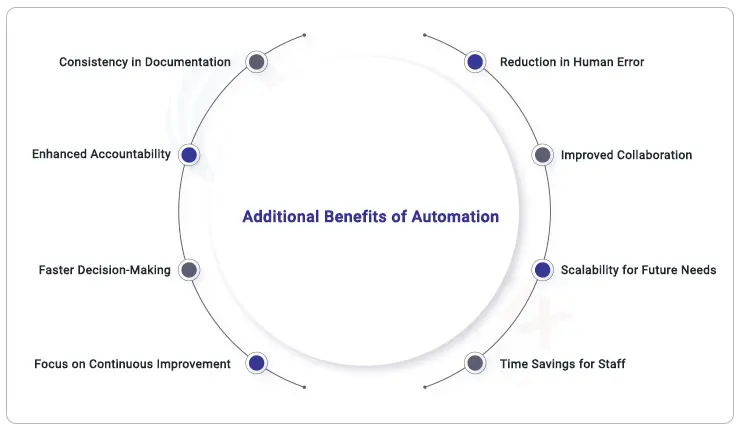
Additional Benefits of Accreditation Data Management Automation
Maintain accurate, consistent, and up-to-date documentation without the need for manual updates.
Maintaining Accountability: A transparent audit trail for all your accrediting operations may be easily created by keeping track of who made changes and revisions.
Faster Decision-Making: With real-time insights and easy access to data, your team can make informed decisions quickly, keeping the accreditation process moving forward.
Focus on Continuous Improvement: By automating routine tasks, you can spend more time analyzing data and implementing improvements that enhance your institution’s performance and outcomes.
Building Transparency and Trust Through Technology
Let’s discuss something absolutely important for modern society: openness. Directors of Accreditation have a special opportunity to use technology to establish confidence among all those engaged in the accreditation process. How can you make this happen?
Real-time dashboards available for stakeholders
Imagine having real-time dashboards at your fingertips. These tools let you instantly share your accreditation progress with stakeholders—no more waiting for quarterly updates! With just a glance, everyone can see where you stand, thanks to clear visuals of your metrics, timelines, and benchmarks.
This degree of openness helps everyone to be responsible as well as promotes teamwork. Trust naturally comes when your stakeholders know you are always trying to meet and surpass accreditation criteria.
Blockchain for Academic Integrity
Let’s now explore something somewhat more novel—blockchain technology. Consider blockchain as your new best buddy helping to maintain the integrity of your certification records. Using this technique makes an unchangeable record of all information connected to accreditation. Your accreditation data management is thus not only safe but also transparent and easily verifiable. Imagine being able to assure other stakeholders and accrediting authorities of your absolutely perfect data. Blockchain helps you to reduce the possibility of conflicts over data accuracy and inspires confidence among all the players. This kind of confidence helps to protect the reputation and integrity of your university.
Enhanced Reporting Capabilities
Now, let’s be honest: reporting can get draggy unless you trigger the right gear! Imagine being able to quickly and accurately create detailed reports that show your commitment to regulatory compliance and continuous growth. You can easily show accreditation groups how much progress you’re making like you have a superpower. By doing more than just checking off boxes, you’ll be showing that your institution is ready to take on any tasks that come its way. Therefore, why not use that report writing duty as a chance to shine? Using technology can help you stay prepared and make a great impression!
Joining the Community
In addition to internal partners, transparency also applies to the public and the rest of the academic community. Sharing your accreditation path will help your university project more professionalism and draw professors and students. Who would not want to be a part of an open and reliable institution?
Using technology to track your certification procedures and results helps you to identify possible problems before they become serious ones. This proactive strategy lets you act early to maintain everything in line.
Enhancing the Student Experience While Meeting Standards
Outcome-Based Education (OBE) and Competency Tracking
Using technology to track your certification procedures and results helps you to identify possible problems before they become serious ones. Being proactive keeps you on target. Improving the Student Experience While Complying with Outcome-Based Education (OBE) and Competency Monitoring.
Here’s the stars: your pupils! The right technology will improve their experience and satisfy all needs. This is where Outcome-Based Education (OBE) really shines. Imagine a system that not only makes sure that educational results are in line with accreditation standards but also makes sure that student success is the most important thing. You definitely need to keep track of students’ skills and make sure they get the help they need to do well by using technology.
That’s not all, though! Real-time feedback tools and polls are your secret weapons for improving quality. These resources allow you to ask students for honest opinions, which might reveal where you’re succeeding and where you might need some improvement. Engaging with your students and listening to what they have to say goes beyond simply completing goals for continuous improvement.
In this way, you make a place where students feel appreciated and supported, and you also show accreditation bodies that you’re dedicated to continuous improvement.
Preparing for the Future: Tech Trends Directors Should Watch
EdTech Innovations
As the Director of Accreditation, it’s important to stay on top of things. Take a look at what next year holds! First, EdTech innovations are coming soon and will supposedly make the process of getting accredited even easier. Consider banking on cutting-edge software that makes data analysis better, streamlines reports, and automates tasks!
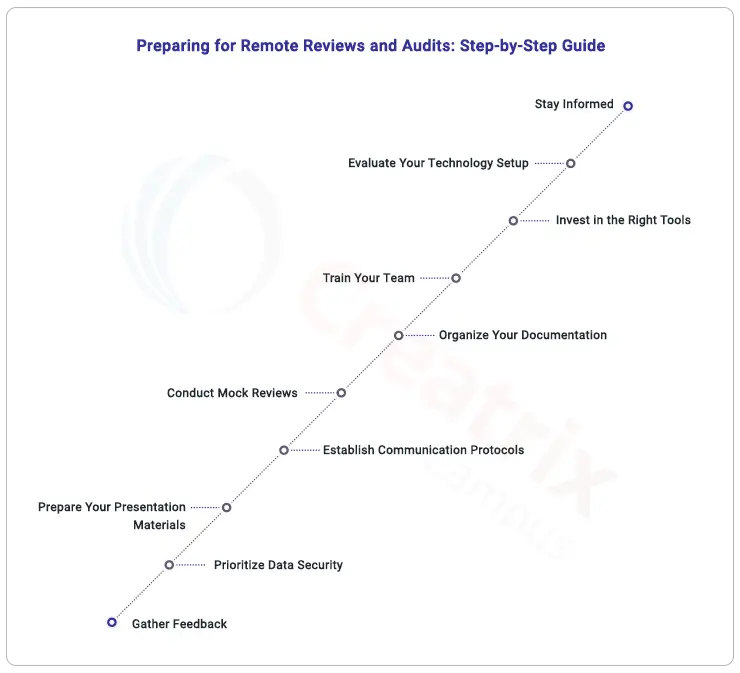
Being Prepared to Virtual Accreditation Visits
Next, we’ll go over the basics of preparing for accreditation visits that take place virtually. As more and more things happen online, reviews and audits done from afar are becoming routine. In what ways can you become ready for this change? By acquiring robust technology that facilitates online participation and emphasizes your organization’s achievements. Ensure that all team members are informed about the use of virtual presentation techniques, online document sharing, and video conferencing. Not only will these novel concepts facilitate the acquisition of accreditations, but they will also facilitate collaboration among partners.
Turn Compliance into a Strategic Advantage with Creatrix Campus Accreditation Platform
By incorporating the appropriate technology, such as the Creatrix Campus Accreditation platform, Directors of Accreditation can elevate compliance from a mundane obligation to a strategic advantage. This strategy will help you satisfy accreditation criteria and match the main objectives of your institution.
This is the time to simplify your certification application. Explore the Creatrix Campus platform for a smarter, more efficient way to meet standards. Let’s team to surpass simple compliance!
I reached out to Daniel Spreadbury, the Product Marketing Manager for Dorico, and asked about the process of moving from Finale to MusicXML. Daniel had some advice, which is listed below (and had already been shared on a Finale user’s group).
I also noticed that Dorico has already placed some Finale to Dorico videos on their YouTube Channel. Logically, they knew this was happening as MakeMusic Cloud suggested that Finale users migrate to Dorico.
I may be oversimplifying Daniel’s response, but Dorico cannot read Finale MUS or MUSX files because those files simply contain the information they need to make a score work in Finale, not all the aspects that would be needed for another program to decode them.
However, Dorico can read MusicXML files relatively well, though there may be some editing required (see the linked video below).
Daniel did suggest one method of bulk conversion—which Finale users with a large library of MUS or MUSX files will need to do before their current version of Finale stops working—straight from Finale.
You go to File > Export > Translate Folder to MusicXML. The batch process embedded in Finale can handle subfolders, so you set it to a master folder, and let it work its way through.
Nonetheless, as you are likely making a move and never opening a Finale file again, I would suggest moving all your MUS and MUSX files to one folder before starting the process, letting your computer do the work, and then back up your new MusicXML files somewhere.
It is nice that this is an option, and wonderful that Dorico is being incredibly supportive of new users to their application.
I will enter three short additions to this post.
First, I have found out that the method above does not work for sub folders, and that’s okay. I just converted more than 1800 of my Finale Files (ones that I created) to MusicXML files.
Second, I found my oldest living score, which is a partial draft of the “Yo Yo March,” which I would have been working on for my junior year in college in 1994. It isn’t very good, and it isn’t complete, and it is one of the few works that I saved from that time. But that’s 30 years ago (yikes). So, Finale has been in my life, albeit distantly, for the past 30 plus years…more than 1/2 my life. So the discontinuance of Finale is a bit like losing an old friend.
Third, I did decide to buy Dorico at the cross grade price. It is odd that you pay MakeMusic (about $158 with taxes) to get Dorico, instead of paying Dorico directly, but considering that you cannot purchase Dorico that inexpensively even as an educator—its one of those things that you just go and do. As the future continues, I’ll definitely continue to use Notion and keep dabbling with MuseScore (it does colored notes, like Boomwhackers, which is important for my current position)…but I’m also going to move ahead with Dorico, which I have loosely played with—but now this is proof that it’s time to really get going with it.
In partnership with Inside Higher Ed, Collegis surveyed 450 students to gauge the impact of higher education technology on both their learning experiences and opinions of the school. Higher ed leaders will want to read our report, “Tech Troubles: How Technology-Student Interactions Impact Retention,” to dive deeper into how technology environments can help (or hinder) the student journey.
Students raise high-stakes concerns
While our study indicates colleges and universities are succeeding in some aspects of technology usage (digital communications, for one), the results also exposed several areas where technology hurdles are damaging, or even disastrous, to the student experience:
Website application hurdles: A quarter of students report some level of difficulty.
No internet, no class? Technical issues cause distractions and lost class time, both on and off campus.
Retention at risk: Over 40% of students who experienced tech issues question whether to continue their education at the institution.
Plus! Included in the report are reactions to the findings from higher ed leaders. They share the top challenges their schools face in addressing the issues raised by students.
Download the report for summaries by topic, stand-out results from audience segments, charts that show the intensity of student sentiment, and recommendations for technology investments to improve student success.
According to The American Association of University Women(AAUW), throughout their education, girls and women are systematically tracked away from science and math. This limits their access, preparation and opportunities to enter these fields for their careers as adults. By the time students reach college, women are significantly underrepresented in STEM majors. Women make up only 34% of the workforce in science, technology, engineering and math (STEM). While this is up from 28% two years ago, it is still significantly less than the existing overall percentage of women, and men vastly outnumber women majoring in most STEM fields in college. The gender gaps are particularly high in some of the fastest-growing and highest-paid jobs of the future, like computer science and engineering.
Women in STEM Occupations Biological Scientists 46% Chemists & Materials Scientists 40.4% Computer & Mathematical Occupations 25.2% Engineers & Architects 16.5% SOURCE: U.S. Bureau of Labor Statistics, “Employed persons by detailed occupation, sex, race, and Hispanic or Latino ethnicity,” Labor Force Statistics from the Current Population Survey, Table 11, 2020.
A typical STEM worker earns two-thirds more than those employed in other fields, according to Pew Research Center. And some of the highest-earning STEM occupations, such as computer science and engineering, have the lowest percentages of women workers. Giving women equal opportunities to pursue and succeed in STEM careers helps narrow the gender pay gap, enhances women’s economic security, ensures a diverse and talented STEM workforce and prevents biases in these fields and the products and services they produce.
To help close the STEM Gap, it is important that girls and women are given the skills and confidence to succeed in math and science. There should be improvements in STEM education and support for girls starting in early education and through K-12. Every student should be exposed to engineering and computer science, and Next Generation Science Standards.Classes should be taught by connecting STEM experiences to girls’ lives, promoting active, hands-on learning and emphasizing ways STEM is collaborative and community-oriented. AAUW also suggests expanding after-school and summer STEM opportunities for girls. They suggest Increasing awareness of higher education and career opportunities, pathway opportunities, role models and mentoring programs with women in STEM for girls.
While there have been some advances, more efforts need to be made to help women close the STEM gap. Educational consultants can help encourage young women with academic aptitudes and interests in math, science, computers and engineering to explore career paths they may not have considered for their future.